

The single most important thing in a gaming laptop is a discrete GPU. This is where budget gaming gets honest: laptops under about $400 that call themselves “gaming” usually rely on integrated graphics and are really esports-and-light-games machines. For genuine 1080p gaming in modern titles, you want a discrete NVIDIA RTX GPU, which realistically starts around $900–$1,000.
Once you have that, the other factors are CPU power, a high-refresh display, and cooling that can sustain performance. Below we rank seven gaming laptops, from honest ultra-budget light-gaming options to RTX-equipped machines that truly play. For non-gaming needs, see our budget laptop guide and the laptops hub.
Top 3 Best Budget Gaming Laptops at a Glance
Best Budget Gaming Laptops in 2027
| Laptop | Best For | Key Spec | Rating | Price |
|---|---|---|---|---|
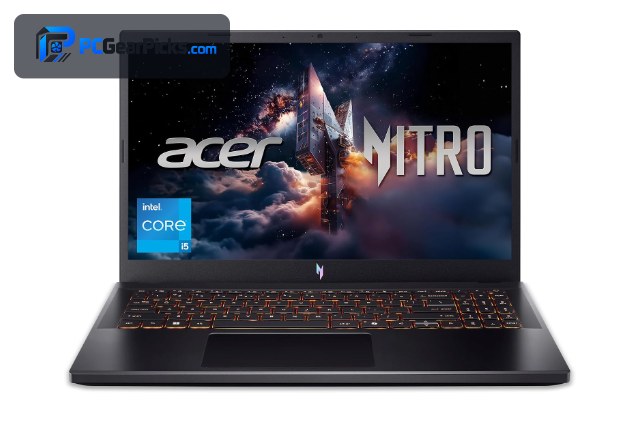
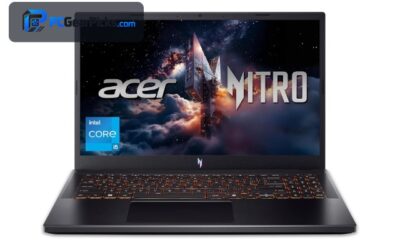
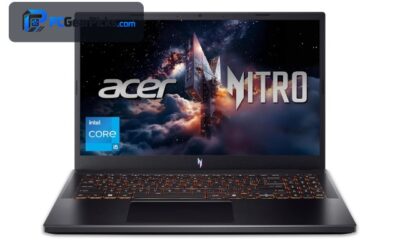
| Acer Nitro V Gaming Laptop (i5) | Best Overall Budget Gaming | Intel Core i5-13420H | 4.5★ (427) | Check Price |
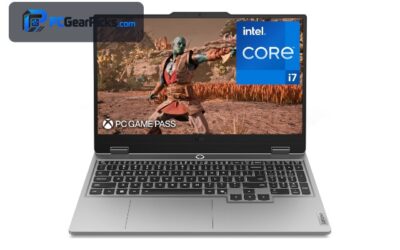
| Lenovo LOQ Gaming Laptop (i7) | Best Performance | Intel Core i7 | 4.3★ (121) | Check Price |
| Alienware 16 Aurora (RTX 5050) | Best Newest Graphics | Intel Core 7 | 4.1★ | Check Price |
| Acer Nitro V Gaming Laptop (i7) | Best i7 Value | Intel Core i7-13620H | 4.6★ (380) | Check Price |
| ASUS ROG Strix G16 | Best ASUS ROG | 16″ 16:10 FHD+ display | 5★ (2) | Check Price |
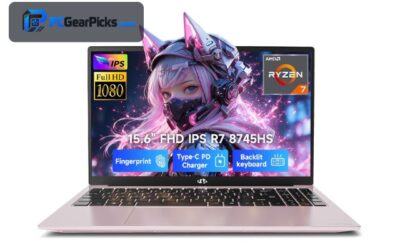
| Budget 16GB Gaming Laptop | Best Ultra-Budget (Light Gaming) | Core processor up to 3.40GHz | 3.9★ (32) | Check Price |
| Tunhail 15.6″ Laptop | Best Cheapest | Core processor, 15.6″ | 4.1★ (59) | Check Price |
1. Acer Nitro V Gaming Laptop (i5) – Best Overall Budget Gaming

- ✓ Real discrete RTX graphics
- ✓ Strong CPU for the price
- ✓ Excellent owner ratings
- ✗ Plastic build
- ✗ Battery life is modest under load
The Acer Nitro V with a Core i5 and discrete NVIDIA RTX graphics is the sweet spot of budget gaming laptops. Around $970 it delivers genuine 1080p gaming performance — the point where a “gaming laptop” actually games — backed by hundreds of positive owner ratings.
The build is plastic and battery life is modest while gaming, as with most laptops at this price, but for dependable 1080p play with upscaling in modern titles, it’s the budget pick to beat.
Best for: Gamers wanting real 1080p performance at the lowest sensible price
May not fit: Those needing all-day battery or a premium chassis
2. Lenovo LOQ Gaming Laptop (i7) – Best Performance

- ✓ Fast Core i7 for gaming and work
- ✓ Discrete RTX graphics
- ✓ Good cooling for the class
- ✗ Heavier chassis
- ✗ Costs more than entry gaming laptops
The Lenovo LOQ steps up to a Core i7 and discrete RTX graphics, giving you more headroom for demanding titles and higher settings. It’s a well-rounded performer that doubles as a capable work machine.
It’s heavier and pricier than entry gaming laptops, but for players who want stronger, longer-lasting performance around the $1,300 mark, it’s a strong value.
Best for: Gamers who want extra CPU and GPU headroom
May not fit: Buyers on the tightest gaming budget
3. Alienware 16 Aurora (RTX 5050) – Best Newest Graphics

- ✓ Latest-generation RTX 5050 graphics
- ✓ Premium Alienware cooling and design
- ✓ Large 16″ screen
- ✗ Priciest here
- ✗ Alienware runs warm under load
The Alienware 16 Aurora brings the newest-generation RTX 5050 graphics to this list, making it the most future-ready gaming pick. Alienware’s cooling and design pedigree help it sustain performance in longer sessions.
At around $1,300 it’s the premium option and it runs warm under load, but for buyers who want the latest GPU architecture and a recognised gaming brand, it delivers.
Best for: Gamers wanting the newest RTX graphics and a premium brand
May not fit: Budget-focused buyers or those avoiding heat
4. Acer Nitro V Gaming Laptop (i7) – Best i7 Value

- ✓ Core i7 muscle for the price
- ✓ Proven Nitro cooling
- ✓ Very strong owner ratings
- ✗ Plastic build
- ✗ Average battery under load
The Core i7 version of the Acer Nitro V adds extra processing power for demanding games and multitasking while keeping the Nitro line’s solid cooling and value. With hundreds of positive ratings, it’s a trusted performer.
Like its i5 sibling it’s plastic-bodied with modest gaming battery life, but for buyers who want a faster CPU without jumping to premium prices, it’s an excellent middle ground.
Best for: Gamers wanting i7 power at a mid-budget price
May not fit: Those seeking a premium build or long battery
5. ASUS ROG Strix G16 – Best ASUS ROG

- ✓ Excellent ROG cooling
- ✓ Tall 16:10 FHD+ screen
- ✓ Gaming-focused design
- ✗ Fewer owner ratings
- ✗ Can get loud under load
The ASUS ROG Strix G16 brings ROG’s gaming pedigree — strong cooling, a tall 16:10 FHD+ display, and a performance-tuned design — to the budget-to-mid gaming space. It’s built to sustain frame rates in longer sessions.
It has fewer owner ratings than the Acer and Lenovo picks and can get loud under load, but for fans of the ROG brand who want effective cooling and a great screen, it’s a compelling choice.
Best for: ROG fans wanting strong cooling and a tall display
May not fit: Buyers who want the quietest or most proven option
6. Budget 16GB Gaming Laptop – Best Ultra-Budget (Light Gaming)

- ✓ 16GB RAM and a 512GB SSD
- ✓ Very low price
- ✓ Fine for esports and older games
- ✗ Integrated-class graphics
- ✗ Not for demanding modern AAA games
At around $330, this budget laptop markets itself for gaming and backs it with 16GB of RAM and a 512GB SSD. Be honest about expectations: without a strong discrete GPU it’s suited to esports titles and older games rather than demanding AAA releases.
For a student or casual player who mostly runs lighter competitive titles and wants plenty of RAM and storage cheaply, it’s a reasonable entry point — just don’t expect it to match the RTX laptops above.
Best for: Casual and esports players on the tightest budget
May not fit: Anyone wanting to play demanding modern AAA games
7. Tunhail 15.6″ Laptop – Best Cheapest

- ✓ Among the cheapest here
- ✓ Full-size 15.6″ screen
- ✓ Handles light games and everyday tasks
- ✗ Entry-level performance
- ✗ Lesser-known brand
The Tunhail 15.6″ is one of the cheapest laptops marketed for gaming, and like other sub-$400 options it’s best viewed as a light-gaming and everyday machine rather than a true gaming rig.
It’ll run esports titles and older games at low settings and handle daily tasks, but for modern AAA gaming you’ll want one of the RTX-equipped laptops. As a cheap all-purpose laptop with occasional light gaming, it does the job.
Best for: Buyers wanting the cheapest light-gaming laptop
May not fit: Serious gamers who want real AAA performance
How to Choose a Budget Gaming Laptop
A discrete GPU is non-negotiable
Real gaming performance comes from a discrete NVIDIA RTX graphics chip, as in the Acer Nitro V, Lenovo LOQ, and Alienware 16. Laptops without one (the sub-$400 options) handle esports and older titles only. If you want to play modern AAA games, prioritise the RTX models.
How much do you need to spend?
Be realistic: genuine budget gaming starts around $900–$1,000 with the Acer Nitro V. Spending less means light gaming only; spending more (the Lenovo LOQ or Alienware) buys a faster CPU, newer GPU, and better cooling. The $330 options are for casual and esports play.
Display and refresh rate
A high-refresh 1080p display makes fast games feel smoother. The RTX laptops here pair their GPUs with suitable screens; the ASUS ROG Strix G16’s tall 16:10 FHD+ panel is especially nice for both gaming and work.
Cooling and sustained performance
Gaming laptops throttle if they can’t stay cool. Brands like Acer Nitro and ASUS ROG invest in cooling to sustain frame rates, which matters in longer sessions. Expect some fan noise — it’s the trade-off for keeping performance up.
Battery and portability
Gaming laptops have shorter battery life under load and are heavier than ultrabooks. If you need all-day battery and portability, a gaming laptop is a compromise — consider whether a standard budget laptop plus cloud gaming might suit you better.
Frequently Asked Questions
What is the best budget gaming laptop in 2027?
The Acer Nitro V with a Core i5 and discrete RTX graphics is our overall pick around $970 — it’s where a gaming laptop actually games, with strong owner ratings. The Lenovo LOQ (Core i7) is the performance upgrade, and the Alienware 16 has the newest RTX 5050.
Can you game on a laptop under $400?
Only lightly. Sub-$400 laptops marketed for gaming usually have integrated graphics, so they handle esports titles and older games at low settings, not demanding modern AAA games. For real gaming, budget around $900–$1,000 for a discrete RTX GPU.
Do I need an NVIDIA RTX GPU for gaming?
For modern gaming, effectively yes — a discrete NVIDIA RTX GPU delivers the performance and upscaling (DLSS) that make 1080p gaming smooth. The Acer Nitro V, Lenovo LOQ, and Alienware 16 all have one; the cheapest laptops here do not.
How much RAM and storage do I need for gaming?
16GB of RAM and a 512GB SSD are a comfortable baseline for gaming, which even the budget 16GB option here provides. Modern games are large, so a 512GB or bigger SSD helps you avoid constantly uninstalling titles.
Are gaming laptops good for work too?
Yes — their strong CPUs and discrete GPUs make them capable for multitasking, content creation, and more. The trade-offs are weight and shorter battery life, so they suit a desk-based setup better than all-day portability.
Final Verdict
For budget gaming, the discrete GPU is everything. The Acer Nitro V (i5) is the best value where a gaming laptop truly games, the Lenovo LOQ adds i7 power, and the Alienware 16 brings the newest RTX graphics. Be honest with yourself: if your budget is under $400, you’re buying a light-gaming laptop, not a gaming rig — spend up to around $1,000 for real performance. For everyday use, see our budget laptop guide and under $1500 picks.

No reviews yet. Be the first to share your experience!