

PCIe 5.0 SSDs are the fastest consumer drives available, with sequential speeds that can nearly double the best Gen4 models. That raw throughput matters most when you move very large files, work with high-resolution video, or load massive datasets. For gaming the benefit is smaller, but for creators and enthusiasts a Gen5 drive is the new performance ceiling.
Below are six PCIe 5.0 drives worth considering, all of which need a Gen5 M.2 slot and good cooling to reach their potential. Check your motherboard for Gen5 support, and for mainstream options see our best NVMe SSD and best SSD guides.
Top 3 Best PCIe 5 SSDs at a Glance

- • PCIe 5.0 NVMe
- • Flagship Samsung controller
- • High sustained speed

- • 2TB, PCIe 5.0
- • High-speed Gen5
- • FURY gaming line
Best PCIe 5 SSD in 2027
| Model | Key Spec | Best For | Rating |
|---|---|---|---|
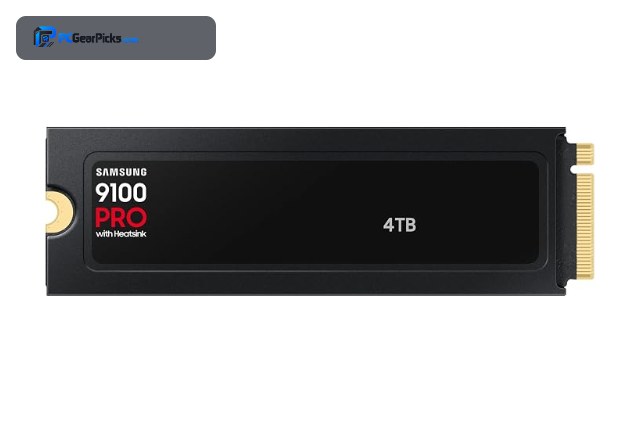
| Samsung 9100 PRO (PCIe 5.0 NVMe) | PCIe 5.0, flagship NVMe | High-end creators and enthusiasts on Gen5 boards. | ★★★★★ 4.6 |
| Crucial T700 1TB (PCIe 5.0 NVMe) | 1TB, PCIe 5.0, ~11700MB/s | Value-focused Gen5 adopters. | ★★★★★ 4.6 |
| Kingston FURY Renegade G5 2TB (PCIe 5.0) | 2TB, PCIe 5.0 NVMe | Enthusiasts wanting 2TB of Gen5 speed. | ★★★★★ 4.7 |
| Samsung PCIe 5.0 NVMe (14800MB/s) | PCIe 5.0, ~14800MB/s read | Professionals moving very large media files. | ★★★★★ 4.6 |
| Samsung Gen5 NVMe SSD (High Performance) | PCIe 5.0, high-performance | Content creators on a Gen5 workstation. | ★★★★★ 4.7 |
| Samsung Gen5 NVMe SSD (Large Capacity) | PCIe 5.0, large capacity | Creators needing Gen5 speed and capacity. | ★★★★★ 4.7 |
1. Samsung 9100 PRO (PCIe 5.0 NVMe) — Best Overall
- ✓ Top-tier Gen5 performance
- ✓ Strong efficiency for Gen5
- ✓ Trusted Samsung reliability
- ✗ Premium pricing
- ✗ Needs Gen5 slot and cooling
The Samsung 9100 PRO is the best all-round PCIe 5.0 drive, bringing Samsung flagship engineering to the Gen5 class with high speed and better efficiency than many early Gen5 rivals. It is the pick for a top-tier modern build.
It delivers the sequential throughput Gen5 is known for while keeping thermals more manageable, making it a dependable high-end choice.
Best for: High-end creators and enthusiasts on Gen5 boards.
May not fit: Gamers who will not benefit from Gen5 speed.
Check Price2. Crucial T700 1TB (PCIe 5.0 NVMe) — Best Value Gen5

- ✓ Blistering sequential speed
- ✓ Most reviewed Gen5 drive
- ✓ Strong all-round Gen5 performance
- ✗ Runs hot without a heatsink
- ✗ 1TB fills fast for creators
The Crucial T700 was one of the first Gen5 drives to go mainstream and remains a strong value, reaching around 11,700MB/s reads. Its large review base makes it the most proven Gen5 option here.
It needs good cooling to sustain those speeds, but for creators on a budget it delivers much of the Gen5 experience at a lower entry point.
Best for: Value-focused Gen5 adopters.
May not fit: Those needing large capacity in one drive.
Check Price3. Kingston FURY Renegade G5 2TB (PCIe 5.0) — Best High Capacity
- ✓ 2TB of Gen5 capacity
- ✓ Strong sequential performance
- ✓ Enthusiast FURY pedigree
- ✗ Newer with fewer reviews
- ✗ Requires cooling
The Kingston FURY Renegade G5 brings 2TB of PCIe 5.0 capacity, pairing Gen5 speed with enough room for large projects. It is aimed at enthusiasts who want both performance and space.
As part of the FURY line it targets high-end builds, and the 2TB size suits creators who find 1TB Gen5 drives limiting.
Best for: Enthusiasts wanting 2TB of Gen5 speed.
May not fit: Buyers who want the longest track record.
Check Price4. Samsung PCIe 5.0 NVMe (14800MB/s) — Fastest

- ✓ Among the fastest drives made
- ✓ Huge sequential throughput
- ✓ Excellent for massive files
- ✗ Premium, newer listing
- ✗ Demands serious cooling
This Samsung Gen5 drive pushes sequential reads toward 14,800MB/s, placing it among the fastest consumer SSDs available. It is built for moving enormous files as quickly as possible.
The speed is extraordinary, but realizing it requires a capable Gen5 platform and robust cooling to avoid throttling.
Best for: Professionals moving very large media files.
May not fit: Mainstream users who do not move huge files.
Check Price5. Samsung Gen5 NVMe SSD (High Performance) — Best for Creators

- ✓ Strong Gen5 throughput
- ✓ Good for content workflows
- ✓ Dependable Samsung build
- ✗ Premium pricing
- ✗ Gen5 platform required
This high-performance Samsung Gen5 drive targets content creators who benefit from fast large-file handling, offering strong throughput for video and photo workflows. It is a dependable choice for a creator workstation.
With Samsung reliability behind it, the drive suits professionals who want Gen5 speed backed by a trusted name.
Best for: Content creators on a Gen5 workstation.
May not fit: Gamers or budget-focused buyers.
Check Price6. Samsung Gen5 NVMe SSD (Large Capacity) — Best for Big Libraries
- ✓ Gen5 speed with ample space
- ✓ Good for large project files
- ✓ Trusted Samsung build
- ✗ Premium pricing
- ✗ Needs Gen5 slot and cooling
This larger-capacity Samsung Gen5 drive suits users who want both the speed of PCIe 5.0 and plenty of room for big project libraries. It is a strong fit for demanding creative storage.
The combination of Gen5 throughput and capacity makes it a practical single-drive solution for a high-end creative machine.
Best for: Creators needing Gen5 speed and capacity.
May not fit: Budget builds or Gen4-only systems.
Check PriceHow to Choose a PCIe 5 SSD
Do you actually need PCIe 5.0?
PCIe 5.0 mainly helps when you move very large files, such as high-resolution video or large datasets. For gaming and everyday use, the benefit over Gen4 is small because games rarely saturate even Gen4 speeds. Buy Gen5 if your workflow involves big sequential transfers; otherwise a Gen4 drive is better value.
What platform do you need?
A Gen5 SSD needs an M.2 slot wired for PCIe 5.0, which is found on recent Intel and AMD motherboards. On an older or Gen4 board the drive will run at Gen4 speeds. Check your motherboard for a Gen5-capable M.2 slot before buying.
Why do Gen5 drives need cooling?
The high speeds of Gen5 generate more heat, and without adequate cooling a drive will throttle to protect itself, losing performance. Many Gen5 drives ship with a heatsink or require the motherboard M.2 heatsink. Good airflow and a heatsink are essential to sustain Gen5 speeds.
How much capacity should you buy?
Gen5 drives are premium, so many buyers start at 1TB or 2TB. For creators working with large files, 2TB or more is worth the investment to avoid constant housekeeping. Balance the capacity against the higher cost per terabyte of the Gen5 class.
Frequently Asked Questions
Is a PCIe 5.0 SSD worth it for gaming?
For most gamers, no. Games rarely saturate even Gen4 speeds, so Gen5 offers little real-world gaming benefit at a higher cost and more heat. Gen5 is most worthwhile for large file workflows.
What do I need to use a Gen5 SSD?
An M.2 slot wired for PCIe 5.0, found on recent motherboards, plus adequate cooling. On older boards a Gen5 drive runs at Gen4 speeds.
Do PCIe 5 SSDs run hot?
Yes. Their high speeds generate heat, and without a heatsink and airflow they throttle. Many ship with a heatsink or use the motherboard M.2 cooler to stay at full speed.
How fast are PCIe 5.0 SSDs?
The fastest reach sequential reads around 14,000MB/s or more, nearly double the best Gen4 drives. Random performance, which matters more for everyday feel, improves less dramatically.
Final Verdict
The Samsung 9100 PRO is the best all-round PCIe 5.0 SSD for high-end builds, while the Crucial T700 is the most proven value entry point and the Kingston FURY Renegade G5 the capacity pick. Remember that Gen5 mainly benefits large file work, so gamers are usually better served by a Gen4 drive from our best NVMe SSD guide.


No reviews yet. Be the first to share your experience!