

Kingston is known for delivering dependable storage at sharp value, and its SSD range reflects that. The NV line offers affordable NVMe capacity, the FURY Renegade targets enthusiasts with high performance, and the long-running A400 remains a go-to for reviving older machines. Across the lineup, Kingston balances price and reliability well.
Below are seven Kingston SSDs worth considering in 2027, from value NVMe to enthusiast Gen4 and Gen5 drives. For cross-brand options see our main best SSD and best NVMe SSD guides.
Top 3 Best Kingston SSDs at a Glance

- • 2TB, PCIe 4.0
- • Compact M.2 2280
- • Value per terabyte

- • 250GB, PCIe 4.0
- • Compact, low cost
- • Good boot speed

- • 2TB, PCIe 4.0
- • High-performance FURY
- • Strong sustained speed
Best Kingston SSD in 2027
| Model | Key Spec | Best For | Rating |
|---|---|---|---|
| Kingston NV3 2TB (PCIe 4.0) | 2TB, PCIe 4.0 NVMe | Value builds wanting large Gen4 capacity. | ★★★★★ 4.7 |
| Kingston NV2 250GB (PCIe 4.0) | 250GB, PCIe 4.0 NVMe | Budget builds and secondary boot drives. | ★★★★★ 4.7 |
| Kingston FURY Renegade 2TB (PCIe 4.0) | 2TB, PCIe 4.0, high-end | Enthusiasts wanting top Kingston Gen4 speed. | ★★★★★ 4.8 |
| Kingston NV3 1TB (PCIe 4.0) | 1TB, PCIe 4.0 NVMe | Value builds wanting a fast 1TB drive. | ★★★★★ 4.7 |
| Kingston NV1 2TB (PCIe NVMe) | 2TB, PCIe NVMe | Affordable 2TB for everyday storage. | ★★★★★ 4.7 |
| Kingston A400 240GB (2.5in SATA) | 240GB, 2.5in SATA | Older laptops and desktops without NVMe. | ★★★★★ 4.8 |
| Kingston FURY Renegade G5 2TB (PCIe 5.0) | 2TB, PCIe 5.0 NVMe | Gen5 creators wanting 2TB of top speed. | ★★★★★ 4.7 |
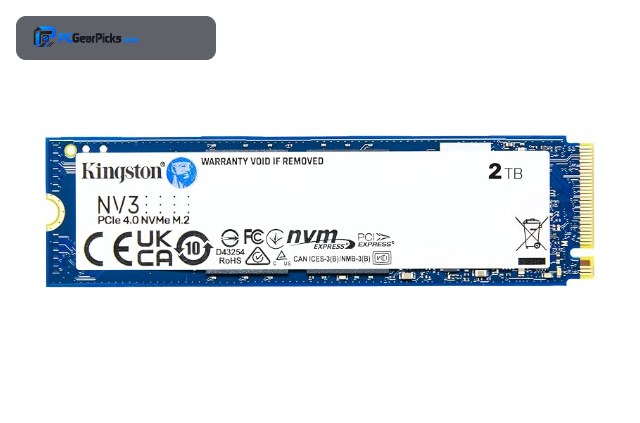
1. Kingston NV3 2TB (PCIe 4.0) — Best Overall
- ✓ Excellent 2TB value
- ✓ Good everyday Gen4 speed
- ✓ Highly reviewed
- ✗ DRAM-less design
- ✗ Not for heavy writes
The Kingston NV3 2TB is the best all-round Kingston SSD, delivering a lot of Gen4 capacity at a sharp price. It is an ideal large game or media drive for a mainstream build.
It handles gaming and everyday tasks comfortably, and the value per terabyte makes it easy to recommend.
Best for: Value builds wanting large Gen4 capacity.
May not fit: Heavy content-creation write workloads.
Check Price2. Kingston NV2 250GB (PCIe 4.0) — Best Budget
- ✓ Very affordable NVMe entry
- ✓ Compact M.2 form
- ✓ Snappy boot performance
- ✗ Small capacity
- ✗ DRAM-less, variable specs
The NV2 is Kingston budget NVMe entry, a low-cost way to add a fast boot or secondary drive. It brings Gen4 responsiveness at an accessible price.
The 250GB size is best for a boot or scratch role rather than a main library, but it delivers the quick feel of NVMe.
Best for: Budget builds and secondary boot drives.
May not fit: Primary drives needing large capacity.
Check Price3. Kingston FURY Renegade 2TB (PCIe 4.0) — Best Performance
- ✓ High-end Gen4 speed
- ✓ 2TB enthusiast capacity
- ✓ Holds speed under load
- ✗ Premium for Gen4
- ✗ Runs warm
The FURY Renegade is Kingston high-performance Gen4 drive, offering top PCIe 4.0 speed with 2TB of space for enthusiasts. It is a strong step up from the value NV line.
It sustains high speeds well, suiting a performance build that installs and updates many large files.
Best for: Enthusiasts wanting top Kingston Gen4 speed.
May not fit: Budget-focused buyers.
Check Price4. Kingston NV3 1TB (PCIe 4.0) — Best 1TB Value

- ✓ Affordable 1TB Gen4
- ✓ Good everyday speed
- ✓ Highly reviewed
- ✗ DRAM-less design
- ✗ 1TB may fill over time
The NV3 1TB is a value primary drive, bringing Gen4 speed at an accessible price. It is a smart boot-and-apps drive for a budget-conscious build.
For gaming and everyday use it feels quick, and the low cost makes it an easy value pick.
Best for: Value builds wanting a fast 1TB drive.
May not fit: Workstations with heavy sustained writes.
Check Price5. Kingston NV1 2TB (PCIe NVMe) — Best Alternative

- ✓ Large capacity at low cost
- ✓ Dependable everyday speed
- ✓ Compact design
- ✗ Older NV platform
- ✗ Variable specifications
The NV1 2TB is an earlier Kingston value NVMe drive that still offers a lot of capacity for the money. It is a dependable large drive for everyday use.
While superseded by the NV3, it remains a cost-effective way to add 2TB of NVMe storage for general tasks.
Best for: Affordable 2TB for everyday storage.
May not fit: Users wanting the latest NV3 platform.
Check Price6. Kingston A400 240GB (2.5in SATA) — Best for Old Systems

- ✓ Revives old laptops and desktops
- ✓ Enormous review base
- ✓ Works where NVMe is not supported
- ✗ SATA speed, below NVMe
- ✗ Small capacity
The Kingston A400 is the classic SATA SSD for breathing life into older machines without an M.2 slot. With a huge review base, it is one of the most trusted upgrade drives ever made.
It will not match NVMe speeds, but swapping a hard drive for an A400 is one of the biggest improvements an older PC or laptop can get.
Best for: Older laptops and desktops without NVMe.
May not fit: Modern builds that can use faster NVMe.
Check Price7. Kingston FURY Renegade G5 2TB (PCIe 5.0) — Fastest

- ✓ Gen5 speed with 2TB capacity
- ✓ Future-ready interface
- ✓ Enthusiast FURY pedigree
- ✗ Needs Gen5 slot and cooling
- ✗ Overkill for gaming
The FURY Renegade G5 is Kingston fastest drive, bringing PCIe 5.0 speed to a 2TB capacity for enthusiasts and creators. It is the top performer in the Kingston lineup.
It needs a Gen5 slot and cooling, but for large-file workflows at 2TB it offers maximum Kingston throughput.
Best for: Gen5 creators wanting 2TB of top speed.
May not fit: Gamers on Gen4 boards.
Check PriceHow to Choose a Kingston SSD
Which Kingston line is right for you?
The NV line (NV1, NV2, NV3) is the value NVMe range, great for affordable capacity. The FURY Renegade targets enthusiasts with high Gen4 and Gen5 performance. The A400 is the classic SATA drive for older systems. Choose NV for value, FURY for performance, and A400 for machines without M.2.
Are value NVMe drives fast enough?
Yes, for most users. Kingston NV drives are DRAM-less but deliver real Gen4 speed that feels fast for gaming and everyday use. The difference against premium drives shows mainly in heavy sustained writes, which most people rarely do.
When should you choose the A400?
The A400 is a SATA drive, so it is the right choice for older laptops and desktops that lack an M.2 NVMe slot. In those machines it delivers a massive speed improvement over a hard drive. For any system with M.2, choose an NVMe drive instead.
Do you need the FURY Renegade?
The FURY line is for enthusiasts who want top performance. If you game casually or do everyday tasks, a value NV drive is plenty. If you want the fastest Kingston speed for demanding work, the FURY Renegade in Gen4 or Gen5 is the pick. Match it to your motherboard.
Frequently Asked Questions
Is Kingston a good SSD brand?
Yes. Kingston is known for dependable storage at sharp value, with the NV line for affordable NVMe, the FURY Renegade for performance, and the long-running A400 for reviving older machines.
What is the difference between Kingston NV and FURY?
The NV line is value-oriented NVMe storage, great for affordable capacity, while the FURY Renegade is the high-performance enthusiast line in Gen4 and Gen5. Choose NV for value and FURY for speed.
Is the Kingston A400 still worth buying?
For older systems without an M.2 slot, yes. The A400 is a SATA SSD that dramatically speeds up a machine using a hard drive. For any system with NVMe support, choose an NVMe drive instead.
Are DRAM-less Kingston drives good?
For most users, yes. Kingston NV drives are DRAM-less but deliver real Gen4 speed that feels fast for gaming and everyday use. The limitation shows mainly in heavy sustained writes.
Final Verdict
The Kingston NV3 2TB is the best all-round Kingston SSD for value, with the NV2 the budget entry, the FURY Renegade the performance pick, and the A400 the classic upgrade for older systems. For cross-brand comparisons see our best NVMe SSD and best SSD guides.


No reviews yet. Be the first to share your experience!