

Upgrading your laptop’s RAM is one of the most effective ways to improve its speed and multitasking, but laptop memory differs from desktop memory. The best laptop RAM depends on your notebook’s memory type, the capacity it supports, and whether the memory is upgradeable at all.
Below we rank six of the best laptop RAM upgrades, led by the Crucial 16GB DDR4 SODIMM. Before buying, check your laptop’s specs, and see our general RAM and DDR5 RAM guides for desktop memory.
Top 3 Best Laptop RAM Upgrades at a Glance
Best Laptop RAM in 2027
| Model | Key Spec | Best For | Rating |
|---|---|---|---|
| Crucial 16GB DDR4 Laptop Memory | 16GB DDR4 SODIMM | Best Overall | ★ 4.8 |
| Corsair Vengeance SODIMM DDR4 32GB | 32GB (2x16GB) DDR4 SODIMM | Best 32GB | ★ 4.7 |
| Crucial 32GB DDR5 Laptop Memory | 32GB (2x16GB) DDR5 SODIMM | Best DDR5 Laptop | ★ 4.8 |
| Corsair Vengeance SODIMM DDR4 16GB | 16GB (1x16GB) DDR4 SODIMM | Best Single Module | ★ 4.7 |
| Crucial 64GB DDR5 Laptop Memory | 64GB (2x32GB) DDR5 SODIMM | Best High-Capacity | ★ 4.8 |
| Timetec 16GB DDR4 Laptop Memory | 16GB DDR4 SODIMM | Best Budget | ★ 4.8 |
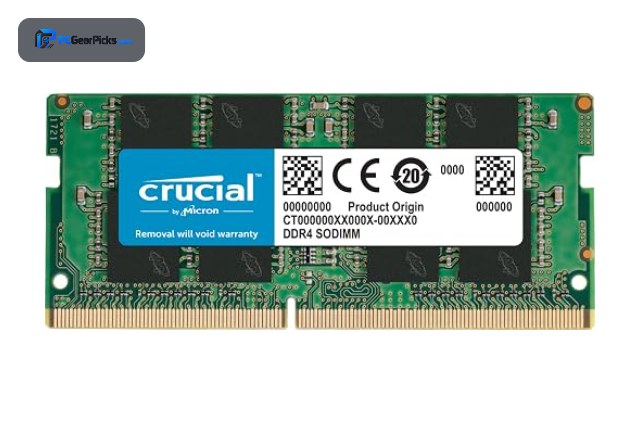
1. Crucial 16GB DDR4 Laptop Memory — Best Overall

16GB DDR4 SODIMM • 3200MHz, CL22 • Laptop form factor
- ✓ Reliable Crucial quality
- ✓ Easy single-module upgrade
- ✓ Over 17,000 reviews
- ✗ DDR4 laptops only
- ✗ Single module as listed
The Crucial 16GB DDR4 SODIMM is the best laptop RAM overall, a reliable upgrade that boosts many notebooks to a comfortable 16GB for smoother multitasking. With over 17,000 reviews, it is the trusted, straightforward choice for a DDR4 laptop.
It fits DDR4 laptops only and is a single module as listed, but for a dependable, affordable notebook memory boost, it is our top pick.
Best for: DDR4 laptop owners upgrading memory
May not fit: DDR5 laptops or desktop builds
2. Corsair Vengeance SODIMM DDR4 32GB — Best 32GB

32GB (2x16GB) DDR4 SODIMM • 3200MHz • Laptop form factor
- ✓ Full 32GB for heavy multitasking
- ✓ Trusted Corsair quality
- ✓ Great 4.7-star rating
- ✗ DDR4 laptops only
- ✗ Check laptop max capacity
The Corsair Vengeance SODIMM DDR4 32GB is the best high-capacity laptop RAM for DDR4 notebooks, delivering a full 32GB for heavy multitasking, creative work, and demanding applications on the go. It is ideal for power users who need more memory.
It fits DDR4 laptops only, so confirm your notebook supports 32GB, but for a big capacity boost, it is an excellent choice.
Best for: DDR4 laptop power users needing 32GB
May not fit: DDR5 laptops or light users
3. Crucial 32GB DDR5 Laptop Memory — Best DDR5 Laptop

32GB (2x16GB) DDR5 SODIMM • 5600MHz • Laptop form factor
- ✓ Fast DDR5-5600 for new laptops
- ✓ Full 32GB capacity
- ✓ Excellent 4.8-star rating
- ✗ DDR5 laptops only
- ✗ Premium over DDR4
The Crucial 32GB DDR5 SODIMM is the best DDR5 laptop RAM, bringing fast DDR5-5600 speed and a full 32GB to modern notebooks that use DDR5 memory. It is ideal for upgrading a newer laptop for heavy multitasking and creative work.
It fits DDR5 laptops only and costs more than DDR4, but for a fast, high-capacity upgrade to a modern laptop, it is an excellent pick.
Best for: Modern DDR5 laptop owners
May not fit: Older DDR4 laptops
4. Corsair Vengeance SODIMM DDR4 16GB — Best Single Module

16GB (1x16GB) DDR4 SODIMM • Laptop form factor • Single stick
- ✓ Single 16GB stick for easy upgrade
- ✓ Trusted Corsair quality
- ✓ Great 4.7-star rating
- ✗ Single-channel if used alone
- ✗ DDR4 laptops only
The Corsair Vengeance SODIMM DDR4 16GB is the best single-module laptop RAM, a single 16GB stick ideal for topping up a laptop that already has one module or filling an empty slot. It is a flexible, reliable way to add memory.
Used alone it runs single-channel and fits DDR4 laptops only, but for a flexible single-stick upgrade, it is a strong pick.
Best for: Laptop owners adding a single 16GB stick
May not fit: Those wanting a matched dual-channel kit
5. Crucial 64GB DDR5 Laptop Memory — Best High-Capacity
64GB (2x32GB) DDR5 SODIMM • 4800MHz, CL40 • Laptop form factor
- ✓ Massive 64GB for mobile workstations
- ✓ Great for creation and virtualization
- ✓ Excellent 4.8-star rating
- ✗ DDR5 laptops only
- ✗ Overkill for light use
The Crucial 64GB DDR5 SODIMM is the best high-capacity laptop RAM, offering a huge 64GB for mobile workstations running heavy creative applications, virtualization, and large datasets. It is the choice for professionals who need maximum memory on the go.
It fits DDR5 laptops only and is overkill for light use, but for a mobile workstation that demands 64GB, it is an outstanding pick.
Best for: Mobile professionals needing 64GB
May not fit: Everyday laptop users
6. Timetec 16GB DDR4 Laptop Memory — Best Budget

16GB DDR4 SODIMM • 2400MHz • Laptop form factor
- ✓ Affordable laptop upgrade
- ✓ Boosts notebook multitasking
- ✓ Excellent 4.8-star rating
- ✗ 2400MHz speed
- ✗ DDR4 laptops only
The Timetec 16GB DDR4 SODIMM is the best budget laptop RAM, an affordable upgrade that boosts an older notebook’s memory for smoother multitasking. It is a straightforward, low-cost way to improve a DDR4 laptop.
It runs at 2400MHz and fits DDR4 laptops only, but for an affordable laptop memory boost, it is a strong value pick.
Best for: Budget-minded DDR4 laptop owners
May not fit: DDR5 laptops or those wanting top speed
How to Choose Laptop RAM
Check if your laptop is upgradeable
Not all laptops allow RAM upgrades — some have memory soldered to the board, while others have accessible SODIMM slots. Before buying, check your laptop model to confirm it has upgradeable memory slots and how many, since this determines whether and how much you can add.
Match the memory type: DDR4 or DDR5
Laptops use either DDR4 or DDR5 SODIMM memory depending on their age and platform. Newer laptops use DDR5 like the Crucial DDR5 kit, while older ones use DDR4. The two are not interchangeable, so confirm your laptop’s memory type before buying.
SODIMM, not desktop DIMM
Laptop memory uses the smaller SODIMM form factor, which is physically different from desktop DIMMs. All the kits here are SODIMMs made for laptops, so make sure you buy SODIMM memory rather than desktop modules, which will not fit a notebook.
Capacity and your needs
16GB is the comfortable target for smooth laptop multitasking, 32GB suits creative work and heavy multitasking, and 64GB is for mobile workstations. Check your laptop’s maximum supported capacity, as every model has a limit on how much memory it accepts.
Single stick or matched kit
Installing a matched pair enables dual-channel mode for better performance, while a single stick like the Corsair 16GB module is handy for filling an empty slot or topping up. Check how your laptop’s existing memory is configured before choosing.
Frequently Asked Questions
What is the best laptop RAM in 2027?
Our overall pick is the Crucial 16GB DDR4 SODIMM, a reliable, widely compatible upgrade for DDR4 laptops. For modern notebooks, the Crucial 32GB DDR5 SODIMM is excellent, and the Timetec DDR4 is the best budget option.
Can I upgrade my laptop’s RAM?
It depends on the laptop — some have accessible SODIMM slots while others have memory soldered to the board. Check your specific model before buying to confirm it has upgradeable slots and how much memory it supports, since this varies widely.
How much RAM does a laptop need?
16GB is the comfortable target for smooth multitasking on most laptops, while 32GB suits creative work and heavy multitasking. Check your laptop’s maximum supported capacity, as every model limits how much memory it can accept.
Is laptop RAM different from desktop RAM?
Yes — laptops use the smaller SODIMM form factor, which is physically different from desktop DIMMs and not interchangeable. Always buy SODIMM memory for a laptop, and match the DDR4 or DDR5 type your notebook uses.
What is SODIMM memory?
SODIMM (Small Outline DIMM) is the compact memory form factor used in laptops and small-form-factor PCs. It is shorter than a desktop DIMM to fit tight spaces, so laptop upgrades require SODIMM modules like the ones in this guide.
Final Verdict
For laptop RAM in 2027, the Crucial 16GB DDR4 SODIMM is the best all-round upgrade, while the Crucial 32GB DDR5 is ideal for modern laptops and the Timetec DDR4 is the best budget pick. Always check your laptop’s memory type and limits first. See our best RAM guide for desktop memory.


No reviews yet. Be the first to share your experience!