

RAM (memory) lets your PC juggle programs and games smoothly, and the best kit depends on your platform, how much capacity you need, and the speed your system supports. The first choice is DDR5 or DDR4, which is set by your motherboard and CPU.
Below we rank seven of the best RAM kits across DDR5, DDR4, and laptop memory, led by the Crucial Pro DDR5-6000. Match your memory to the right motherboard and CPU, and see our DDR5 and DDR4 RAM guides.
Top 3 Best RAM Kits at a Glance
Best RAM Kits in 2027
| Model | Key Spec | Best For | Rating |
|---|---|---|---|
| Crucial Pro 32GB DDR5-6000 | 32GB (2x16GB) DDR5 | Best Overall | ★ 4.8 |
| G.SKILL Trident Z5 Neo RGB 32GB DDR5 | 32GB (2x16GB) DDR5 | Best for AMD | ★ 4.8 |
| Corsair Vengeance LPX 16GB DDR4 | 16GB (2x8GB) DDR4 | Best Value | ★ 4.8 |
| Corsair Vengeance RGB DDR5 32GB | 32GB (2x16GB) DDR5 | Best RGB | ★ 4.7 |
| Corsair Vengeance DDR5 64GB | 64GB (2x32GB) DDR5 | Best High-Capacity | ★ 4.7 |
| ADATA Premier 8GB DDR4 | 8GB (1x8GB) DDR4 | Best Budget | ★ 4.8 |
| Crucial 16GB DDR4 Laptop Memory | 16GB DDR4 SODIMM | Best for Laptops | ★ 4.8 |
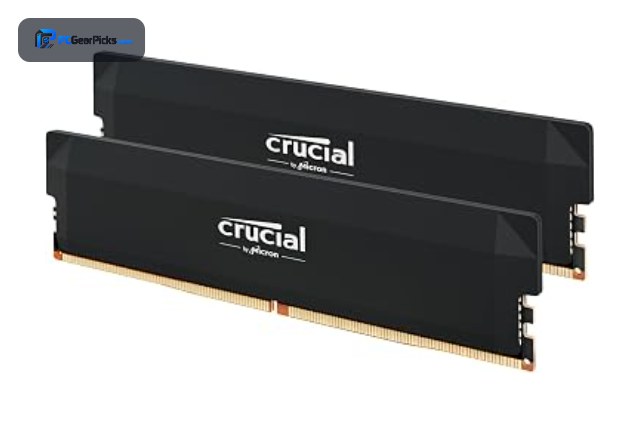
1. Crucial Pro 32GB DDR5-6000 — Best Overall

32GB (2x16GB) DDR5 • 6000MHz, CL36 • Overclocking support
- ✓ Fast DDR5-6000 at the sweet spot
- ✓ Reliable Crucial quality
- ✓ Excellent 4.8-star rating
- ✗ Requires a DDR5 platform
- ✗ No RGB lighting
The Crucial Pro 32GB DDR5-6000 is the best RAM overall, pairing the ideal 32GB capacity with fast DDR5-6000 speed and CL36 timings for modern builds. With a 4.8-star rating and thousands of reviews, it is the dependable, well-rounded choice for most gaming and productivity PCs.
It needs a DDR5 motherboard and skips RGB, but for fast, reliable memory at the capacity and speed most builds want, it is our top pick.
Best for: Most modern DDR5 gaming and work builds
May not fit: Older DDR4 systems or RGB-focused builds
2. G.SKILL Trident Z5 Neo RGB 32GB DDR5 — Best for AMD

32GB (2x16GB) DDR5 • 6000MHz, AMD EXPO • RGB lighting
- ✓ AMD EXPO for easy Ryzen tuning
- ✓ Striking RGB design
- ✓ Top 4.8-star rating
- ✗ Premium over non-RGB kits
- ✗ DDR5 platform required
The G.SKILL Trident Z5 Neo RGB 32GB DDR5 is the best RAM for AMD builds, featuring AMD EXPO profiles for one-click DDR5-6000 tuning on Ryzen systems, plus eye-catching RGB. It is tuned specifically for the AMD platform where it runs beautifully.
It costs more than plain kits and needs a DDR5 board, but for a Ryzen build that wants fast, good-looking memory, it is an excellent pick.
Best for: AMD Ryzen builders wanting EXPO and RGB
May not fit: Those on a budget or without DDR5
3. Corsair Vengeance LPX 16GB DDR4 — Best Value

16GB (2x8GB) DDR4 • 3200MHz • Low-profile heatspreader
- ✓ Legendary reliability
- ✓ Low-profile fits any cooler
- ✓ Over 60,000 reviews
- ✗ DDR4, not the latest standard
- ✗ 16GB may be limiting for some
The Corsair Vengeance LPX 16GB DDR4-3200 is the best value RAM, a proven low-profile kit with an enormous 60,000-plus review base behind it. For DDR4 systems, it is the go-to choice that just works, pairing with a huge range of CPUs and boards.
It uses DDR4 rather than the latest DDR5 and 16GB suits mainstream rather than heavy workloads, but for dependable, widely compatible memory, it is unbeatable value.
Best for: DDR4 builders wanting proven reliability
May not fit: New DDR5 builds or heavy multitaskers
4. Corsair Vengeance RGB DDR5 32GB — Best RGB

32GB (2x16GB) DDR5 • 6000MHz • Dynamic RGB
- ✓ Vibrant customizable RGB
- ✓ Fast DDR5-6000
- ✓ Trusted Corsair iCUE support
- ✗ Premium pricing
- ✗ DDR5 platform required
The Corsair Vengeance RGB DDR5 32GB is the best RGB memory, combining fast DDR5-6000 performance with vibrant, customizable lighting controlled through Corsair iCUE. It is ideal for a showcase build that wants both speed and style.
It carries a premium and needs a DDR5 board, but for a striking, fast RGB kit from a trusted brand, it is a standout.
Best for: Builders wanting fast memory with RGB flair
May not fit: Those who prefer plain, lower-cost kits
5. Corsair Vengeance DDR5 64GB — Best High-Capacity

64GB (2x32GB) DDR5 • 5200MHz, CL40 • Workstation capacity
- ✓ Huge 64GB for heavy workloads
- ✓ Great for creation and virtualization
- ✓ Reliable Corsair build
- ✗ Overkill for pure gaming
- ✗ Lower clock than 32GB kits
The Corsair Vengeance DDR5 64GB is the best high-capacity memory, delivering a massive 64GB for demanding creative work, heavy multitasking, and virtualization. It is the choice when 32GB is not enough and you need headroom for large projects.
It is overkill for pure gaming and clocks a little lower than 32GB kits, but for workstation-class capacity on DDR5, it is an excellent pick.
Best for: Creators and power users needing 64GB
May not fit: Gamers who only need 32GB
6. ADATA Premier 8GB DDR4 — Best Budget

8GB (1x8GB) DDR4 • 3200MHz, CL22 • Single module
- ✓ Very affordable entry memory
- ✓ Easy single-module upgrade
- ✓ Excellent 4.8-star rating
- ✗ Only 8GB in one stick
- ✗ Single-channel on its own
The ADATA Premier 8GB DDR4-3200 is the best budget RAM, an affordable single module ideal for a basic build or a quick capacity upgrade. Its strong rating makes it a reliable, wallet-friendly way to add memory to a DDR4 system.
It is a single 8GB stick, so it runs single-channel alone and suits light use, but for an affordable entry or top-up, it is a smart value pick.
Best for: Budget builds or simple memory upgrades
May not fit: Gaming or multitasking that needs 16GB+
7. Crucial 16GB DDR4 Laptop Memory — Best for Laptops

16GB DDR4 SODIMM • 3200MHz, CL22 • Laptop form factor
- ✓ Easy laptop memory upgrade
- ✓ Reliable Crucial quality
- ✓ Huge 17,000-plus review base
- ✗ SODIMM, not for desktops
- ✗ Single module as listed
The Crucial 16GB DDR4 SODIMM is the best RAM for laptops, a reliable upgrade that boosts the memory of many notebooks for smoother multitasking. With over 17,000 reviews, it is a trusted, straightforward way to breathe new life into a DDR4 laptop.
It is a laptop SODIMM and will not fit desktops, but for upgrading a notebook affordably and reliably, it is the standout choice.
Best for: Laptop owners upgrading their memory
May not fit: Desktop builds needing standard DIMMs
How to Choose RAM
DDR5 or DDR4
Your motherboard and CPU decide the memory type. Modern AMD AM5 and new Intel platforms use DDR5, which is faster and future-proof, while older AM4 and many Intel boards use DDR4, which is affordable and widely available. Check your board before buying, since the two are not interchangeable.
How much capacity you need
16GB is the comfortable minimum for gaming and everyday use, 32GB is the current sweet spot for gaming and light creative work, and 64GB suits heavy content creation, virtualization, and demanding workloads. Choose capacity based on how many programs and how large the projects you run.
Speed and timings
Faster memory can improve performance, especially on AMD Ryzen systems. DDR5-6000 is a popular sweet spot for Ryzen, while timings like CL36 affect latency. Make sure your motherboard supports the speed, and enable the EXPO or XMP profile to run it at rated speed.
EXPO and XMP profiles
Memory runs at a slower default speed until you enable its performance profile in the BIOS: EXPO for AMD and XMP for Intel. Kits like the Trident Z5 Neo include EXPO for easy one-click tuning on Ryzen, so look for the profile that matches your platform.
Dual channel and form factor
Install memory in matched pairs to enable dual-channel mode, which boosts bandwidth noticeably over a single stick. Desktops use full-size DIMMs, while laptops use smaller SODIMMs like the Crucial laptop kit, so buy the correct form factor for your system.
Frequently Asked Questions
What is the best RAM in 2027?
Our overall pick is the Crucial Pro 32GB DDR5-6000, a fast, reliable kit at the capacity and speed most builds want. For AMD, the G.SKILL Trident Z5 Neo with EXPO is excellent, and the Corsair Vengeance LPX DDR4 is the best value for DDR4 systems.
How much RAM do I need?
16GB is the minimum for smooth gaming and everyday use, 32GB is the current sweet spot for gaming and light creative work, and 64GB suits heavy content creation and virtualization. Most gamers are well served by 32GB in 2027.
Is DDR5 worth it over DDR4?
For new builds on modern platforms, DDR5 offers more bandwidth and better longevity, helping in productivity and future games. For gaming the difference is often modest, so DDR4 remains great value if your platform uses it. Your motherboard decides which you can use.
What RAM speed should I get?
DDR5-6000 is a popular sweet spot, especially for AMD Ryzen, while DDR4-3200 is the common baseline for DDR4 systems. Make sure your motherboard supports the speed, and enable the EXPO or XMP profile in the BIOS to run memory at its rated speed.
Can I use desktop RAM in a laptop?
No — desktops use full-size DIMMs while laptops use smaller SODIMMs like the Crucial laptop kit. They are not interchangeable, so buy memory in the correct form factor for your system, and check your laptop’s maximum supported capacity and speed.
Final Verdict
For RAM in 2027, the Crucial Pro DDR5-6000 is the best all-round pick, while the G.SKILL Trident Z5 Neo is ideal for AMD and the Corsair Vengeance LPX is the best DDR4 value. For laptops, the Crucial SODIMM is the easy upgrade. See our DDR5 RAM and gaming RAM guides for more.


No reviews yet. Be the first to share your experience!