

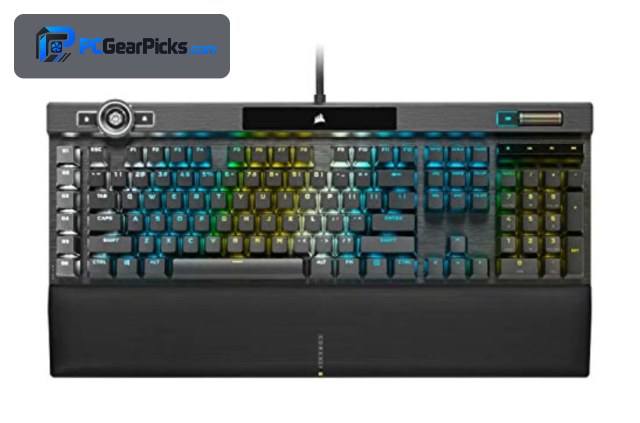
Corsair makes some of the best-known gaming keyboards around, and its range runs from affordable quiet boards to display-equipped flagships. Choosing the right one comes down to your budget, whether you want premium materials and macros, and how much you value competitive features like Rapid Trigger and high polling rates.
All of Corsair’s keyboards work with its iCUE software for lighting and macros, so the main differences are build quality, switches, and extras like control wheels and displays. Below we rank five Corsair keyboards by value and use case. For other brands and styles, see our mechanical keyboard and custom keyboard guides, plus the peripherals hub.
Top 3 Best Corsair Keyboards at a Glance

- Cherry MX / OPX switches
- Per-key RGB, aluminum frame
- iCUE control wheel + macros
Best Corsair Keyboards in 2027
| Keyboard | Best For | Key Spec | Rating | Price |
|---|---|---|---|---|
| Corsair K100 RGB | Best Overall Corsair | Cherry MX / OPX switches | 4.6★ (1874) | Check Price |
| Corsair Skiff 100 | Best Value | Quiet switches | 4.7★ (48) | Check Price |
| Corsair K70 CORE RGB | Best Mid-Range | Pre-lubed switches | 4★ | Check Price |
| Corsair SOCD Rapid Trigger | Best for Competitive | Rapid Trigger, adjustable actuation | 4.4★ | Check Price |
| Corsair Galleon 100 SD | Best Premium Alternative | Mechanical, per-key RGB | 3.8★ (158) | Check Price |
1. Corsair K100 RGB – Best Overall Corsair
- ✓ Premium aluminum build
- ✓ Fast switches and high polling
- ✓ Dedicated control wheel and macro keys
- ✗ Expensive
- ✗ Large full-size footprint
The Corsair K100 RGB is the flagship of Corsair’s keyboard range and the best overall pick for fans of the brand. It pairs premium Cherry MX (or fast OPX optical) switches with a sturdy aluminum frame, per-key RGB, and a handy iCUE control wheel for media and macros — all backed by thousands of positive ratings.
At around $320 it’s a serious investment and takes up a full-size desk footprint, but for gamers and power users who want Corsair’s best build and features, nothing else in the lineup matches it.
Best for: Enthusiasts wanting Corsair’s flagship build and features
May not fit: Budget buyers or those wanting a compact board
2. Corsair Skiff 100 – Best Value

- ✓ Genuinely quiet for the price
- ✓ Strong 4.7-star rating
- ✓ Affordable Corsair entry
- ✗ Fewer premium extras
- ✗ Newer model, modest review count
The Corsair Skiff 100 is the value pick, bringing quiet switches and per-key RGB to an affordable price around $59. Its quiet operation makes it a good fit for shared spaces or late-night sessions, and it carries a strong 4.7-star rating.
It skips the flagship extras like a control wheel and aluminum frame, but as the cheapest way into a genuine Corsair gaming keyboard, it’s an excellent entry point.
Best for: Budget buyers wanting a quiet Corsair keyboard
May not fit: Those wanting premium materials or macro wheels
3. Corsair K70 CORE RGB – Best Mid-Range

- ✓ Smooth pre-lubed switches
- ✓ Sound-dampening for a nicer typing feel
- ✓ Beloved K70 line pedigree
- ✗ Few reviews on this model yet
- ✗ No dedicated macro column
The Corsair K70 CORE continues the brand’s most popular keyboard line, adding pre-lubed switches and internal sound-dampening foam for a smoother, quieter typing experience around $107. It’s the sweet spot between the budget Skiff and the flagship K100.
It’s a newer listing with fewer reviews so far and lacks a dedicated macro column, but for most gamers the K70 CORE delivers the Corsair experience at a sensible mid-range price.
Best for: Gamers wanting the classic K70 feel at a fair price
May not fit: Those needing dedicated macro keys or the cheapest option
4. Corsair SOCD Rapid Trigger – Best for Competitive

- ✓ Rapid Trigger and adjustable actuation
- ✓ Fast 8000Hz polling
- ✓ SOCD for competitive inputs
- ✗ Niche competitive focus
- ✗ Modest review count
For competitive players, this Corsair board focuses on speed: Rapid Trigger with adjustable actuation points, an 8000Hz polling rate, and SOCD support give you the fastest, most tunable inputs for esports titles around $99.
Its feature set is aimed squarely at competitive gaming rather than everyday typing, and it has a modest review count, but for players who want cutting-edge responsiveness from Corsair, it delivers.
Best for: Competitive players wanting Rapid Trigger and fast polling
May not fit: Everyday typists who don’t need competitive features
5. Corsair Galleon 100 SD – Best Premium Alternative

- ✓ Built-in smart display
- ✓ Per-key RGB
- ✓ Full-featured Corsair design
- ✗ Mixed owner ratings
- ✗ Premium price
The Corsair Galleon 100 SD adds a built-in smart display to a full-featured mechanical keyboard, giving you at-a-glance info and media control around $300. It’s a premium alternative to the K100 for those who want a screen on their board.
Its owner ratings are more mixed than the K100’s and it sits at a premium price, so check recent reviews, but for Corsair fans who want a display-equipped flagship, it’s worth a look.
Best for: Corsair fans who want a built-in display
May not fit: Buyers wanting the most proven flagship (the K100)
How to Choose a Corsair Keyboard
Budget vs flagship
Corsair’s range spans the affordable Skiff 100 (around $59) to the flagship K100 RGB (around $320). The cheaper boards cover the essentials well; the flagships add aluminum frames, control wheels, and displays. Spend based on how much those extras matter to you.
Switches and typing feel
Corsair offers Cherry MX, fast OPX optical, and pre-lubed options. The K70 CORE’s pre-lubed switches and sound-dampening give a smoother, quieter feel, while the K100 offers premium Cherry MX or rapid optical switches for gaming.
Competitive features
For esports, look for Rapid Trigger, adjustable actuation, and high polling — the Corsair SOCD board focuses on exactly these. If you play competitively, those features offer a real responsiveness edge over a standard board.
iCUE software and ecosystem
All Corsair keyboards use iCUE for RGB lighting, macros, and settings, which syncs nicely if you own other Corsair gear. It’s powerful but can be heavy, so factor that in if you prefer lightweight software.
Size and extras
Most Corsair gaming keyboards are full-size with media controls; the flagships add a control wheel (K100) or a smart display (Galleon 100 SD). Make sure you have the desk space, and decide whether a wheel or screen is worth the premium.
Frequently Asked Questions
What is the best Corsair keyboard in 2027?
The Corsair K100 RGB is our overall pick — a flagship with premium switches, an aluminum frame, a control wheel, and macro keys, backed by thousands of positive ratings. The Skiff 100 is the best value around $59, and the K70 CORE is the mid-range sweet spot.
Which Corsair keyboard is best for competitive gaming?
The Corsair SOCD board with Rapid Trigger, adjustable actuation, and 8000Hz polling is built for competitive play, giving the fastest, most tunable inputs. The K100 with optical switches is also excellent for fast-paced gaming.
Is there an affordable Corsair keyboard?
Yes — the Corsair Skiff 100 around $59 is the most affordable, offering quiet switches and per-key RGB with a strong 4.7-star rating. It’s the best way into the Corsair ecosystem without spending much.
Do all Corsair keyboards use iCUE software?
Yes, Corsair keyboards use iCUE for RGB lighting, macros, and customization, which also syncs with other Corsair peripherals. It’s feature-rich, though some users find it heavy, so it’s worth knowing if you prefer minimal software.
What is the difference between the K70 CORE and K100?
The K70 CORE is a mid-range board with pre-lubed switches and sound-dampening around $107, while the K100 is the flagship with a premium aluminum frame, a control wheel, dedicated macro keys, and faster optical switch options around $320.
Final Verdict
For a Corsair keyboard, the K100 RGB is the flagship to beat, with premium build, switches, and a control wheel. The Skiff 100 is the value pick at around $59, and the K70 CORE is the mid-range sweet spot with a smooth, dampened feel. Competitive players should look at the Rapid Trigger SOCD board. Choose based on budget and which Corsair extras you’ll actually use. For other options, see our mechanical keyboard guide.
No reviews yet. Be the first to share your experience!