

An ergonomic keyboard reduces wrist and shoulder strain by letting your hands rest in a more natural position, which matters most for long work days and anyone prone to RSI. The best pick depends on whether you want a true split, a contoured one-piece board, wired or wireless, and your budget.
Below we rank seven of the best ergonomic keyboards, led by the adjustable Kinesis Freestyle2 split and the value Arteck split. For other styles see our best keyboards, wireless, and mechanical keyboard guides, and browse the peripherals hub.
Top 3 Best Ergonomic Keyboards at a Glance

Contoured Wireless Ergonomic Keyboard
- Natural-posture contour
- Multi-device (up to 3)
- Wireless
Best Ergonomic Keyboards in 2027
| Ergonomic Keyboard | Best For | Rating | Price |
|---|---|---|---|
| Kinesis Freestyle2 | Best Overall | 4.3★ | Check Price |
| Arteck Split Ergonomic Keyboard | Best Value | 4.3★ | Check Price |
| Contoured Wireless Ergonomic Keyboard | Best Wireless | 4.2★ | Check Price |
| Wave Ergonomic Keyboard | Best Contoured Design | 4.2★ | Check Price |
| Perixx Periboard-612B Wireless Split | Best Full-Size Split | 3.9★ | Check Price |
| Kensington Pro Fit Ergonomic Wired | Best Budget Wired | 4.1★ | Check Price |
| Kinesis Freestyle2 Blue Wireless | Best Wireless Split | 3.9★ | Check Price |
1. Kinesis Freestyle2 – Best Overall

- ✓ Fully split for natural posture
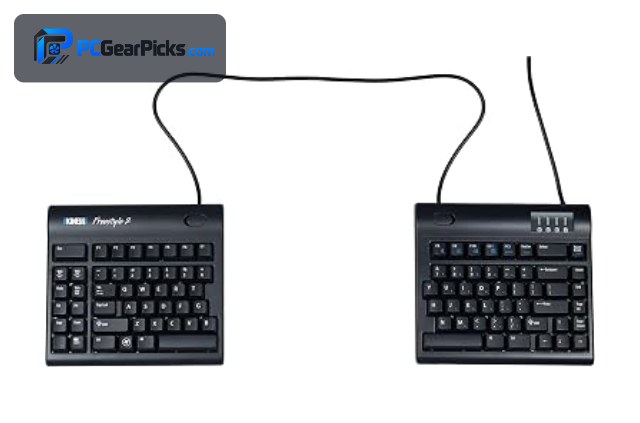
- ✓ Adjustable separation width
- ✓ Trusted ergonomic brand
- ✗ Tenting kit sold separately
- ✗ Wired only in this version
The Kinesis Freestyle2 is the best ergonomic keyboard overall, a true split design that lets each half sit at shoulder width for a natural, strain-reducing typing posture for around $110. With a strong rating and over 1,400 reviews, it’s a long-trusted choice for comfort and RSI relief.
The tenting accessory that angles the halves is sold separately and this version is wired, but for genuine split ergonomics from a specialist brand, it’s the standout pick.
Best for: Typists wanting true split ergonomics and RSI relief
May not fit: Those wanting an all-in-one wireless board cheaply
2. Arteck Split Ergonomic Keyboard – Best Value

- ✓ Affordable split ergonomics
- ✓ Built-in cushioned palm rest
- ✓ Wireless convenience
- ✗ Non-adjustable split
- ✗ Membrane feel
The Arteck Split Ergonomic Keyboard is the best value ergonomic pick, offering a one-piece split layout with an integrated cushioned palm rest and wireless connectivity for around $55. With over 1,700 ratings, it brings ergonomic comfort to a budget price.
The split angle is fixed rather than adjustable and it has a membrane feel, but for affordable, comfortable ergonomic typing, it’s excellent value.
Best for: Budget users wanting ergonomic comfort
May not fit: Those wanting an adjustable or mechanical split
3. Contoured Wireless Ergonomic Keyboard – Best Wireless
- ✓ Comfortable contoured layout
- ✓ Connects to up to 3 devices
- ✓ Popular with over 3,000 ratings
- ✗ Fixed one-piece design
- ✗ Basic key feel
This contoured wireless ergonomic keyboard is the best wireless pick, with a natural-posture curved layout and multi-device connectivity for up to three devices for around $70. With over 3,000 ratings, it’s a popular, comfortable choice for a wireless ergonomic desk.
It’s a fixed one-piece design with a basic key feel rather than a true adjustable split, but for comfortable wireless ergonomic typing across devices, it’s a strong option.
Best for: Users wanting comfortable multi-device wireless typing
May not fit: Those wanting a fully adjustable split
4. Wave Ergonomic Keyboard – Best Contoured Design

- ✓ Wave layout eases wrist angle
- ✓ Ambidextrous comfortable shape
- ✓ Built-in wrist rest
- ✗ Takes adjustment
- ✗ Not a true split
This wave-shaped ergonomic keyboard is the best contoured design, using gently curved, wave-form key rows and an integrated wrist rest to ease strain without a full split for around $80. It’s an easier transition than a split board for many users.
The wave layout takes some adjustment and it isn’t a true split, but for a comfortable middle ground between a standard and split keyboard, it’s a great choice.
Best for: Those wanting ergonomic comfort with an easy transition
May not fit: Users wanting maximum split adjustability
5. Perixx Periboard-612B Wireless Split – Best Full-Size Split

- ✓ Full-size split with numpad
- ✓ Wireless connectivity
- ✓ Large 3,000+ rating base
- ✗ Lower average rating
- ✗ Membrane keys
The Perixx Periboard-612B is the best full-size split ergonomic keyboard, pairing a split layout with a full numpad and wireless connectivity for around $70. With over 3,000 ratings, it suits those who need the numpad alongside ergonomic comfort.
Its average rating is a bit lower and it uses membrane keys, but for a full-size wireless split with a numpad, it fills a specific need well.
Best for: Data-entry users wanting a split board with a numpad
May not fit: Those wanting the highest ratings or mechanical keys
6. Kensington Pro Fit Ergonomic Wired – Best Budget Wired
- ✓ Affordable ergonomic comfort
- ✓ Cushioned palm rest
- ✓ Simple wired plug-and-play
- ✗ One-piece, not split
- ✗ Basic membrane feel
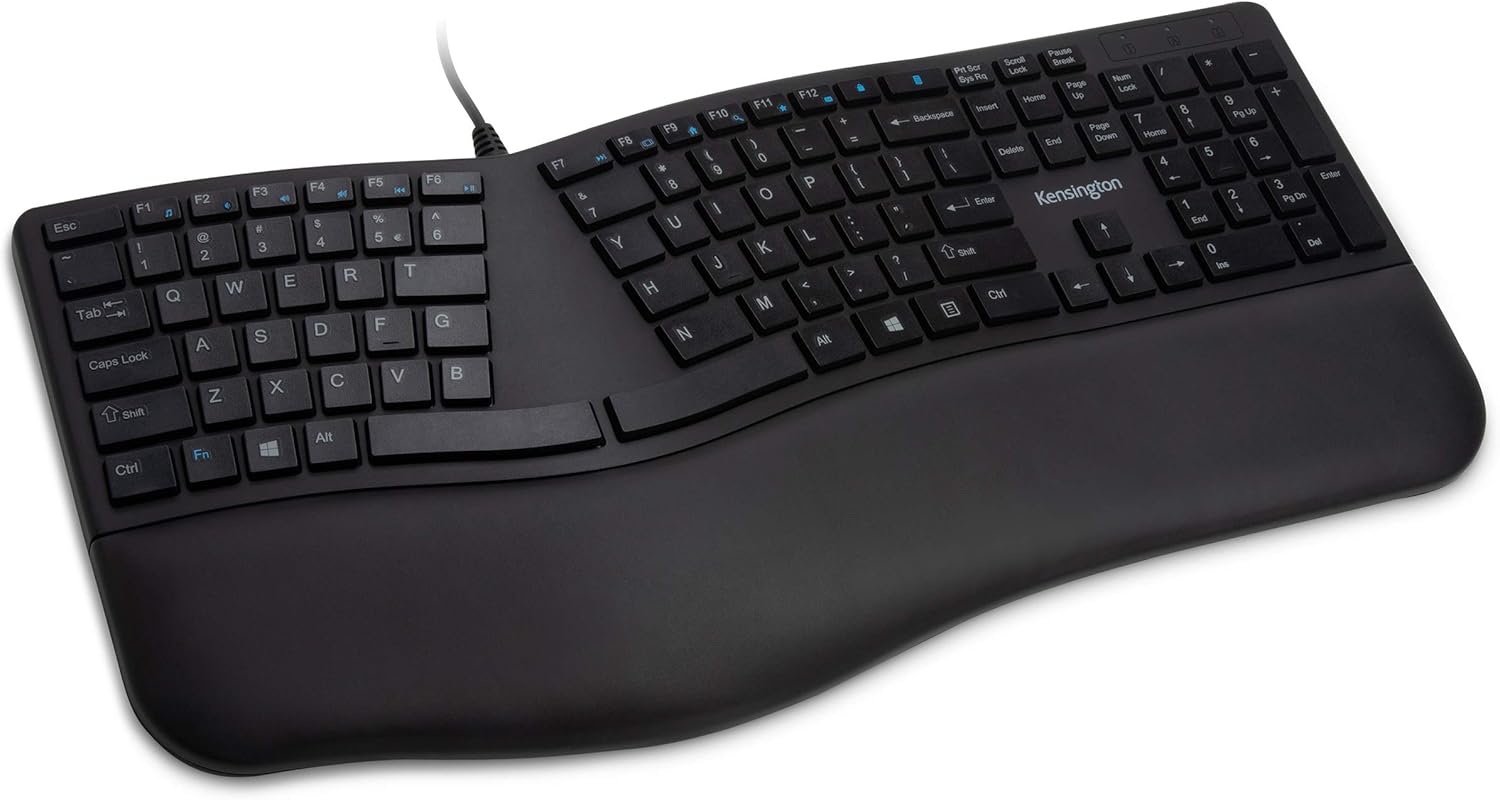
The Kensington Pro Fit Ergonomic Wired keyboard is the best budget wired ergonomic pick, offering a curved layout and cushioned palm rest for comfortable typing at around $40. It’s a simple, affordable way to reduce wrist strain at a desk.
It’s a one-piece curved design rather than a true split and has a basic membrane feel, but for cheap, reliable ergonomic comfort, it’s a solid choice.
Best for: Budget desks wanting simple ergonomic comfort
May not fit: Those wanting a split or wireless board
7. Kinesis Freestyle2 Blue Wireless – Best Wireless Split

- ✓ True split with wireless freedom
- ✓ Adjustable separation width
- ✓ Specialist ergonomic brand
- ✗ Lower average rating
- ✗ Premium price
The Kinesis Freestyle2 Blue Wireless is the best wireless split ergonomic keyboard, combining the Freestyle2’s adjustable split design with Bluetooth wireless for a clean, cable-free ergonomic setup for around $118. It’s ideal for those who want true split ergonomics without wires.
Its average rating is a little lower and it carries a premium price, but for an adjustable wireless split from a specialist brand, it’s the pick.
Best for: Users wanting a true adjustable split without cables
May not fit: Budget buyers or those fine with a fixed layout
How to Choose an Ergonomic Keyboard
Split vs contoured vs wave
A true split board like the Kinesis Freestyle2 separates into two halves for the most natural shoulder-width posture, a contoured one-piece eases wrist angle without splitting, and a wave design is an easy middle ground. Splits offer the most benefit but take the most adjustment.
Adjustability and tenting
The best ergonomic boards let you adjust the separation and angle (tenting) of the halves, as the Kinesis Freestyle2 does. Tenting raises the inner edges to reduce forearm rotation — look for adjustability if you want to fine-tune your posture, though tenting kits are sometimes sold separately.
Wired vs wireless
Wired ergonomic boards like the Kensington Pro Fit are cheaper and never need charging, while wireless models like the Kinesis Freestyle2 Blue and contoured wireless picks keep your desk tidy. Choose based on your desk setup and whether you value a clean, cable-free look.
Palm rests and comfort
Many ergonomic keyboards include integrated palm or wrist rests, like the Arteck split and Kensington Pro Fit, which support your hands and complete the ergonomic benefit. A good palm rest makes a big difference during long typing sessions.
Transition time
Ergonomic keyboards, especially true splits, take time to get used to — expect a few days to a couple of weeks of slower typing. A contoured or wave board like our contoured picks is an easier transition, while a full split offers more benefit once you adapt.
Frequently Asked Questions
What is the best ergonomic keyboard in 2027?
The Kinesis Freestyle2 is our overall pick — a true split keyboard with adjustable separation for a natural posture, backed by over 1,400 ratings. For value, the Arteck Split Ergonomic is excellent at around $55, and the Kinesis Freestyle2 Blue is the best wireless split.
Do ergonomic keyboards actually help?
Yes — by letting your hands rest in a more natural position, ergonomic keyboards can reduce wrist and shoulder strain, which helps during long work days and for those prone to RSI. True split boards like the Kinesis Freestyle2 offer the most benefit once you adjust to them.
What is the difference between a split and contoured keyboard?
A split keyboard like the Kinesis Freestyle2 separates into two halves you can position at shoulder width, offering the most natural posture, while a contoured or wave board eases wrist angle in one piece. Splits offer more benefit but take more adjustment.
Are ergonomic keyboards hard to get used to?
They take some adjustment — expect a few days to a couple of weeks of slower typing, especially with a true split. Contoured and wave designs like our contoured picks are an easier transition, while a full split rewards patience with the most comfort.
Should I get a wired or wireless ergonomic keyboard?
Wired boards like the Kensington Pro Fit are cheaper and never need charging, while wireless models like the Kinesis Freestyle2 Blue keep your desk tidy and cable-free. Choose based on your setup — both can offer the same ergonomic benefits.
Final Verdict
For an ergonomic keyboard in 2027, the Kinesis Freestyle2 is the best overall with its adjustable true-split design, while the Arteck Split is the best value and the Kinesis Freestyle2 Blue is the best wireless split. For an easier transition, the contoured and wave picks are great. See our best keyboards and wireless keyboard guides for more options.
No reviews yet. Be the first to share your experience!