

Budget RAM lets you add memory affordably without overspending, whether you are building a value PC or upgrading an older system. The best budget kit depends on your memory type (DDR4, DDR5, or older DDR3), capacity, and form factor.
Below we rank six of the best budget RAM kits, led by the ADATA Premier. Match your memory to your motherboard, and see our DDR4 and general RAM guides for more.
Top 3 Best Budget RAM Kits at a Glance
Best Budget RAM in 2027
| Model | Key Spec | Best For | Rating |
|---|---|---|---|
| ADATA Premier 8GB DDR4 | 8GB (1x8GB) DDR4 | Best Entry | ★ 4.8 |
| Corsair Vengeance LPX 16GB DDR4 | 16GB (2x8GB) DDR4 | Best Overall Value | ★ 4.8 |
| G.SKILL Ripjaws V 16GB DDR4 | 16GB (2x8GB) DDR4 | Best G.SKILL Value | ★ 4.7 |
| Corsair Vengeance LPX 16GB DDR4-3000 | 16GB (2x8GB) DDR4 | Best Reliable Budget | ★ 4.8 |
| Timetec 16GB DDR3-1600 | 16GB (2x8GB) DDR3 | Best for Older PCs | ★ 4.7 |
| Timetec 16GB DDR4 Laptop Memory | 16GB DDR4 SODIMM | Best Budget Laptop | ★ 4.8 |
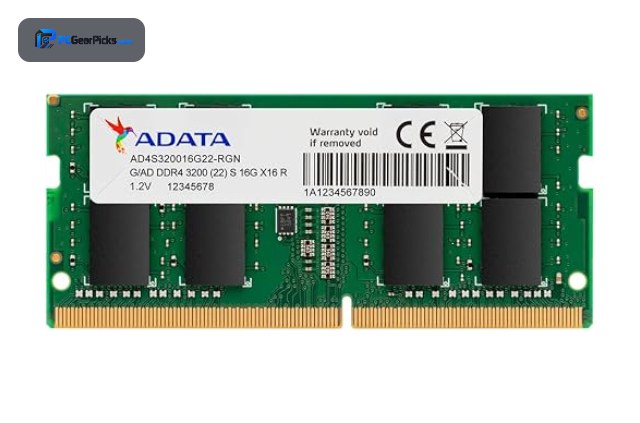
1. ADATA Premier 8GB DDR4 — Best Entry

8GB (1x8GB) DDR4 • 3200MHz, CL22 • Single module
- ✓ Very affordable entry memory
- ✓ Easy single-module upgrade
- ✓ Excellent 4.8-star rating
- ✗ Only 8GB alone
- ✗ Single-channel by itself
The ADATA Premier 8GB DDR4-3200 is the best entry budget RAM, an affordable single module ideal for a basic build or a quick capacity top-up. Its strong rating makes it a reliable, wallet-friendly way to add memory to a DDR4 system.
It is a single 8GB stick that runs single-channel alone and suits light use, but for the most affordable entry or upgrade, it is a smart pick.
Best for: Basic builds or simple memory top-ups
May not fit: Gaming or multitasking needing 16GB+
2. Corsair Vengeance LPX 16GB DDR4 — Best Overall Value

16GB (2x8GB) DDR4 • 3200MHz • Low-profile
- ✓ Legendary reliability on a budget
- ✓ Low-profile fits any cooler
- ✓ Over 60,000 reviews
- ✗ DDR4 platform only
- ✗ No RGB
The Corsair Vengeance LPX 16GB DDR4-3200 is the best overall value RAM, a proven low-profile kit with an enormous review base that delivers dependable 16GB performance affordably. For a DDR4 build on a budget, it is the go-to choice.
It is DDR4 only and has no RGB, but for reliable, widely compatible memory at a great price, it is unbeatable value.
Best for: Budget DDR4 gaming and everyday builds
May not fit: New DDR5 builds or RGB fans
3. G.SKILL Ripjaws V 16GB DDR4 — Best G.SKILL Value

16GB (2x8GB) DDR4 • XMP support • Low-profile
- ✓ Affordable and reliable
- ✓ Low-profile heatspreader
- ✓ Strong 4.7-star rating
- ✗ No RGB
- ✗ 16GB capacity
The G.SKILL Ripjaws V 16GB DDR4 is a top budget alternative, a dependable low-profile kit with easy XMP tuning at an accessible level. It is a no-nonsense, affordable choice for a DDR4 gaming or everyday build.
It skips RGB and sticks to 16GB, but for reliable budget DDR4 memory, it is an excellent value pick.
Best for: Value DDR4 builds wanting a trusted brand
May not fit: Those wanting RGB or more capacity
4. Corsair Vengeance LPX 16GB DDR4-3000 — Best Reliable Budget

16GB (2x8GB) DDR4 • 3000MHz • Low-profile
- ✓ Proven low-profile reliability
- ✓ Great budget pairing
- ✓ Excellent 4.8-star rating
- ✗ Slightly slower 3000MHz
- ✗ No RGB
The Corsair Vengeance LPX 16GB DDR4-3000 is a reliable budget pick, offering the same proven low-profile design as the 3200MHz kit at a slightly lower speed. It is a dependable, affordable 16GB option for DDR4 systems.
Its 3000MHz speed is marginally lower and there is no RGB, but for dependable budget memory from a trusted brand, it is a solid choice.
Best for: Budget builds wanting proven reliability
May not fit: Those chasing the highest speed
5. Timetec 16GB DDR3-1600 — Best for Older PCs

16GB (2x8GB) DDR3 • 1600MHz • For DDR3 systems
- ✓ Affordable upgrade for older PCs
- ✓ Doubles capacity to 16GB
- ✓ Strong 4.7-star rating
- ✗ DDR3, for older systems only
- ✗ Not for modern boards
The Timetec 16GB DDR3-1600 is the best budget RAM for older PCs, an affordable way to upgrade an aging DDR3 system to a comfortable 16GB for smoother everyday use. It breathes new life into older desktops at low cost.
It uses DDR3 and only fits older systems, not modern boards, but for upgrading an aging PC affordably, it is a smart value pick.
Best for: Owners of older DDR3 desktops
May not fit: Modern DDR4 or DDR5 builds
6. Timetec 16GB DDR4 Laptop Memory — Best Budget Laptop

16GB DDR4 SODIMM • 2400MHz • Laptop form factor
- ✓ Affordable laptop upgrade
- ✓ Boosts notebook multitasking
- ✓ Excellent 4.8-star rating
- ✗ SODIMM, not for desktops
- ✗ 2400MHz speed
The Timetec 16GB DDR4 SODIMM is the best budget laptop RAM, an affordable upgrade that boosts a notebook’s memory for smoother multitasking. It is a straightforward, low-cost way to improve an older DDR4 laptop.
It is a laptop SODIMM that will not fit desktops and runs at 2400MHz, but for an affordable laptop memory boost, it is a strong value pick.
Best for: Laptop owners upgrading affordably
May not fit: Desktop builds needing DIMMs
How to Choose Budget RAM
Match the memory type to your system
Your motherboard decides the type: DDR4 for AM4 and many Intel boards, DDR5 for newer platforms, and DDR3 for older systems. Budget kits are widely available in DDR4 and DDR3, so confirm your board before buying, since the types are not interchangeable.
Capacity on a budget
16GB is the comfortable target for budget gaming and everyday use, while 8GB suits very basic tasks or a quick top-up. Buying a 16GB kit like the Vengeance LPX gives the best balance of cost and smooth performance for most budget builds.
Speed versus savings
Faster memory costs a little more, but on a budget a standard speed like DDR4-3200 or 3000 delivers excellent everyday performance. Prioritise getting enough capacity at a reliable speed over chasing the fastest kit, which offers diminishing returns for budget builds.
Desktop DIMM or laptop SODIMM
Desktops use full-size DIMMs while laptops use smaller SODIMMs like the Timetec laptop kit. Buy the correct form factor for your system, and for laptops, check the maximum supported capacity and speed before upgrading.
Upgrading older systems
For an older DDR3 PC, an affordable kit like the Timetec DDR3 can double capacity to 16GB for much smoother everyday use. It is one of the most cost-effective ways to extend the life of an aging desktop without a full rebuild.
Frequently Asked Questions
What is the best budget RAM in 2027?
Our overall value pick is the Corsair Vengeance LPX 16GB DDR4, a proven, reliable kit at a budget-friendly level. For the cheapest entry, the ADATA Premier 8GB is excellent, and the Timetec DDR3 is best for upgrading older PCs.
How much RAM do I need on a budget?
16GB is the comfortable target for budget gaming and everyday use, giving smooth performance without overspending. 8GB works for very basic tasks or a quick top-up, but 16GB is the better value for most budget builds in 2027.
Is budget RAM reliable?
Yes — budget kits from trusted brands like Corsair, G.SKILL, ADATA, and Crucial are reliable and well reviewed. The main trade-offs versus premium kits are speed and RGB, not reliability, so a budget kit is a safe choice for everyday builds.
Can I upgrade an old PC with budget RAM?
Yes — for an older DDR3 system, an affordable kit like the Timetec DDR3 can double capacity to 16GB for smoother everyday use. Just confirm your system uses DDR3 and supports the capacity, since older boards have limits.
Does budget RAM work for gaming?
Yes — a 16GB budget kit at a standard speed like DDR4-3200 handles gaming well, since capacity and dual-channel matter more than chasing the fastest speed on a budget. Pair it with a good graphics card for smooth gaming performance.
Final Verdict
For budget RAM in 2027, the Corsair Vengeance LPX 16GB is the best overall value, while the ADATA Premier is the cheapest entry and the Timetec DDR3 is ideal for older PCs. For laptops, the Timetec SODIMM is the affordable upgrade. See our best RAM and DDR4 RAM guides for more.


No reviews yet. Be the first to share your experience!