

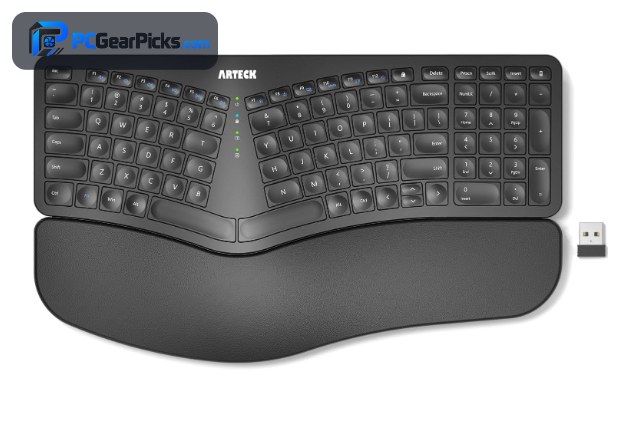
Typing for hours on a flat keyboard can strain your wrists and shoulders, but fixing that does not have to be expensive. A good budget ergonomic keyboard uses a split or curved layout and a palm rest to keep your hands in a more natural position, easing tension during long work sessions without the premium price tag.
Our team compared the most popular affordable ergonomic keyboards on comfort, layout, wireless options, build quality and value, then narrowed the field to the six best budget picks below. For more gear, browse our full range of PC peripherals guides.

- True split ergonomic layout
- 2.4GHz wireless connection
- Integrated palm rest
- Full-size with numpad

- Curved ergonomic design
- 2.4GHz + Bluetooth dual-mode
- Rechargeable battery
- Budget price under $40

- Wave-shaped comfort layout
- Wireless + Bluetooth multi-device
- Cushioned palm rest
- Compact full-size build
Best Budget Ergonomic Keyboards in 2026
| # | Product | Key Features | Price |
|---|---|---|---|
| 1 | Arteck Split Ergonomic Keyboard |
| CHECK LATEST PRICE |
| 2 | TECKNET Wireless Ergonomic Keyboard |
| CHECK LATEST PRICE |
| 3 | Logitech Wave Keys Ergonomic Keyboard |
| CHECK LATEST PRICE |
| 4 |  Perixx PERIBOARD-512B Ergonomic Keyboard Perixx PERIBOARD-512B Ergonomic Keyboard |
| CHECK LATEST PRICE |
| 5 |  Wired Ergonomic Split Keyboard with RGB Wired Ergonomic Split Keyboard with RGB |
| CHECK LATEST PRICE |
| 6 |  Logitech Ergo K860 Ergonomic Keyboard Logitech Ergo K860 Ergonomic Keyboard |
| CHECK LATEST PRICE |
1. Arteck Split Ergonomic Keyboard – Best Overall
- True split ergonomic layout
- 2.4GHz wireless connection
- Integrated palm rest
- Full-size with numpad
As an Amazon Associate we earn from qualifying purchases, at no additional cost to you.
- ✓True split layout eases wrist and shoulder strain
- ✓Wireless 2.4GHz keeps the desk tidy
- ✓Built-in palm rest for all-day comfort
- ✓Full-size with a numpad
- ✓Backed by 1,700+ reviews
- ✗Split layout has a short learning curve
- ✗Membrane keys, not mechanical
The Arteck Split Ergonomic is our top overall budget pick because it delivers a genuine split ergonomic layout, wireless freedom and a built-in palm rest for well under $60. That combination normally costs far more, which makes it the best all-round value for comfort-focused typists.
The split, slightly angled design turns your hands outward to reduce the twisting that causes wrist and forearm fatigue. The integrated palm rest supports your wrists so they are not bent back during long sessions, and the full-size layout keeps a numpad for spreadsheets and data entry.
A 2.4GHz wireless connection keeps the desk clean and the board works plug-and-play with its USB receiver. With more than 1,700 reviews at a solid rating, it is a proven, low-risk way to switch to ergonomic typing.
For whom this is best
Office workers and writers who want the comfort of a true split ergonomic keyboard — wireless, with a palm rest and numpad — without spending over $60. Ideal for anyone easing wrist strain on a budget.
For whom this may not fit
If you want mechanical switches or a compact layout, this membrane full-size board is not the one. Gamers who need fast actuation should look at a mechanical option instead.
2. TECKNET Wireless Ergonomic Keyboard – Best Value
- Curved ergonomic design
- 2.4GHz + Bluetooth dual-mode
- Rechargeable battery
- Budget price under $40
As an Amazon Associate we earn from qualifying purchases, at no additional cost to you.
- ✓Under $40 for a wireless ergonomic board
- ✓Dual-mode 2.4GHz + Bluetooth
- ✓Rechargeable built-in battery
- ✓Curved layout eases wrist angle
- ✓1,500+ reviews
- ✗Curved, not a full split layout
- ✗Keycap feel is average
At under $40, the TECKNET Wireless Ergonomic is the best-value way to make the switch to a more comfortable keyboard. It pairs a curved ergonomic layout with dual-mode wireless, which is rare at this price.
The gently curved key layout and sloped design encourage a more natural hand position than a flat board, reducing wrist strain without the steeper learning curve of a fully split keyboard. A built-in rechargeable battery means no disposable AAAs to replace.
Dual-mode connectivity lets you switch between a 2.4GHz dongle and Bluetooth, so you can move between a desktop and a laptop or tablet. With more than 1,500 reviews, it is a dependable budget entry point to ergonomic typing.
For whom this is best
Budget shoppers who want a more comfortable, wireless keyboard for under $40 and prefer a gentle curve over a full split. Great for students and home offices.
For whom this may not fit
Typists who want maximum ergonomic correction will prefer a true split board, and anyone who dislikes membrane keys should consider a mechanical ergonomic option.
3. Logitech Wave Keys Ergonomic Keyboard – Most Versatile
- Wave-shaped comfort layout
- Wireless + Bluetooth multi-device
- Cushioned palm rest
- Compact full-size build
As an Amazon Associate we earn from qualifying purchases, at no additional cost to you.
- ✓Wave layout eases finger reach
- ✓Wireless + Bluetooth multi-device
- ✓Cushioned palm rest
- ✓Compact full-size footprint
- ✓Trusted Logitech build and software
- ✗Not a full split design
- ✗Sits at the top of the budget range
The Logitech Wave Keys is the most versatile pick thanks to its multi-device wireless and a distinctive wave-shaped key layout that supports a natural finger posture. It is a comfortable upgrade that still fits a normal desk.
Instead of a dramatic split, the keys rise and fall in a gentle wave that matches the natural length of your fingers, which many users find easier to adapt to than a split board. The plush, cushioned palm rest keeps your wrists supported throughout the day.
Wireless and Bluetooth connectivity let it pair with multiple devices and switch between them instantly, and Logitech’s build quality and software add polish. It sits at the higher end of the budget range but earns it with comfort and flexibility.
For whom this is best
Users who want ergonomic comfort and multi-device flexibility from a trusted brand, without committing to a full split layout. Great for hybrid desk-and-laptop setups.
For whom this may not fit
If you want the maximum wrist relief of a true split, or the lowest possible price, other picks will suit you better.
4. Perixx PERIBOARD-512B Ergonomic Keyboard – Best for Typists
- Split ergonomic key layout
- Wired plug-and-play
- Palm rest included
- 9,600+ reviews at 4.4 stars
As an Amazon Associate we earn from qualifying purchases, at no additional cost to you.
- ✓Split ergonomic layout for natural typing
- ✓Huge 9,600+ reviews at 4.4 stars
- ✓Integrated palm rest
- ✓Simple wired plug-and-play
- ✓Durable, proven design
- ✗Wired only
- ✗Bulky full-size footprint
The Perixx PERIBOARD-512B is our pick for heavy typists, backed by more than 9,600 reviews — one of the most proven ergonomic keyboards at any price. Its split, sloped layout is built for people who spend all day at the keyboard.
The fixed split places your hands shoulder-width apart with a natural outward angle, and a large integrated palm rest keeps your wrists supported. It is a wired plug-and-play board, so there is no pairing, charging or latency to think about.
While it is wired and fairly large, that simplicity and reliability are exactly what many long-session typists want. Its enormous, consistently positive review history makes it one of the safest ergonomic buys on this list.
For whom this is best
Writers, coders and data-entry workers who type all day and want a proven, no-fuss wired split keyboard with a palm rest. Reliability-focused buyers will love the track record.
For whom this may not fit
If you need a wireless or compact board, look elsewhere. The large wired design is less suited to minimal or mobile setups.
5. Wired Ergonomic Split Keyboard with RGB – Best for RGB Lovers
- Split ergonomic layout
- RGB backlight
- Dedicated numpad
- Wired USB connection
As an Amazon Associate we earn from qualifying purchases, at no additional cost to you.
- ✓Split ergonomic layout
- ✓RGB backlight
- ✓Dedicated numpad
- ✓Affordable under $40
- ✓High 4.5-star rating
- ✗Small review base so far
- ✗Wired only
If you want ergonomic comfort with some flair, this wired split keyboard adds RGB backlighting to a proper split layout for under $40. It is a rare mix of ergonomics and gaming-style lighting at a budget price.
The split design keeps your hands at a natural angle to reduce strain, while the RGB backlight makes it usable in low light and adds personality to your setup. A dedicated numpad keeps it practical for work as well as play.
It is a newer listing with a smaller review count, but early feedback is strongly positive at 4.5 stars. For users who want a lit, ergonomic board without spending much, it is an appealing option.
For whom this is best
Budget users who want an ergonomic split layout with RGB lighting and a numpad, especially those who like a bit of style or type in low light.
For whom this may not fit
Shoppers who want a long review history or wireless connectivity should choose a more established pick — this one is wired only.
6. Logitech Ergo K860 Ergonomic Keyboard – Best Premium Upgrade
- Curved split keyframe
- Wireless + Bluetooth multi-device
- Pillowed wrist rest
- Adjustable tilt legs
As an Amazon Associate we earn from qualifying purchases, at no additional cost to you.
- ✓Premium curved split keyframe
- ✓Wireless + Bluetooth multi-device
- ✓Pillowed, high-quality wrist rest
- ✓Adjustable negative tilt
- ✓Logitech reliability and software
- ✗Most expensive on this list
- ✗Large footprint
The Logitech Ergo K860 is the premium upgrade for anyone ready to invest more in comfort. It is pricier than the rest, but its curved split keyframe and pillowed wrist rest represent the gold standard for mainstream ergonomic keyboards.
The split, curved layout and adjustable tilt (including a negative tilt) let you fine-tune the angle to keep wrists and forearms relaxed. The generous, high-density wrist rest is noticeably more supportive than the budget boards above.
Multi-device wireless and Bluetooth, plus Logitech’s Options+ software for customization, round out a polished package. If your budget stretches and comfort is the priority, the K860 is the long-term pick.
For whom this is best
Professionals with wrist concerns who can spend more for the best mainstream ergonomic comfort, customization and build quality. A long-term investment for all-day typists.
For whom this may not fit
If you are on a tight budget, this sits well above the others in price, and minimal-desk users may find it large.
What to Consider When Buying a Budget Ergonomic Keyboard
An ergonomic keyboard is all about reducing strain, so comfort features matter more than flashy extras. Here are the factors our team weighed most when choosing budget picks.
Split vs Curved Layout
A true split layout (like the Arteck or Perixx) separates the two halves so your hands sit shoulder-width apart at a natural angle, offering the most strain relief. A curved or wave layout (TECKNET, Logitech Wave Keys) is a gentler change that is easier to adapt to. Choose a split for maximum correction, or a curve for an easier transition.
Palm and Wrist Rest
A supportive palm or wrist rest keeps your wrists from bending back, which is where much ergonomic benefit comes from. Every pick here includes one, with the Logitech Ergo K860 offering the plushest support. Look for a cushioned, non-slip rest if you type for hours.
Wired vs Wireless
Wireless boards (Arteck, TECKNET, Wave Keys, K860) keep your desk tidy and let you position the keyboard freely, which itself aids ergonomics. Wired boards (Perixx) are plug-and-play with no charging. If you value a clean desk and flexible placement, go wireless.
Size, Numpad and Build
Decide whether you need a numpad for data entry — full-size ergonomic boards keep it, while compact models save desk space. Also check build quality and keycap feel; most budget ergonomic boards use membrane switches, which are quiet and comfortable for typing.
If you are building out the rest of your setup, our guides on the best budget wireless keyboards and best budget mechanical keyboards cover more options.
Frequently Asked Questions
What is the best budget ergonomic keyboard?
For most people the Arteck Split Ergonomic Keyboard is the best budget pick, combining a true split layout, wireless connectivity and a palm rest for under $60. If you want to spend less, the TECKNET Wireless Ergonomic delivers a curved, comfortable layout for under $40.
Do ergonomic keyboards actually help?
Yes. By splitting or curving the keys and supporting your wrists, ergonomic keyboards reduce the forearm twisting and wrist extension that cause strain during long typing sessions. Most people feel the difference within a week or two of adjusting.
Is a split or curved ergonomic keyboard better?
A split layout offers the most strain relief because it lets your hands sit at a natural, shoulder-width angle, but it has a short learning curve. A curved or wave layout is a gentler, easier change. Beginners often start with a curve like the Logitech Wave Keys.
Are wireless ergonomic keyboards reliable?
Modern wireless ergonomic keyboards are very reliable. A 2.4GHz dongle is stable and lag-free for typing, and Bluetooth adds multi-device flexibility. Boards like the Arteck and TECKNET prove you can get dependable wireless on a budget.
Which Budget Ergonomic Keyboard Should You Buy?
After comparing the field, the Arteck Split Ergonomic Keyboard is the best overall budget pick for 2026, with a true split layout, wireless connectivity and a palm rest under $60. For the tightest budgets, the TECKNET Wireless Ergonomic is excellent value under $40, while the Logitech Wave Keys is the most versatile multi-device option and the Logitech Ergo K860 is the premium upgrade.
Whichever you choose, prioritise the layout and wrist support that feel best for your hands — that is what reduces strain day to day. For more, see our guides to the best budget custom keyboards and the best budget gaming keyboards.
Any of the six keyboards above is a smart budget ergonomic choice — match the layout, connectivity and wrist support to how you work, and your hands will thank you.
No reviews yet. Be the first to share your experience!