

Building or buying a budget custom keyboard used to mean compromise, but in 2026 you can get hot-swappable switches, gasket-mounted builds and wireless connectivity for well under $100. These boards let you swap switches, tune the sound and feel, and personalize your setup without the custom-group-buy price tag.
Our team compared dozens of affordable custom and mechanical keyboards on build quality, switch and keycap quality, hot-swap support, connectivity and value, then narrowed the field to the six best budget picks below. For more gear, browse our full range of PC peripherals guides.

- 75% hot-swappable layout
- Tri-mode wireless (BT/2.4GHz/wired)
- Gasket-mounted custom build
- South-facing RGB backlight

- Ultra-compact 60% layout
- Hot-swappable sockets
- Per-key RGB backlight
- Wired USB-C

- 96% layout keeps a numpad
- Tri-mode BT5.0 / 2.4GHz / USB-C
- Hot-swap + gasket mount
- Volume control knob
Best Budget Custom Keyboards in 2026
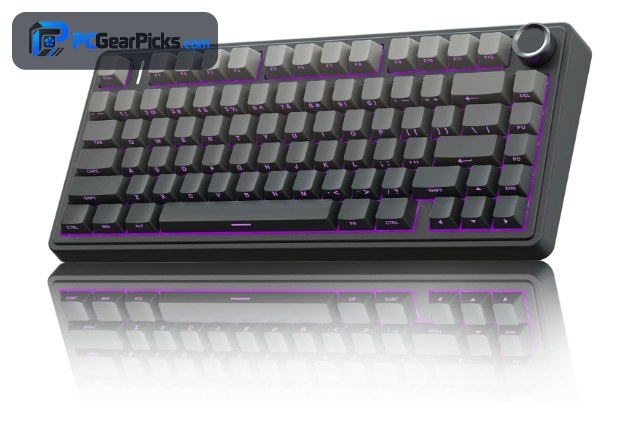
1. AULA F75 Pro 75% Wireless Mechanical Keyboard – Best Overall
- 75% hot-swappable layout
- Tri-mode wireless (BT/2.4GHz/wired)
- Gasket-mounted custom build
- South-facing RGB backlight
As an Amazon Associate we earn from qualifying purchases, at no additional cost to you.
- ✓Hot-swappable switches for easy customization
- ✓Tri-mode wireless (BT, 2.4GHz, wired)
- ✓Gasket mount gives a soft, premium feel
- ✓Compact 75% layout saves desk space
- ✓4.6 stars from 1,800+ buyers
- ✗75% layout drops the dedicated numpad
- ✗Companion software is fairly basic
The AULA F75 Pro earns our top spot by packing genuine custom-keyboard features into a sub-$70 wireless package. You get a gasket-mounted 75% layout, hot-swappable sockets and tri-mode connectivity, which is a remarkable amount of hardware for the money.
Hot-swap sockets let you drop in your favourite linear, tactile or clicky switches without soldering, so the board grows with you as your tastes change. The gasket mount delivers a softer, more cushioned typing feel than cheap tray-mounted boards, and the pre-installed foam keeps the sound deep rather than hollow.
The 75% layout keeps the arrow keys and a function row while trimming the numpad, striking a smart balance between compactness and usability. Tri-mode connectivity (Bluetooth, 2.4GHz and wired) pairs it with a laptop, desktop and tablet, and the 4.6-star average from more than 1,800 buyers backs up its reliability.
For whom this is best
Anyone who wants a true entry point into custom keyboards — hot-swap switches, a gasket build and wireless freedom — without spending over $70. It is ideal for typists and gamers who like to tinker with switches and keycaps over time.
For whom this may not fit
If you rely on a dedicated number pad for data entry or accounting, the 75% layout will feel limiting. Power users who want deep per-key software and macros may also find the companion app basic.
2. Redragon K617 60% Hot-Swap Mechanical Keyboard – Best Value
- Ultra-compact 60% layout
- Hot-swappable sockets
- Per-key RGB backlight
- Wired USB-C
As an Amazon Associate we earn from qualifying purchases, at no additional cost to you.
- ✓Hot-swap sockets rare under $30
- ✓Excellent 4.6-star rating from 5,800+ reviews
- ✓Ultra-compact 60% frees mouse space
- ✓Per-key RGB backlight included
- ✓Sturdy build for the price
- ✗Wired only (no wireless)
- ✗60% layout hides arrows and F-keys on a layer
At under $30, the Redragon K617 is the easiest way to try a hot-swappable mechanical keyboard, which is why it is our best-value pick. Very few boards at this price let you change switches at all, let alone through a tool-free hot-swap socket.
The ultra-compact 60% layout removes the function row, numpad and arrow cluster to free up a huge amount of desk space for low-sensitivity gaming or a minimalist setup. Those keys move to a function layer, which takes a short adjustment period but quickly becomes second nature.
Per-key RGB lighting, a surprisingly sturdy build and a 4.6-star average across more than 5,800 reviews make this a remarkably safe budget buy. It is wired over USB-C, which helps keep both the price and the latency low — a sensible trade-off for a value board.
For whom this is best
Budget builders, students and gamers who want to experience a hot-swappable mechanical keyboard for the lowest possible price. The compact 60% size is perfect for small desks and low-sensitivity gaming.
For whom this may not fit
If you frequently use arrow keys, function keys or a numpad without wanting to learn a function layer, a larger layout will suit you better. Anyone who needs wireless should also look at other picks.
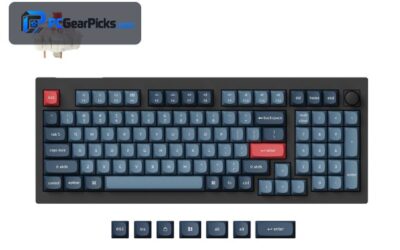
3. AULA F99 Tri-Mode Wireless Mechanical Keyboard – Most Versatile
- 96% layout keeps a numpad
- Tri-mode BT5.0 / 2.4GHz / USB-C
- Hot-swap + gasket mount
- Volume control knob
As an Amazon Associate we earn from qualifying purchases, at no additional cost to you.
- ✓96% layout keeps a full numpad
- ✓Tri-mode wireless for three devices
- ✓Hot-swap + gasket-mounted build
- ✓Handy volume/control knob
- ✓4.5 stars from 3,100+ reviews
- ✗Heavier than 60/75% boards
- ✗Stock keycaps are only average
The AULA F99 is the most versatile board here because it keeps a full number pad in a compact 96% body. You get the data-entry convenience of a full-size keyboard with a footprint much closer to a TKL.
Tri-mode connectivity (Bluetooth 5.0, 2.4GHz and USB-C) lets you switch between three devices instantly, and the hot-swap, gasket-mounted build matches the custom feel of pricier boards. A dedicated control knob handles volume and media without stealing keys.
With a 4.5-star average from more than 3,100 reviews, the F99 is a proven all-rounder for work and play. The stock keycaps are only average, but since the switches are hot-swappable and keycaps are easy to replace, it makes an excellent base to customize.
For whom this is best
Users who want one keyboard that does everything — numpad included — across multiple devices. It suits hybrid work-and-gaming setups and anyone who values a knob and wireless flexibility.
For whom this may not fit
If desk space is extremely tight or you want the lightest possible board, a 60% or 75% model is more portable. Keycap enthusiasts may also want to budget for an aftermarket set.
4. Redragon K771 Wireless Mechanical Keyboard – Best for Gaming

- Full-size 108-key layout
- 2.4GHz + Bluetooth + wired
- Hot-swappable switches
- Long battery life + RGB
As an Amazon Associate we earn from qualifying purchases, at no additional cost to you.
- ✓Full-size 108-key with numpad
- ✓Triple connectivity (2.4GHz/BT/wired)
- ✓Hot-swappable switches
- ✓Backed by 11,000+ reviews
- ✓Affordable mid-range price
- ✗Larger full-size footprint
- ✗4.4 rating slightly below top picks
The Redragon K771 is our pick for gamers who want a full-size wireless mechanical keyboard without paying a premium. It keeps every key — numpad, function row and arrows — so you never hunt for a layer mid-game.
Triple connectivity means a low-latency 2.4GHz dongle for gaming plus Bluetooth for other devices and a wired fallback. Hot-swappable sockets let you tune the switch feel, and the long battery life keeps RGB-lit sessions going.
With more than 11,000 reviews and a 4.4-star average, the K771 is one of the most proven budget boards available. The full-size footprint takes more desk space, but for gamers who use the numpad and macros, that is a worthwhile trade.
For whom this is best
Gamers and everyday users who want a full-size wireless mechanical keyboard with hot-swap support at a mid-range price. The huge review base makes it a low-risk buy.
For whom this may not fit
Players who run low-sensitivity setups and want maximum mouse room will prefer a TKL or 60% board. Those chasing the highest ratings may prefer our top two picks.
5. Womier SK80 75% Keyboard with Smart Display – Best for Customization

- 75% layout with color display
- Hot-swappable sockets
- Gasket-mounted build
- Multimedia knob + RGB
As an Amazon Associate we earn from qualifying purchases, at no additional cost to you.
- ✓Built-in color display for GIFs/stats
- ✓Hot-swap sockets + gasket mount
- ✓Compact 75% layout
- ✓Multimedia knob + vivid RGB
- ✓Premium feel for the price
- ✗Newer model with fewer reviews
- ✗Display adds a slight learning curve
The Womier SK80 stands out for customization thanks to a built-in color display that can show GIFs, system stats or custom images right on the board. Paired with hot-swap sockets and a gasket mount, it delivers a surprisingly premium, personalizable package for under $60.
The 75% layout keeps the board compact while retaining arrows and a function row, and a multimedia knob adds quick volume and scroll control. Vivid south-facing RGB shines cleanly through the keycaps.
Because the switches are hot-swappable and the keycaps are easy to swap, the SK80 is a great canvas for a personalized build. It is a newer model so review volume is still growing, but its strong spec sheet makes it a standout for tinkerers.
For whom this is best
Enthusiasts who want the most personalization for their money — a color display, hot-swap switches and a knob — in a compact 75% board. Great for creators who want a keyboard that reflects their style.
For whom this may not fit
Shoppers who want a long track record of reviews may prefer a more established model. If you never use the display or knob, a simpler board offers the same typing feel for less.
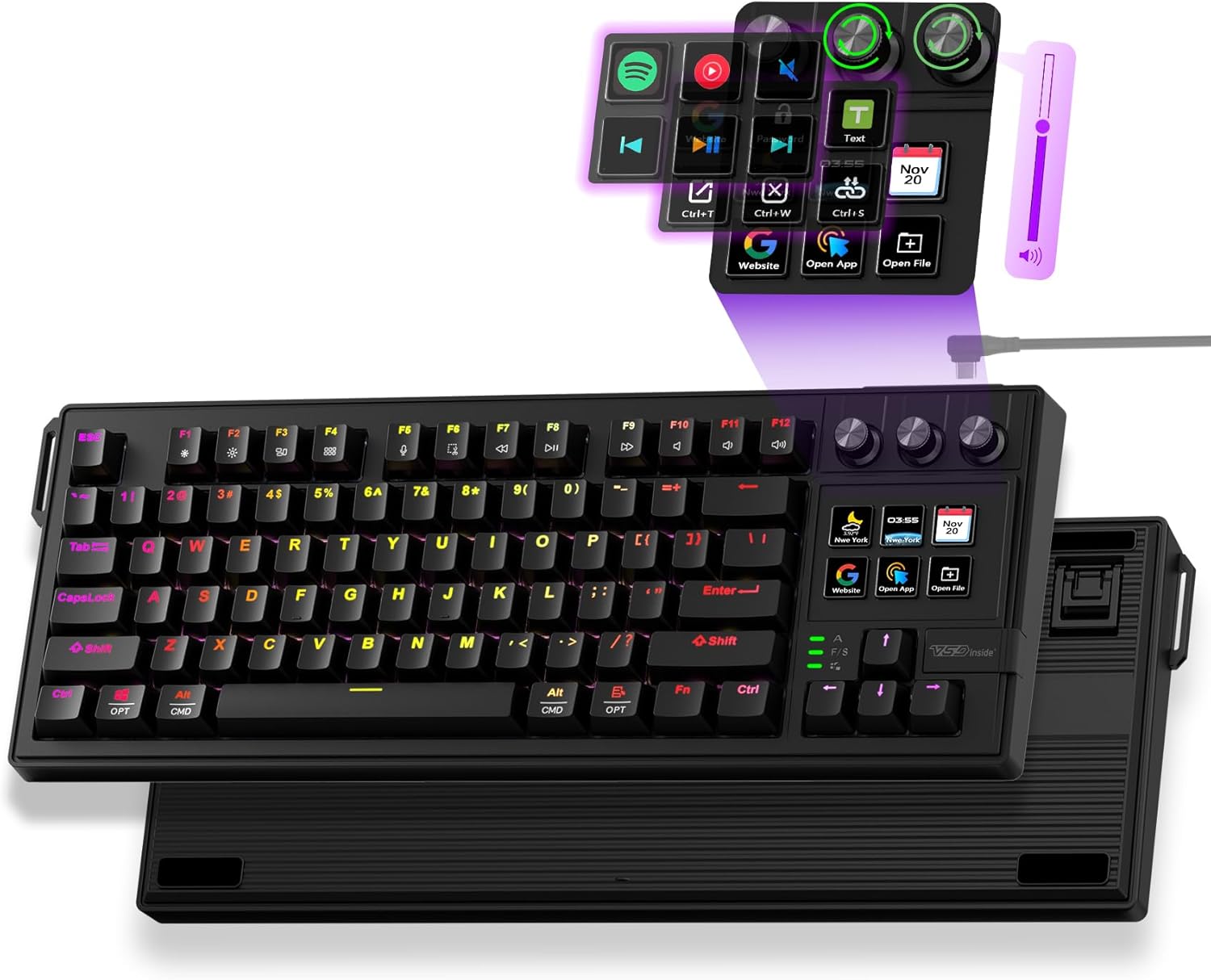
6. VSD K1 Pro 87-Key Macro Mechanical Keyboard – Best for Streaming
- TKL 87-key layout
- Integrated streaming/macro deck
- Mechanical switches
- Programmable RGB keys
As an Amazon Associate we earn from qualifying purchases, at no additional cost to you.
- ✓Integrated streaming/macro deck
- ✓TKL 87-key saves desk space
- ✓Programmable keys for OBS and apps
- ✓Mechanical switches
- ✓Customizable RGB
- ✗Lower 4.2-star rating
- ✗Smaller review base
- ✗Requires software setup
The VSD K1 Pro is built for streamers and creators, pairing a standard TKL mechanical keyboard with an integrated macro and streaming deck. Instead of buying a separate stream controller, you get programmable keys to switch scenes, mute your mic or trigger effects straight from the board.
The 87-key TKL layout keeps things compact for a busy desk, and the mechanical switches deliver a satisfying typing feel for long sessions. Customizable RGB and programmable macros make it useful beyond streaming, for shortcuts in creative apps too.
At a 4.2-star average it rates a little below our top picks, and the review base is smaller, so it is a more niche recommendation. But for creators who want keyboard-plus-stream-deck in one, the value is hard to beat under $70.
For whom this is best
Streamers and content creators who want macro and scene controls built into their keyboard, saving desk space and the cost of a separate stream deck.
For whom this may not fit
Users who do not stream or use macros are paying for features they will not touch. Those who prioritize the highest ratings and biggest review counts should consider our top picks.
What to Consider When Buying a Budget Custom Keyboard
Shopping for a budget custom keyboard is about finding the right mix of features for your desk and workflow. Hot-swap support, layout, build quality and connectivity matter more than flashy marketing. Here are the factors our team weighed most heavily.
Hot-Swappable Switches
Hot-swap sockets are the single most important feature of a custom keyboard. They let you change switches without soldering, so you can try linears, tactiles or clicky switches and fine-tune the feel over time. Every board on this list supports hot-swapping, with the AULA F75 Pro and Redragon K617 being especially beginner-friendly.
Layout and Size
Layout is personal. A 60% board like the Redragon K617 maximises desk space but moves arrows and function keys to a layer. A 75% (AULA F75 Pro, Womier SK80) keeps arrows and a function row, while a 96% (AULA F99) or full-size (Redragon K771) retains the numpad. Pick the smallest layout that still has the keys you use daily.
Build Quality and Mounting
A gasket-mounted case with sound-dampening foam gives a softer, deeper typing feel than a hollow tray-mount budget board. Several picks here, including the AULA models and the Womier SK80, use gasket mounting that rivals keyboards costing twice as much. Check stabiliser quality and foam in reviews.
Connectivity
Decide between wired and wireless. Wired boards like the Redragon K617 keep costs and latency low. Tri-mode boards (AULA F75 Pro, F99) add Bluetooth and 2.4GHz so you can switch between a laptop, desktop and tablet. For gaming, always use the 2.4GHz dongle rather than Bluetooth.
Keycaps and Customization
Budget boards usually ship with average keycaps, but because they are easy to replace, they make a great base for customization. Look for standard key spacing so aftermarket keycap sets fit. If you are also building out the rest of your setup, our guides on the best budget wireless keyboards and best budget mechanical keyboards offer more options.
Frequently Asked Questions
What is the best budget custom keyboard?
For most people, the AULA F75 Pro is the best budget custom keyboard in 2026. It combines hot-swappable switches, a gasket-mounted 75% layout and tri-mode wireless for under $70. If you want to spend as little as possible, the Redragon K617 delivers hot-swap mechanical typing for under $30.
Are hot-swappable keyboards worth it?
Yes. Hot-swap sockets let you change switches without soldering, so you can tune the typing feel, replace a failed switch, or experiment as your preferences evolve. On a budget board like the AULA F75 Pro or Redragon K617, it turns a cheap keyboard into a long-term, upgradeable one.
What keyboard size should I buy?
Choose the smallest layout that keeps the keys you use daily. A 60% (Redragon K617) is great for gaming and minimal desks, a 75% (AULA F75 Pro) balances size and usability, and a 96% or full-size (AULA F99, Redragon K771) keeps the numpad for data entry.
Can you get a good custom keyboard under $50?
Absolutely. The Redragon K617 at under $30 offers hot-swap sockets, RGB and a sturdy build, while the Redragon K771 adds wireless and a full-size layout under $50. Both prove you do not need to spend big to get genuine custom-keyboard features.
Which Budget Custom Keyboard Should You Buy?
After comparing the field, the AULA F75 Pro stands out as the best overall budget custom keyboard for 2026, thanks to its hot-swap sockets, gasket build and tri-mode wireless under $70. For the tightest budgets, the Redragon K617 delivers genuine hot-swap mechanical typing for under $30, and the AULA F99 is the most versatile pick if you want a numpad and multi-device wireless.
Whichever you choose, prioritise hot-swap support, the right layout and solid build quality over marketing buzzwords — those are what you will notice every day. If you are still exploring, check out our guide to the best custom keyboards under $150 for a step up, or the best budget gaming keyboards if gaming is your focus.
Any of the six keyboards above is a smart budget custom pick — match the layout, connectivity and switch feel to how you type and play, and you will not go wrong.
No reviews yet. Be the first to share your experience!