

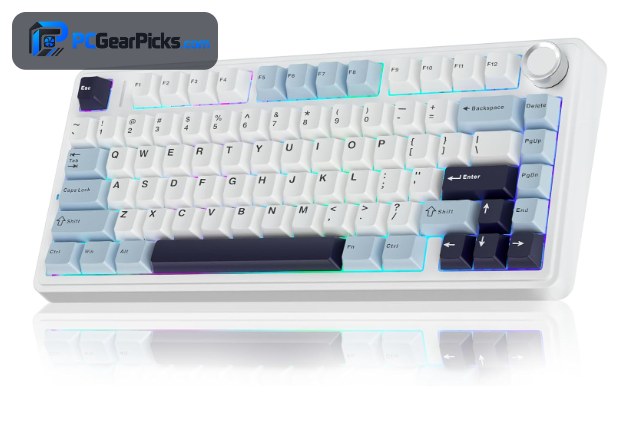
Finding the best budget wireless keyboard means getting clean, lag-free typing and a solid build without paying flagship prices. Whether you game, type all day, or just want a tidy desk free of cables, there are now excellent wireless boards for well under $150.
Our team compared dozens of wireless keyboards on connectivity, battery life, switch feel, and build quality to pick the best values for 2026. We focused on reliable tri-mode performance and real buyer feedback. If you prefer a wired build, see our guides to the best budget mechanical keyboards and best budget gaming keyboards. For more gear, browse our full range of PC peripherals guides.

- 75% hot-swappable layout
- Tri-mode wireless (BT/2.4GHz/wired)
- Gasket mount with creamy sound
- 4.6 stars from 2,600+ buyers

- 81-key compact layout
- RGB gasket build + scroll knob
- Tri-mode wireless under $50
- 4.6 stars from 1,400+ buyers

- 75% CNC metal body
- Hot-swap + RGB backlight
- Tri-mode wireless
- 4.7 stars from 1,800+ buyers
Best Budget Wireless Keyboards in 2026
| # | Product | Key Features | Price |
|---|---|---|---|
| 1 | AULA F75 Wireless Mechanical Keyboard |
| CHECK LATEST PRICE |
| 2 | Redragon K673 PRO Wireless Gaming Keyboard |
| CHECK LATEST PRICE |
| 3 | GravaStar Mercury K1 Wireless Keyboard |
| CHECK LATEST PRICE |
| 4 |  ASUS ROG Strix Scope II 96 Wireless ASUS ROG Strix Scope II 96 Wireless |
| CHECK LATEST PRICE |
| 5 |  YUNZII B75 PRO Wireless Mechanical Keyboard YUNZII B75 PRO Wireless Mechanical Keyboard |
| CHECK LATEST PRICE |
| 6 |  Keychron K4 Ultra Wireless Keyboard Keychron K4 Ultra Wireless Keyboard |
| CHECK LATEST PRICE |
| 7 |  Kensington KB535 Wireless Keyboard Kensington KB535 Wireless Keyboard |
| CHECK LATEST PRICE |
1. AULA F75 Wireless Mechanical Keyboard – Best Overall
- 75% hot-swappable layout
- Tri-mode wireless (BT/2.4GHz/wired)
- Gasket mount with creamy sound
- 4.6 stars from 2,600+ buyers
As an Amazon Associate we earn from qualifying purchases, at no additional cost to you.
- ✓Tri-mode wireless (BT, 2.4GHz, wired)
- ✓Hot-swappable switches
- ✓Gasket mount with creamy sound
- ✓Great value at ~$66
- ✗75% layout drops the numpad
- ✗Software is basic
The AULA F75 is the best budget wireless keyboard for most people. It packs features normally found on $150+ boards — a gasket-mounted 75% layout, hot-swappable switches, and reliable tri-mode wireless — for around $66. Out of the box it sounds and feels “creamy,” with pre-lubed switches and sound-dampening foam.
Battery life easily lasts a full work week with the backlight dimmed, and the 2.4GHz dongle delivers lag-free performance for everyday gaming. With 2,600+ ratings averaging 4.6 stars, it is one of the most trusted budget wireless boards on Amazon.
For whom this is best
Anyone who wants a premium-feeling wireless keyboard without spending over $100.
For whom this may not fit
Users who need a dedicated numpad for heavy data entry.
2. Redragon K673 PRO Wireless Gaming Keyboard – Best Value
- 81-key compact layout
- RGB gasket build + scroll knob
- Tri-mode wireless under $50
- 4.6 stars from 1,400+ buyers
As an Amazon Associate we earn from qualifying purchases, at no additional cost to you.
- ✓Tri-mode wireless under $50
- ✓RGB gasket build + scroll knob
- ✓Compact 81-key layout
- ✓Strong battery life
- ✗Smaller keys take adjustment
- ✗ABS keycaps, not PBT
The Redragon K673 PRO is the best value wireless keyboard on this list, delivering tri-mode connectivity, a gasket-mounted RGB build, and a handy scroll knob for under $50. For the price, the typing feel and feature set are hard to beat.
The compact 81-key layout keeps the arrow keys while saving desk space, and the control knob makes volume and brightness adjustments effortless. With 1,400+ ratings at 4.6 stars, it is a proven pick for budget shoppers who still want modern features.
For whom this is best
Budget buyers who want gasket-mount feel and wireless freedom under $50.
For whom this may not fit
Those who prefer full-size layouts or premium PBT keycaps.
3. GravaStar Mercury K1 Wireless Keyboard – Best Design
- 75% CNC metal body
- Hot-swap + RGB backlight
- Tri-mode wireless
- 4.7 stars from 1,800+ buyers
As an Amazon Associate we earn from qualifying purchases, at no additional cost to you.
- ✓CNC aluminum body
- ✓Striking industrial design
- ✓Hot-swap + RGB
- ✓Tri-mode wireless
- ✗Pricier than most budget picks
- ✗Heavier to carry
If looks matter, the GravaStar Mercury K1 is the best-designed wireless keyboard here. Its CNC-machined metal body and futuristic styling stand out on any desk, and the build quality feels far more premium than the ~$130 price suggests.
Beyond the design, it is a capable performer: hot-swappable switches, bright RGB, and dependable tri-mode wireless. With 1,800+ ratings at 4.7 stars, buyers consistently praise both its feel and its head-turning aesthetics.
For whom this is best
Users who want a premium metal build and standout design.
For whom this may not fit
Shoppers on the tightest budgets or who want a lightweight board.
4. ASUS ROG Strix Scope II 96 Wireless – Best for Gaming
- 96% full-size layout
- ROG NX mechanical switches
- Tri-mode wireless + long battery
- 4.6 stars from 1,000+ buyers
As an Amazon Associate we earn from qualifying purchases, at no additional cost to you.
- ✓96% full-size layout keeps numpad
- ✓ROG NX mechanical switches
- ✓Long wireless battery life
- ✓Premium gaming build
- ✗Higher price point
- ✗Software can be heavy
The ASUS ROG Strix Scope II 96 is the best wireless keyboard here for gamers who still want a numpad. Its 96% layout fits full-size functionality into a compact footprint, and the pre-lubed ROG NX switches feel smooth and responsive for both gaming and typing.
Tri-mode wireless with low-latency 2.4GHz keeps competitive play lag-free, and the sound-dampening foam gives it a satisfying, muted sound. With 1,000+ ratings at 4.6 stars, it is a reliable premium-budget choice for gamers.
For whom this is best
Gamers who want wireless performance plus a full numpad.
For whom this may not fit
Minimalists who prefer compact 75% or 65% layouts.
5. YUNZII B75 PRO Wireless Mechanical Keyboard – Best for Typing
- 75% gasket-mounted build
- Pre-lubed switches, creamy feel
- Tri-mode wireless
- 4.6 stars from 1,300+ buyers
As an Amazon Associate we earn from qualifying purchases, at no additional cost to you.
- ✓Gasket build, creamy typing
- ✓Pre-lubed switches
- ✓Tri-mode wireless
- ✓Attractive colorways
- ✗No dedicated numpad
- ✗RGB less bright than rivals
The YUNZII B75 PRO is the best wireless keyboard here for pure typing feel. Its gasket-mounted 75% build, pre-lubed switches, and layered dampening deliver a soft, “thocky” sound that typists love, right out of the box.
It connects over Bluetooth, 2.4GHz, or USB-C, so it works with every device you own, and the cocoa-cream colorways look great on a clean desk. With 1,300+ ratings at 4.6 stars, it is a favorite among enthusiasts on a budget.
For whom this is best
Typists who want a soft, premium sound signature for under $70.
For whom this may not fit
Gamers who need the brightest RGB or a numpad.
6. Keychron K4 Ultra Wireless Keyboard – Best Premium
- 96% compact layout
- 8000 Hz polling, QMK/VIA
- Hot-swap + tri-mode wireless
- 5-star early rating
As an Amazon Associate we earn from qualifying purchases, at no additional cost to you.
- ✓QMK/VIA + 8000 Hz polling
- ✓Hot-swap + tri-mode wireless
- ✓96% compact layout
- ✓Excellent build quality
- ✗Pricier, around $115
- ✗Heavier than plastic boards
The Keychron K4 Ultra is the best premium pick for buyers willing to stretch the budget. It combines a 96% layout, hot-swappable switches, and full QMK/VIA customization with a fast 8000 Hz polling rate — a spec sheet that rivals boards costing far more.
The sturdy build and tri-mode wireless make it equally at home for work and play, and the deep customization means you can tune every key and macro. It is the choice for enthusiasts who want room to grow.
For whom this is best
Enthusiasts who want deep customization and a near-full layout.
For whom this may not fit
Buyers trying to stay well under $100.
7. Kensington KB535 Wireless Keyboard – Best for Office
- Full-size quiet membrane
- Bluetooth + 2.4GHz dual mode
- Long battery, plug-and-play
- 4.8-star rating, under $35
As an Amazon Associate we earn from qualifying purchases, at no additional cost to you.
- ✓Very affordable (~$34)
- ✓Quiet full-size membrane
- ✓Bluetooth + 2.4GHz dual mode
- ✓Plug-and-play simplicity
- ✗Membrane, not mechanical
- ✗No RGB or hot-swap
The Kensington KB535 is the best budget wireless keyboard for office and home use. At around $34 it keeps the full-size layout with a numpad, runs quiet membrane keys, and switches easily between Bluetooth and 2.4GHz for up to three devices.
It is not mechanical, but for spreadsheets, email, and everyday productivity it is comfortable, reliable, and extremely easy to set up. With a 4.8-star rating, it is a smart pick for anyone who values simplicity and a low price over gaming features.
For whom this is best
Office and home users who want a quiet, affordable full-size wireless board.
For whom this may not fit
Gamers or enthusiasts who want mechanical switches.
What to Consider When Buying a Budget Wireless Keyboard
A great budget wireless keyboard balances connectivity, battery life, and switch feel. Here is what our team weighed most.
Connectivity: Bluetooth, 2.4GHz, or Tri-Mode
Bluetooth is convenient for phones and tablets, while a 2.4GHz dongle gives lower latency for gaming. Tri-mode boards (AULA F75, Redragon K673 PRO) offer both plus wired USB-C, so you get flexibility and a reliable fallback.
Battery Life
Look for boards that last at least a full work week with the backlight on. RGB drains batteries fast, so dimming or turning off lighting dramatically extends runtime. Membrane boards like the Kensington KB535 can run for months on simple AA power.
Switch Type and Feel
Mechanical switches (linear, tactile, or clicky) feel better and last longer than membrane. Hot-swappable boards let you change switches without soldering, so you can tune the feel over time. For heavy office use, a quiet membrane board is still a comfortable, affordable option.
Layout and Size
A 75% layout (AULA F75, YUNZII B75 PRO) saves desk space while keeping arrows, a 96% layout (ASUS ROG, Keychron K4 Ultra) keeps the numpad in a compact body, and full-size membrane boards suit data entry. Pick the smallest layout that still has the keys you use daily.
If you want a wired board instead, compare our picks for the best budget mechanical keyboards and the best budget low profile keyboards.
Frequently Asked Questions
What is the best budget wireless keyboard?
For most people the AULA F75 is the best budget wireless keyboard, offering hot-swap switches, a gasket build, and tri-mode wireless for around $66. If value is the priority, the Redragon K673 PRO delivers tri-mode wireless for under $50.
Is wireless or wired better for gaming?
Modern 2.4GHz wireless (as on the ASUS ROG Strix Scope II 96) is effectively lag-free and fine for most gamers. Only top competitive players will notice a difference versus wired, and tri-mode boards let you plug in whenever you want zero-latency certainty.
How long do wireless keyboard batteries last?
It varies widely. Mechanical RGB boards typically last several days to a couple of weeks per charge depending on lighting, while simple membrane boards like the Kensington KB535 can run for months. Dimming the backlight is the easiest way to extend runtime.
Do budget wireless keyboards support multiple devices?
Many do. Bluetooth boards usually pair with up to three devices and switch between them with a hotkey, which is great for using one keyboard across a laptop, tablet, and phone. Tri-mode boards add a dedicated 2.4GHz channel for your main PC.
Which Budget Wireless Keyboard Should You Buy?
After comparing the field, the AULA F75 is the best overall budget wireless keyboard for 2026, with hot-swap switches, a gasket build, and tri-mode wireless for around $66. For the tightest budgets, the Redragon K673 PRO is unbeatable under $50, while the ASUS ROG Strix Scope II 96 is the best wireless pick for gamers who need a numpad.
Match the connectivity, layout, and switch type to how you work and play, and any board above will serve you well. For more keyboard guides, see the best budget custom keyboards and the best budget ergonomic keyboards.
No reviews yet. Be the first to share your experience!