

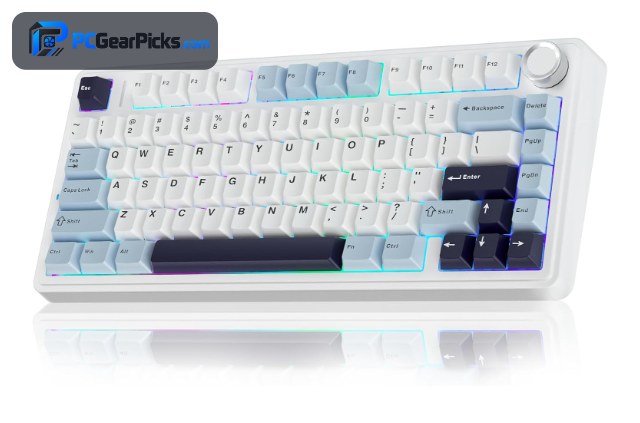
A wireless keyboard keeps your edit bay clean and lets you position the board wherever is comfortable — useful when you are juggling a mouse, tablet, and control surface. The best wireless keyboard for video editing pairs a comfortable feel with control knobs for scrubbing, numpads for timecodes, and programmable keys for shortcuts.
We compared wireless keyboards on controls, layout, comfort, and value to find the top picks for editors in Premiere, DaVinci Resolve, and Final Cut. Each balances a tidy wireless setup with real editing utility. For related gear, see our guides to the best custom keyboards for video editing and the best mechanical keyboards for video editing. For more gear, browse our full range of PC peripherals guides.
Top 3 Best Wireless Keyboards at a Glance

- 75% hot-swappable layout
- Gasket mount, comfortable feel
- Tri-mode wireless
- 4.6 stars from 2,600+ buyers

- Macros + layers for edit shortcuts
- 96% layout with numpad
- Hot-swap + tri-mode wireless
- 8000 Hz polling

- Scroll knob for timeline/scrub
- Gasket build + RGB
- Tri-mode wireless under $50
- 4.6 stars from 1,400+ buyers
Best Wireless Keyboards for Video Editing in 2026
| # | Product | Key Features | Price |
|---|---|---|---|
| 1 | AULA F75 Wireless Keyboard |
| CHECK LATEST PRICE |
| 2 | Keychron K4 Ultra Wireless Keyboard |
| CHECK LATEST PRICE |
| 3 | Redragon K673 PRO Wireless Keyboard |
| CHECK LATEST PRICE |
| 4 |  AULA F99 Wireless Keyboard AULA F99 Wireless Keyboard |
| CHECK LATEST PRICE |
| 5 |  GravaStar Mercury K1 Wireless Keyboard GravaStar Mercury K1 Wireless Keyboard |
| CHECK LATEST PRICE |
| 6 |  YUNZII B75 PRO Wireless Keyboard YUNZII B75 PRO Wireless Keyboard |
| CHECK LATEST PRICE |
| 7 |  ASUS ROG Strix Scope II 96 Wireless ASUS ROG Strix Scope II 96 Wireless |
| CHECK LATEST PRICE |
1. AULA F75 Wireless Keyboard – Best Overall
- 75% hot-swappable layout
- Gasket mount, comfortable feel
- Tri-mode wireless
- 4.6 stars from 2,600+ buyers
As an Amazon Associate we earn from qualifying purchases, at no additional cost to you.
- ✓Comfortable gasket typing
- ✓Hot-swappable switches
- ✓Tri-mode wireless
- ✓Great value at ~$66
- ✗75% drops the numpad
- ✗Basic software
The AULA F75 is the best overall wireless keyboard for video editing. Its gasket-mounted build and pre-lubed switches stay comfortable through long edit sessions, and the compact 75% layout keeps arrows and a function row for timeline navigation while freeing desk space for a mouse or tablet.
Tri-mode wireless keeps your edit bay tidy and cable-free, and hot-swap sockets let you tune the feel. With 2,600+ ratings at 4.6 stars, it is a reliable, affordable foundation for any editor.
For whom this is best
Editors who want a comfortable, compact wireless board for long sessions.
For whom this may not fit
Those who rely heavily on a dedicated numpad.
2. Keychron K4 Ultra Wireless Keyboard – Best for Shortcuts
- Macros + layers for edit shortcuts
- 96% layout with numpad
- Hot-swap + tri-mode wireless
- 8000 Hz polling
As an Amazon Associate we earn from qualifying purchases, at no additional cost to you.
- ✓Macros + layers for edit shortcuts
- ✓96% layout keeps numpad
- ✓Hot-swap + tri-mode wireless
- ✓8000 Hz polling
- ✗Around $115
- ✗Heavier build
The Keychron K4 Ultra is the best wireless keyboard for editors who live in keyboard shortcuts. Full QMK/VIA support lets you bind cuts, transitions, ripple deletes, and tool switches to single keys or layers — a major speed boost in Premiere or DaVinci Resolve, all wirelessly.
The 96% layout keeps the numpad for timecode entry, and hot-swap sockets let you tune the feel. For editors who want to script their workflow into the keyboard, it is the standout pick.
For whom this is best
Editors who want to bind complex edit commands to macros.
For whom this may not fit
Buyers trying to stay well under $100.
3. Redragon K673 PRO Wireless Keyboard – Best Value with Knob
- Scroll knob for timeline/scrub
- Gasket build + RGB
- Tri-mode wireless under $50
- 4.6 stars from 1,400+ buyers
As an Amazon Associate we earn from qualifying purchases, at no additional cost to you.
- ✓Scroll knob for timeline/scrub
- ✓Tri-mode wireless under $50
- ✓Gasket build + RGB
- ✓Compact 81-key layout
- ✗Smaller keys take adjustment
- ✗ABS keycaps
The Redragon K673 PRO is the best value wireless keyboard for video editing. Its scroll knob is ideal for scrubbing the timeline or nudging the playhead frame by frame, and the gasket-mounted build feels great — all wirelessly for under $50.
Tri-mode wireless keeps your desk clean, and the compact layout leaves room for an editing mouse or control surface. With 1,400+ ratings at 4.6 stars, it brings editor-friendly features to a tight budget.
For whom this is best
Budget editors who want a scrub knob and wireless under $50.
For whom this may not fit
Those who prefer full-size layouts or PBT keycaps.
4. AULA F99 Wireless Keyboard – Best Full-Size
- 99-key compact full layout
- Numpad for timecodes
- Hot-swap + tri-mode wireless
- 4.5 stars from 3,100+ buyers
As an Amazon Associate we earn from qualifying purchases, at no additional cost to you.
- ✓99-key compact full layout
- ✓Numpad for timecodes
- ✓Hot-swap + tri-mode wireless
- ✓Huge review base
- ✗Tight key spacing takes adjustment
- ✗Basic software
The AULA F99 is the best full-size wireless keyboard for video editing. Its 99-key layout keeps a numpad — invaluable for entering timecodes and numeric shortcuts — in a compact body, with a gasket mount and hot-swap sockets for a premium feel.
Tri-mode wireless keeps the desk tidy, and the creamy typing suits long sessions. With 3,100+ ratings at 4.5 stars, it is a top pick for editors who want a numpad without a full-size footprint.
For whom this is best
Editors who need a numpad for timecodes and shortcuts.
For whom this may not fit
Those who prefer compact 60% or 65% layouts.
5. GravaStar Mercury K1 Wireless Keyboard – Best Premium
- CNC aluminum body
- Hot-swap + RGB
- Tri-mode wireless
- 4.7 stars from 1,800+ buyers
As an Amazon Associate we earn from qualifying purchases, at no additional cost to you.
- ✓CNC aluminum body
- ✓Hot-swap + RGB
- ✓Tri-mode wireless
- ✓Premium desk presence
- ✗Around $130
- ✗Heavier build
The GravaStar Mercury K1 is the best premium wireless keyboard for a standout edit bay. Its CNC-machined metal chassis feels rock-solid and looks striking, elevating any workstation beyond its ~$130 price — with no cables in sight.
It performs well too, with hot-swap switches, bright RGB, and reliable tri-mode wireless. With 1,800+ ratings at 4.7 stars, buyers praise both its typing feel and premium build.
For whom this is best
Editors who want a premium metal board that looks the part.
For whom this may not fit
Budget shoppers or those who want a light board.
6. YUNZII B75 PRO Wireless Keyboard – Best for Comfort
- Gasket build, soft keystroke
- Pre-lubed switches
- Tri-mode wireless
- 4.6 stars from 1,300+ buyers
As an Amazon Associate we earn from qualifying purchases, at no additional cost to you.
- ✓Soft, comfortable keystroke
- ✓Pre-lubed switches
- ✓Gasket-mounted build
- ✓Tri-mode wireless
- ✗No numpad
- ✗Subtle RGB
The YUNZII B75 PRO is the best wireless keyboard for editing comfort. Its gasket mount, layered foam, and pre-lubed switches deliver a cushioned, quiet keystroke that keeps your hands fresh across marathon edits.
It connects over Bluetooth, 2.4GHz, or USB-C and looks clean on an edit bay. With 1,300+ ratings at 4.6 stars, it is a favorite among editors who value a premium, fatigue-reducing feel.
For whom this is best
Editors who work for hours and want a cushioned, quiet feel.
For whom this may not fit
Those who need a numpad or bright RGB.
7. ASUS ROG Strix Scope II 96 Wireless – Best for Numpad Work
- 96% layout keeps numpad
- Pre-lubed ROG NX switches
- Low-latency tri-mode wireless
- 4.6 stars from 1,000+ buyers
As an Amazon Associate we earn from qualifying purchases, at no additional cost to you.
- ✓96% layout keeps numpad
- ✓Pre-lubed ROG NX switches
- ✓Low-latency tri-mode wireless
- ✓Premium build
- ✗Higher price
- ✗Heavier software suite
The ASUS ROG Strix Scope II 96 is the best wireless keyboard for numpad-heavy editing. Its 96% layout keeps the numpad for timecodes and numeric shortcuts in a compact body, and the smooth, pre-lubed ROG NX switches feel precise and responsive.
Low-latency tri-mode wireless keeps the desk tidy, and sound-dampening foam gives it a muted, premium sound. With 1,000+ ratings at 4.6 stars, it is a dependable pick for editors who want a numpad and wireless freedom.
For whom this is best
Editors who want a numpad plus premium wireless.
For whom this may not fit
Those who prefer compact layouts without a numpad.
What to Look for in a Wireless Keyboard for Video Editing
A wireless keyboard for editing should speed up shortcuts, make scrubbing easy, and keep a clean desk. Here is what our team prioritized.
Control Knob for Scrubbing
A rotary knob (Redragon K673 PRO) is ideal for scrubbing the timeline, nudging the playhead, or adjusting zoom and audio — precise tactile control a mouse cannot match, all wirelessly.
Programmable Macros
Editing relies on dozens of shortcuts. A board with VIA/QMK support like the Keychron K4 Ultra lets you bind cuts, transitions, and tool switches to single keys, saving time in Premiere, DaVinci Resolve, or Final Cut.
Numpad for Timecodes
A numpad speeds up timecode entry and numeric shortcuts. A 99-key board (AULA F99) or 96% board (ASUS ROG Strix Scope II 96) keeps the numpad, while a compact 75% (AULA F75) frees desk space.
Comfort and Battery
A gasket mount with foam (AULA F75, YUNZII B75 PRO) softens each keystroke for long edits, and long battery life keeps you working. Tri-mode boards let you switch to wired if the battery runs low. For more, see the best mechanical keyboards for video editing.
Frequently Asked Questions
What is the best wireless keyboard for video editing?
For most editors the AULA F75 is the best wireless keyboard for video editing, with a comfortable gasket build, hot-swap switches, and tri-mode wireless for around $66. For shortcuts, the Keychron K4 Ultra offers full macro support and a numpad.
Do I need a knob for video editing?
It is not essential, but a control knob (Redragon K673 PRO) makes scrubbing, zooming, and audio adjustments fast and precise. Many editors find it a meaningful workflow upgrade over mouse-only control.
Should an editing keyboard have a numpad?
If you enter timecodes or use numeric shortcuts often, yes — a 99-key board like the AULA F99 or a 96% board like the ASUS ROG Strix Scope II 96 keeps the numpad. If you rarely use numbers, a 75% board frees more desk space.
Is wireless reliable for editing?
Yes. For editing there is no latency concern, and a dedicated 2.4GHz connection is stable. Tri-mode boards let you plug in anytime, and wireless keeps cables off a busy edit desk with a mouse, tablet, and control surface.
Which Wireless Keyboard for Video Editing Should You Buy?
After testing the field, the AULA F75 is the best overall wireless keyboard for video editing in 2026, with a comfortable gasket build, hot-swap switches, and tri-mode wireless for around $66. For shortcut-heavy workflows, the Keychron K4 Ultra leads, while the Redragon K673 PRO brings a scrub knob to editors on a tight budget.
Match the knob, numpad, and macro features to your editing software, and any board above will speed up your work. For more, see our guides to the best custom keyboards for video editing and the best wireless keyboards for programming.
No reviews yet. Be the first to share your experience!