

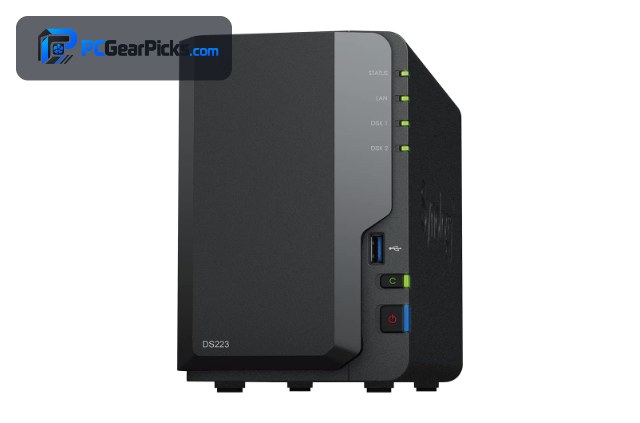
Synology makes some of the most popular NAS devices thanks to its polished DSM software, reliable hardware, and deep app ecosystem for backups, photos, media, and a personal cloud. The best Synology NAS for you depends on how many bays you need and whether you want the extra power of a Plus-series model.
Below we rank eight of the best Synology DiskStation models, led by the well-rounded DS223. For a wider view, see our best NAS guide and best NAS for Plex, or consider a mini PC for a DIY server.
Top 3 Best Synology NAS Models at a Glance


Best Synology NAS Models in 2027
| Product | Key specs | Rating | Price | |
|---|---|---|---|---|
| Synology DS223 (2-Bay) Best Overall | 2-bay, DSM software, Backup & file hub | 4.6★ | $285.99 | Check Price on Amazon |
| Synology DS223j (2-Bay) Best Value | 2-bay, DSM software, Entry-level | 4.5★ | $209.99 | Check Price on Amazon |
| Synology DS425+ (4-Bay) Best for Media | 4-bay, Plus-series CPU, Media server | 4.7★ | $578.99 | Check Price on Amazon |
| Synology DS124 (1-Bay) Best Single-Bay | 1-bay, DSM software, Compact | 4.3★ | $159.99 | Check Price on Amazon |
| Synology DS423 (4-Bay) Best 4-Bay Value | 4-bay, DSM software, Family & business | 4.4★ | $349.99 | Check Price on Amazon |
| Synology DS925+ (4-Bay) Best for Power Users | 4-bay, Plus-series CPU, Expandable | 4.3★ | $759.00 | Check Price on Amazon |
| Synology DS225+ (2-Bay) Best 2-Bay Plus | 2-bay, Plus-series CPU, Media server | 4.6★ | $364.99 | Check Price on Amazon |
| Synology DS1525+ (5-Bay) Best for Creators | 5-bay, Plus-series CPU, Video production | 4.4★ | $1,309.99 | Check Price on Amazon |
1. Synology DS223 (2-Bay) – Best Overall
- ✓ Excellent DSM software and apps
- ✓ Reliable 2-bay backup and storage
- ✓ Strong 4.6-star rating
- ✗ Diskless (drives sold separately)
- ✗ Not for heavy 4K transcoding
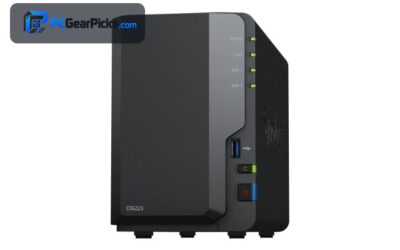
The Synology DS223 is the best Synology NAS overall for most homes and small offices, combining a reliable 2-bay design with Synology’s polished DSM software for backups, file sharing, and a personal cloud for around $286. It is the easy recommendation for most Synology buyers.
It ships diskless and is not built for heavy 4K transcoding, but for a dependable, easy-to-use Synology NAS, it is our top pick.
Best for: Most homes wanting easy backups and a personal cloud
May not fit: Those needing heavy media transcoding
2. Synology DS223j (2-Bay) – Best Value
- ✓ Lowest-cost Synology DSM experience
- ✓ Great for backups and file storage
- ✓ Most reviews in this roundup
- ✗ Entry-level CPU
- ✗ Diskless (drives sold separately)
The Synology DS223j is the best value Synology NAS, bringing DSM to a 2-bay box for around $210. With the most reviews here, it is the proven, affordable way into the Synology ecosystem for backups and a basic personal cloud.
Its entry-level CPU limits demanding tasks and it ships diskless, but for the cheapest 2-bay Synology, it is the value standout.
Best for: Budget buyers wanting Synology DSM for less
May not fit: Power users or media transcoding
3. Synology DS425+ (4-Bay) – Best for Media
- ✓ Capable Plus-series performance
- ✓ Four bays for large libraries
- ✓ Excellent 4.7-star rating
- ✗ Higher price
- ✗ Diskless (drives sold separately)
The Synology DS425+ is the best Synology NAS for media and demanding home use, pairing a capable Plus-series processor with four bays and media-server features for around $579. It is a strong choice for streaming, large libraries, and multi-user homes.
It costs more and ships diskless, but for a powerful 4-bay Synology media server, it is an excellent higher-end pick.
Best for: Media libraries and multi-user homes
May not fit: Those on a tight budget
4. Synology DS124 (1-Bay) – Best Single-Bay

- ✓ Affordable entry to Synology DSM
- ✓ Compact single-bay design
- ✓ Great for backups and files
- ✗ Single bay (no redundancy)
- ✗ Diskless (drive sold separately)
The Synology DS124 is the best single-bay Synology NAS, bringing DSM to a compact, affordable box for around $160. It is a tidy way to add a personal cloud and automated backups for a single household or user.
It has one bay so there is no drive redundancy and it ships diskless, but for the cheapest compact Synology, it is an excellent budget pick.
Best for: Single users wanting Synology DSM on a budget
May not fit: Those needing redundancy or multiple drives
5. Synology DS423 (4-Bay) – Best 4-Bay Value

- ✓ Four bays at a sensible price
- ✓ Flexible RAID for capacity and safety
- ✓ Reliable DSM software
- ✗ Non-Plus CPU limits heavy apps
- ✗ Diskless (drives sold separately)
The Synology DS423 is the best 4-bay value Synology NAS, offering four bays and flexible RAID for larger backups and file storage for around $350. It is a sensible step up for families and small businesses that need more capacity than a 2-bay unit.
Its non-Plus CPU is less suited to heavy apps and transcoding, and it ships diskless, but for affordable 4-bay Synology storage, it is a strong pick.
Best for: Families and small offices wanting 4 bays for less
May not fit: Those needing heavy transcoding or apps
6. Synology DS925+ (4-Bay) – Best for Power Users

- ✓ Capable Plus-series performance
- ✓ Four bays with expansion options
- ✓ Great for apps and virtualization
- ✗ Premium price
- ✗ Diskless (drives sold separately)
The Synology DS925+ is the best Synology NAS for power users, combining a capable Plus-series processor with four expandable bays for around $759. It handles demanding apps, virtualization, and large libraries with room to grow.
It is a premium, diskless unit, but for a powerful, expandable 4-bay Synology for enthusiasts, it is an excellent choice.
Best for: Power users wanting apps, VMs, and expansion
May not fit: Casual users wanting a simple box
7. Synology DS225+ (2-Bay) – Best 2-Bay Plus

- ✓ Plus-series power in a 2-bay unit
- ✓ Good for media and apps
- ✓ Strong 4.6-star rating
- ✗ Pricier than non-Plus 2-bay
- ✗ Diskless (drives sold separately)
The Synology DS225+ is the best 2-bay Plus-series Synology NAS, bringing more capable performance to a compact two-bay box for media streaming and apps for around $365. It is a great middle ground for users who want more than the DS223 in a small footprint.
It costs more than non-Plus 2-bay units and ships diskless, but for Plus-series power in a compact 2-bay Synology, it is an excellent pick.
Best for: Users wanting media and apps in a 2-bay unit
May not fit: Those on the tightest budget
8. Synology DS1525+ (5-Bay) – Best for Creators

- ✓ Five bays for large media libraries
- ✓ Capable performance for editing workflows
- ✓ Expandable high-capacity storage
- ✗ High price
- ✗ Overkill for simple backups
The Synology DS1525+ is the best Synology NAS for creators and video production, offering five bays and capable performance for large media libraries and editing workflows for around $1,310. It is built for professionals who need serious, expandable storage.
It is expensive and overkill for simple backups, but for a high-capacity Synology server aimed at creative workflows, it is the standout professional pick.
Best for: Creators and professionals needing large storage
May not fit: Home users wanting a simple, affordable NAS
How to Choose a Synology NAS
Value (j) vs standard vs Plus (+) models
Synology’s j models like the DS223j are the most affordable and suit backups and file storage; standard models like the DS223 and DS423 add performance; and Plus models like the DS425+ and DS925+ have stronger CPUs for media transcoding, apps, and virtualization. Match the tier to your workload.
How many bays do you need
Single-bay units like the DS124 are cheapest but offer no redundancy; 2-bay models like the DS223 let you mirror drives; and 4- or 5-bay models like the DS425+ and DS1525+ give more capacity and flexible RAID for large libraries. Buy for the data you need to protect and grow into.
DSM software and apps
Every Synology runs DSM, which includes excellent apps for backup, photo management, a personal cloud, and more. Plus-series models can also run containers and virtual machines, so if you want to self-host apps, favour a Plus model like the DS925+.
Media and transcoding
For media streaming, a Plus-series model like the DS425+ or DS225+ handles media-server duties better than entry models. If 4K transcoding matters, confirm the specific model’s capabilities, as lighter CPUs are better suited to direct play than heavy on-the-fly transcoding.
Drives and expansion
Synology NAS units ship diskless, so budget for drives when comparing prices, and check each model’s supported drive list. Higher-end models like the DS925+ and DS1525+ support expansion units, letting you add bays later as your storage needs grow.
Frequently Asked Questions
What is the best Synology NAS in 2027?
Our overall pick is the Synology DS223, a reliable 2-bay unit with excellent DSM software for around $286. For value, the DS223j is the best affordable choice, and the DS425+ is the best for media and demanding home use.
What do the j and + mean on Synology models?
The j suffix (as on the DS223j) marks an entry-level, value model best for backups and file storage, while the + suffix (as on the DS425+) marks a Plus-series model with a stronger CPU for media transcoding, apps, and virtualization. Standard models with no suffix sit in between.
Which Synology NAS is best for Plex?
A Plus-series model like the DS425+ or DS225+ is best for media serving, as its stronger CPU handles media-server duties better than entry models. For heavy 4K transcoding, check the specific model and consider an Intel-based NAS. See our best NAS for Plex guide for details.
Do Synology NAS devices come with drives?
No — Synology NAS units ship diskless, so you choose and fit your own drives. This lets you pick the capacity and drive type that suit you, but remember to budget for drives when comparing a Synology to a drive-included NAS.
How much should I spend on a Synology NAS?
Entry single- and 2-bay Synology models start around $160-210, a capable 2-bay like the DS223 is about $286, and 4-bay or Plus-series models run $350 to $759, with creator-focused units higher. Spend based on bays, performance tier, and whether you need Plus features.
Final Verdict
For a Synology NAS in 2027, the DS223 is the best all-round pick thanks to its reliability and DSM software, while the DS223j is the best value and the DS425+ is the best for media. Power users should look at the DS925+, and creators at the DS1525+. See our wider best NAS guide and best NAS for Plex.
No reviews yet. Be the first to share your experience!