

A NAS (network attached storage) gives your home or office a private, always-on place to store files, back up every device, and run a personal cloud. The best NAS for you depends on how many drive bays you need, the software you want, and whether you plan to stream media or run demanding apps.
Below we rank eight of the best NAS devices across every budget, led by the well-rounded Synology DS223. For a dedicated streaming box, see our best NAS for Plex guide and Synology NAS roundup, or a mini PC for a DIY home server.
Top 3 Best NAS Devices at a Glance


Best NAS Devices in 2027
| Product | Key specs | Rating | Price | |
|---|---|---|---|---|
| Synology DS223 (2-Bay) Best Overall | 2-bay, DSM software, Backup & file hub | 4.6★ | $285.99 | Check Price on Amazon |
| Synology DS223j (2-Bay) Best Value | 2-bay, DSM software, Entry-level | 4.5★ | $209.99 | Check Price on Amazon |
| Synology DS425+ (4-Bay) Best for Media | 4-bay, Plus-series CPU, Media server | 4.7★ | $578.99 | Check Price on Amazon |
| Buffalo LinkStation 210 (1-Bay) Best Plug-and-Play | 1-bay, Drive included, Simple setup | 3.9★ | $192.99 | Check Price on Amazon |
| Asustor Lockerstor 6 Gen2 (6-Bay) Best High-End | 6-bay, Intel quad-core, 10GbE / M.2 | 4.2★ | $615.04 | Check Price on Amazon |
| All-Flash M.2 NAS (6x M.2) Best All-Flash | 6x M.2 SSD slots, Dual 2.5G LAN, Compact | 4.4★ | $329.00 | Check Price on Amazon |
| Buffalo LinkStation 220 (2-Bay) Best 2-Bay Plug-and-Play | 2-bay, Drives included, RAID support | 4.1★ | $285.99 | Check Price on Amazon |
| Synology DS124 (1-Bay) Best Budget Single-Bay | 1-bay, DSM software, Compact | 4.3★ | $159.99 | Check Price on Amazon |
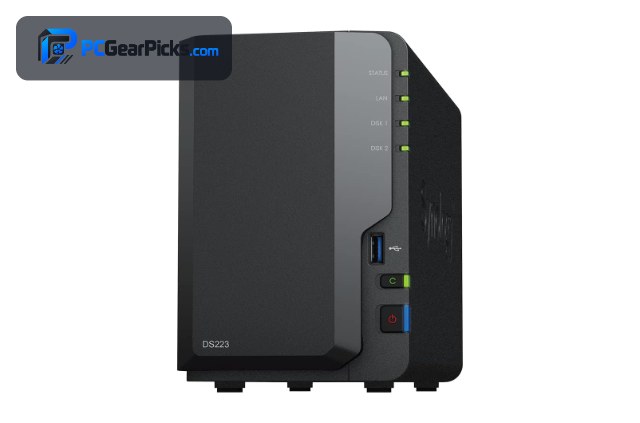
1. Synology DS223 (2-Bay) – Best Overall
- ✓ Excellent DSM software and apps
- ✓ Reliable 2-bay storage and backup
- ✓ Strong 4.6-star rating
- ✗ Diskless (drives sold separately)
- ✗ Not ideal for heavy 4K transcoding
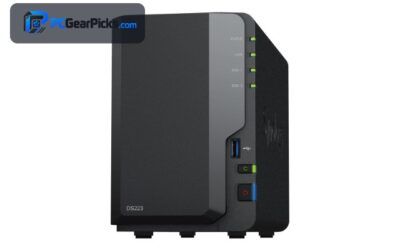
The Synology DS223 is the best NAS overall for most homes and small offices, pairing a reliable 2-bay design with Synology’s excellent DSM software for backups, file sharing, and personal cloud for around $286. Its polished app ecosystem and strong rating make it the easy recommendation for most buyers.
It ships diskless so you add your own drives, and it is not built for heavy 4K video transcoding, but for a dependable, easy-to-use home NAS it is our top pick.
Best for: Most homes wanting easy backups and a personal cloud
May not fit: Those needing heavy 4K Plex transcoding
2. Synology DS223j (2-Bay) – Best Value
- ✓ Lowest-cost way into Synology DSM
- ✓ Great for backups and file storage
- ✓ Most reviews in this roundup
- ✗ Entry-level CPU
- ✗ Diskless (drives sold separately)
The Synology DS223j is the best value NAS, bringing Synology’s acclaimed DSM software to a 2-bay box for around $210. With the most reviews here, it is the proven, affordable choice for backups, file sharing, and a basic personal cloud.
Its entry-level CPU limits demanding tasks and it ships diskless, but for the lowest-cost route into the Synology ecosystem, it is the value standout.
Best for: Budget buyers wanting Synology DSM for less
May not fit: Power users or media transcoding
3. Synology DS425+ (4-Bay) – Best for Media
- ✓ Capable Plus-series performance
- ✓ Four bays for large libraries
- ✓ Excellent 4.7-star rating
- ✗ Higher price
- ✗ Diskless (drives sold separately)
The Synology DS425+ is the best NAS for media and a personal cloud, pairing a capable Plus-series processor with four bays and media-server features for around $579. It is a strong choice for streaming, large libraries, and more demanding home workloads.
It costs more and ships diskless, but for a powerful 4-bay media server with Synology’s software, it is an excellent higher-end pick.
Best for: Media libraries and multi-user homes
May not fit: Those on a tight budget
4. Buffalo LinkStation 210 (1-Bay) – Best Plug-and-Play

- ✓ Comes with a hard drive included
- ✓ Simple plug-and-play setup
- ✓ Very large review base
- ✗ Single bay (no redundancy)
- ✗ Modest performance and rating
The Buffalo LinkStation 210 is the best plug-and-play NAS, arriving with a hard drive already installed so you can start backing up straight out of the box for around $193. It is the simplest way to add network storage without choosing or fitting drives.
It is a single-bay unit with no drive redundancy and only a modest rating, but for a truly simple, ready-to-use NAS with a drive included, it fills a clear niche.
Best for: Beginners wanting a ready-to-use NAS with a drive
May not fit: Those needing redundancy or high performance
5. Asustor Lockerstor 6 Gen2 (6-Bay) – Best High-End

- ✓ Six bays for large arrays
- ✓ Fast Intel CPU and 10GbE-class networking
- ✓ Great for demanding workloads
- ✗ Premium price
- ✗ Overkill for simple backups
The Asustor Lockerstor 6 Gen2 is the best high-end NAS, offering six bays, a fast Intel processor, and fast networking for large arrays and demanding workloads for around $615. It is built for enthusiasts and small businesses that need serious capacity and speed.
It is a premium unit and overkill for simple backups, but for a powerful, expandable NAS with fast networking, it is the standout high-end choice.
Best for: Enthusiasts and small businesses needing capacity
May not fit: Casual users wanting a simple 2-bay box
6. All-Flash M.2 NAS (6x M.2) – Best All-Flash

- ✓ Silent, compact all-flash design
- ✓ Fast dual 2.5G networking
- ✓ Well reviewed with 1,100+ ratings
- ✗ SSD-only (higher cost per TB)
- ✗ Less raw capacity than hard-drive NAS
This all-flash NAS with six M.2 SSD slots and dual 2.5G networking is the best choice for a silent, compact setup, delivering fast flash storage in a small, quiet box for around $329. It is ideal for a tidy desk or living room where noise and size matter.
SSD storage costs more per terabyte and offers less raw capacity than hard-drive NAS units, but for a silent, fast, compact all-flash server, it is an excellent modern pick.
Best for: Users wanting a silent, compact flash NAS
May not fit: Those needing maximum capacity for the lowest cost
7. Buffalo LinkStation 220 (2-Bay) – Best 2-Bay Plug-and-Play

- ✓ Two bays with drives included
- ✓ Supports RAID for redundancy
- ✓ Large review base
- ✗ Modest performance
- ✗ Basic software vs Synology
The Buffalo LinkStation 220 is the best 2-bay plug-and-play NAS, arriving with drives installed and RAID support for redundancy for around $286. It is a simple, ready-to-use option for homes that want mirrored backups without fitting drives themselves.
Its performance is modest and its software is more basic than Synology’s, but for a ready-to-use 2-bay NAS with drives and redundancy, it is a practical choice.
Best for: Homes wanting ready-to-use mirrored backups
May not fit: Those wanting the best software or performance
8. Synology DS124 (1-Bay) – Best Budget Single-Bay

- ✓ Affordable entry to Synology DSM
- ✓ Compact single-bay design
- ✓ Great for backups and files
- ✗ Single bay (no redundancy)
- ✗ Diskless (drive sold separately)
The Synology DS124 is the best budget single-bay NAS, bringing Synology’s DSM software to a compact, affordable box for around $160. It is a tidy way to add a personal cloud and automated backups for a single household or user.
It has just one bay so there is no drive redundancy and it ships diskless, but for the cheapest route to Synology’s software in a compact unit, it is an excellent budget pick.
Best for: Single users wanting Synology DSM on a budget
May not fit: Those needing redundancy or multiple drives
How to Choose a NAS
How many bays do you need
Single-bay units like the Synology DS124 are cheapest but offer no drive redundancy; 2-bay units like the DS223 let you mirror drives so your data survives a disk failure; and 4-bay or larger models like the DS425+ and Asustor Lockerstor give more capacity and flexible RAID. Choose based on how much data you need to protect.
Software and ecosystem
Software matters as much as hardware. Synology’s DSM is the most polished, with excellent apps for backup, photos, and a personal cloud, while Buffalo LinkStation units are simpler and more plug-and-play. If you want the richest features, favour a Synology model.
Diskless vs drives included
Most NAS units like the Synology models ship diskless, so you choose and fit your own drives for the best value and capacity. Buffalo LinkStation units arrive with drives installed for a true plug-and-play setup. Factor drive cost into diskless models when comparing prices.
Performance and networking
For simple backups, an entry CPU like the DS223j is plenty; for media streaming and apps, a Plus-series or Intel-based NAS like the DS425+ or Asustor Lockerstor is better. Faster 2.5G or 10GbE networking, as on the all-flash and Asustor picks, speeds up large transfers.
Noise, size, and flash options
Hard-drive NAS units can be audible and larger, while all-flash M.2 models are silent and compact at a higher cost per terabyte. If your NAS sits in a living room or on a desk, a quiet all-flash unit may be worth the premium; otherwise a traditional drive-based NAS offers more capacity for the money.
Frequently Asked Questions
What is the best NAS in 2027?
Our overall pick is the Synology DS223, a reliable 2-bay unit with excellent DSM software for backups and a personal cloud, for around $286. For value, the DS223j is the best affordable choice, and the DS425+ is the best for media.
What is a NAS used for?
A NAS is an always-on network drive for your home or office. It stores and shares files, automatically backs up your computers and phones, and can run a personal cloud, media server, surveillance storage, and more, depending on the model and software.
How many drive bays do I need?
For a single user wanting basic backups, a 1-bay unit like the DS124 works; for most homes, a 2-bay NAS like the DS223 lets you mirror drives for redundancy; and for large libraries or small businesses, a 4-bay or larger model like the DS425+ or Asustor Lockerstor is better.
Do I need to buy hard drives separately?
Usually yes — most NAS units like the Synology models ship diskless so you choose your own drives. Buffalo LinkStation models are an exception, arriving with drives installed for a plug-and-play setup. Factor drive cost into diskless models when budgeting.
How much should I spend on a NAS?
Entry single- and 2-bay units start around $160-210, the sweet spot for a capable 2-bay home NAS is roughly $286, and 4-bay or high-end models run $350 to $600 and up. Spend based on how many bays, how much performance, and which software you want.
Final Verdict
For a NAS in 2027, the Synology DS223 is the best all-round pick thanks to its reliability and excellent DSM software, while the DS223j is the best value and the DS425+ is the best for media. For a ready-to-use option, the Buffalo LinkStation units include drives. See our Synology NAS guide and best NAS for Plex for more.
No reviews yet. Be the first to share your experience!