

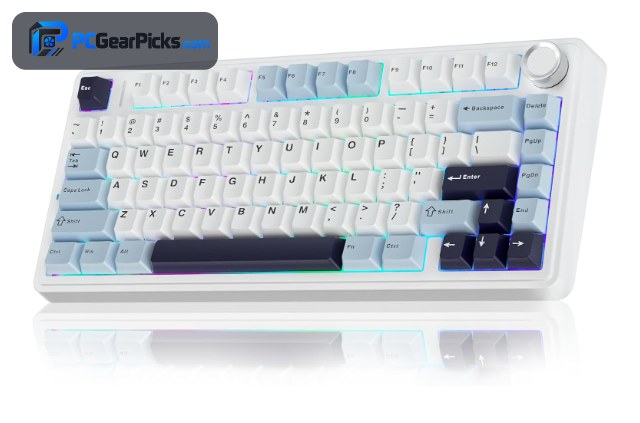
For programmers, a great mechanical keyboard turns long coding sessions into a comfortable, efficient experience. The best mechanical keyboard for programming pairs a satisfying, low-fatigue typing feel with a layout that keeps the keys coders rely on — arrows, the function row, and often a numpad.
We compared mechanical keyboards on comfort, switch feel, layout, and build quality to find the best options for developers. Gasket mounts and hot-swap switches lead the way. For related setups, see our guides to the best custom keyboards for programming. For more gear, browse our full range of PC peripherals guides.
Top 3 Best Mechanical Keyboards at a Glance

- 75% layout keeps arrows + F-row
- Gasket mount, quiet feel
- Hot-swap + tri-mode wireless
- 4.6 stars from 2,600+ buyers

- Gasket build, soft keystroke
- Pre-lubed switches
- Quiet, dampened sound
- 4.6 stars from 1,300+ buyers

- 99-key compact full layout
- Hot-swap + gasket mount
- Tri-mode wireless
- 4.5 stars from 3,100+ buyers
Best Mechanical Keyboards for Programming in 2026
| # | Product | Key Features | Price |
|---|---|---|---|
| 1 | AULA F75 Mechanical Keyboard |
|
CHECK LATEST PRICE |
| 2 | YUNZII B75 PRO Mechanical Keyboard |
|
CHECK LATEST PRICE |
| 3 | AULA F99 Mechanical Keyboard |
|
CHECK LATEST PRICE |
| 4 |  Redragon K617 Mechanical Keyboard Redragon K617 Mechanical Keyboard |
|
CHECK LATEST PRICE |
| 5 |  GravaStar Mercury K1 Mechanical Keyboard GravaStar Mercury K1 Mechanical Keyboard |
|
CHECK LATEST PRICE |
| 6 |  SteelSeries Apex 5 Mechanical Keyboard SteelSeries Apex 5 Mechanical Keyboard |
|
CHECK LATEST PRICE |
| 7 |  Redragon K556 Mechanical Keyboard Redragon K556 Mechanical Keyboard |
|
CHECK LATEST PRICE |
1. AULA F75 Mechanical Keyboard – Best Overall
- 75% layout keeps arrows + F-row
- Gasket mount, quiet feel
- Hot-swap + tri-mode wireless
- 4.6 stars from 2,600+ buyers
As an Amazon Associate we earn from qualifying purchases, at no additional cost to you.
- ✓75% keeps arrows + F-row
- ✓Gasket mount, quiet feel
- ✓Hot-swap + tri-mode wireless
- ✓Great value at ~$66
- ✗Drops the numpad
- ✗Basic software
The AULA F75 is the best overall mechanical keyboard for programming. Its gasket-mounted 75% build and pre-lubed, hot-swappable switches deliver a soft, quiet keystroke that stays comfortable through hours of coding, while keeping arrows and a function row for IDE navigation.
Tri-mode wireless lets you move it between machines, and hot-swap sockets let you tune the feel to reduce fatigue. With 2,600+ ratings at 4.6 stars, it is the mechanical board we recommend first for developers.
For whom this is best
Developers who want a quiet, comfortable board with arrows and F-row.
For whom this may not fit
Those who need a dedicated numpad for heavy numeric input.
2. YUNZII B75 PRO Mechanical Keyboard – Best for Comfort
- Gasket build, soft keystroke
- Pre-lubed switches
- Quiet, dampened sound
- 4.6 stars from 1,300+ buyers
As an Amazon Associate we earn from qualifying purchases, at no additional cost to you.
- ✓Soft, quiet typing feel
- ✓Pre-lubed switches
- ✓Gasket-mounted build
- ✓Attractive colorways
- ✗No numpad
- ✗Subtle RGB
The YUNZII B75 PRO is the best mechanical keyboard for coding comfort. Its gasket mount, layered foam, and pre-lubed switches produce a cushioned, muted keystroke that keeps your hands fresh through marathon sessions and stays quiet on calls.
It connects over Bluetooth, 2.4GHz, or USB-C, fitting any dev setup, and the understated colorways look clean on a professional desk. With 1,300+ ratings at 4.6 stars, it is a favorite for comfort-focused typists.
For whom this is best
Developers who code for hours and want a fatigue-reducing feel.
For whom this may not fit
Users who need a numpad or bright RGB.
3. AULA F99 Mechanical Keyboard – Best Full-Size
- 99-key compact full layout
- Hot-swap + gasket mount
- Tri-mode wireless
- 4.5 stars from 3,100+ buyers
As an Amazon Associate we earn from qualifying purchases, at no additional cost to you.
- ✓99-key compact full layout
- ✓Hot-swap + gasket mount
- ✓Tri-mode wireless
- ✓Huge review base
- ✗Tight key spacing takes adjustment
- ✗Basic software
The AULA F99 is the best full-size mechanical keyboard for programming. Its 99-key layout keeps a numpad in a compact body — ideal for numeric input and shortcuts — while retaining a gasket mount and hot-swap sockets for a premium feel.
Tri-mode wireless keeps the desk tidy, and the creamy typing feel suits long coding sessions. With 3,100+ ratings at 4.5 stars, it is a top pick for developers who want a numpad without a full-size footprint.
For whom this is best
Developers who need a numpad plus a premium compact layout.
For whom this may not fit
Those who prefer wide key spacing or a minimalist board.
4. Redragon K617 Mechanical Keyboard – Best Value
- 60% hot-swappable layout
- RGB backlight
- Under $30
- 4.6 stars from 5,800+ buyers
As an Amazon Associate we earn from qualifying purchases, at no additional cost to you.
- ✓Hot-swap under $30
- ✓Compact 60% saves space
- ✓RGB backlight
- ✓5,800+ proven reviews
- ✗60% drops arrows to a layer
- ✗ABS keycaps
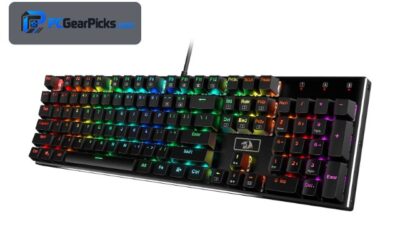
The Redragon K617 is the best value mechanical keyboard for programming on a budget. Its hot-swappable sockets let you tune switch feel for under $30, and the compact 60% footprint keeps a tidy desk.
You access arrows and function keys via a layer, which becomes second nature with practice. With over 5,800 ratings at 4.6 stars, it is a hugely popular, low-risk way to get a customizable mechanical board cheaply.
For whom this is best
Coders who want to try switch swapping on a tiny budget.
For whom this may not fit
Developers who rely on always-visible arrow and function keys.
5. GravaStar Mercury K1 Mechanical Keyboard – Best Premium
- CNC aluminum body
- Hot-swap + RGB
- Tri-mode wireless
- 4.7 stars from 1,800+ buyers
As an Amazon Associate we earn from qualifying purchases, at no additional cost to you.
- ✓CNC aluminum body
- ✓Hot-swap + RGB
- ✓Tri-mode wireless
- ✓Premium desk presence
- ✗Around $130
- ✗Heavier build
The GravaStar Mercury K1 is the best premium mechanical keyboard for a standout dev setup. Its CNC-machined metal chassis feels rock-solid and looks striking, elevating any workstation beyond its ~$130 price.
It performs well too, with hot-swappable switches, bright RGB, and reliable tri-mode wireless. With 1,800+ ratings at 4.7 stars, buyers praise both its typing feel and its premium build.
For whom this is best
Developers who want a premium metal board that looks the part.
For whom this may not fit
Budget shoppers or those who want a lightweight board.
6. SteelSeries Apex 5 Mechanical Keyboard – Best for Multitasking
- OLED smart display
- Hybrid mechanical switches
- Per-key RGB + media controls
- 4.6 stars from 4,200+ buyers
As an Amazon Associate we earn from qualifying purchases, at no additional cost to you.
- ✓OLED smart display
- ✓Hybrid mechanical switches
- ✓Per-key RGB + media controls
- ✓Sturdy build
- ✗Not hot-swappable
- ✗Larger footprint
The SteelSeries Apex 5 is the best mechanical keyboard for programming multitasking. Its OLED smart display can show build status, system stats, or notifications, and the media controls and volume roller keep you in the flow while coding.
The hybrid mechanical switches feel responsive and durable, and per-key RGB adds flair. With 4,200+ ratings at 4.6 stars, it is a feature-rich pick for developers who want information and controls built into the board.
For whom this is best
Developers who want an on-board display and media controls.
For whom this may not fit
Enthusiasts who want hot-swappable switches.
7. Redragon K556 Mechanical Keyboard – Best Budget Full-Size
- Full-size RGB layout
- Durable mechanical switches
- Under $50
- 4.6 stars from 8,100+ buyers
As an Amazon Associate we earn from qualifying purchases, at no additional cost to you.
- ✓Full-size RGB layout
- ✓Durable mechanical switches
- ✓Under $50
- ✓8,100+ reviews
- ✗No hot-swap
- ✗Larger footprint
The Redragon K556 is the best budget full-size mechanical keyboard for programming. It keeps the complete layout with a numpad, uses durable mechanical switches, and adds RGB — all for under $50, making it a reliable coding workhorse.
With over 8,100 ratings at 4.6 stars, it is one of the most proven budget mechanical boards available. For developers who want a dependable full-size board without spending much, it is a safe, popular choice.
For whom this is best
Developers who want a proven full-size mechanical board under $50.
For whom this may not fit
Enthusiasts who want hot-swap or a compact layout.
What to Look for in a Mechanical Keyboard for Programming
For coding, typing comfort and a practical layout matter most, alongside durable, tunable switches. Here is what our team prioritized.
Typing Comfort
A gasket mount with foam (AULA F75, YUNZII B75 PRO) softens each keystroke and reduces fatigue during long sessions. Pre-lubed switches feel smoother out of the box, so look for boards that advertise them.
Layout: Arrows, Function Row, and Numpad
Programmers lean on arrows, the function row, and often a numpad. A 75% (AULA F75) keeps arrows and F-keys compactly, a 99-key (AULA F99) adds a numpad, and full-size (Redragon K556) keeps everything. Choose the smallest layout with your must-have keys.
Hot-Swappable Switches
Hot-swap sockets let you change switches without soldering, so you can find the quiet, comfortable feel that suits marathon coding. Most top picks here, from the AULA F75 to the Redragon K617, support it.
Extra Features
Some boards add an OLED display and media controls (SteelSeries Apex 5) for quick access to stats and notifications. Decide which extras genuinely help your workflow. For more, see the best budget wireless keyboards.
Frequently Asked Questions
What is the best mechanical keyboard for programming?
For most developers the AULA F75 is the best mechanical keyboard for programming, with a quiet gasket build, hot-swap switches, and tri-mode wireless for around $66. For a numpad, the AULA F99 is an excellent compact full-size option.
What layout is best for coding?
It depends on your habits. A 75% board like the AULA F75 keeps arrows and the function row for IDE navigation, while a 99-key or full-size board (AULA F99, Redragon K556) retains the numpad. Many coders find a 75% layout the best balance.
What switches are best for programming?
Smooth linear or light tactile switches, ideally pre-lubed, tend to feel best over long sessions. Because most top picks are hot-swappable, you can experiment and settle on the feel that keeps your hands comfortable.
Are mechanical keyboards better for coding?
Many developers think so. Mechanical switches offer a more satisfying, consistent feel and better durability than membrane boards, and features like a gasket mount reduce fatigue over long days of typing.
Which Mechanical Keyboard for Programming Should You Buy?
After testing the field, the AULA F75 is the best overall mechanical keyboard for programming in 2026, with a quiet gasket build, hot-swap switches, and tri-mode wireless for around $66. For a numpad, the AULA F99 shines, while the Redragon K617 is an unbeatable sub-$30 starting point.
Prioritize typing comfort and the layout that fits your workflow, and any board above will serve you well. For more, see our guides to the best custom keyboards for programming and the best budget mechanical keyboards.
No reviews yet. Be the first to share your experience!