

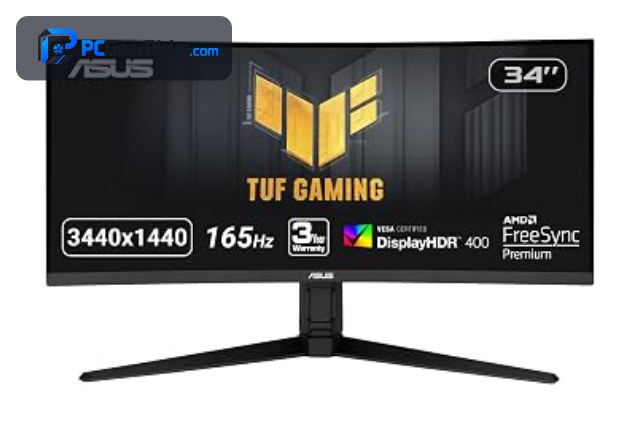
ASUS makes some of the most respected gaming monitors, spanning the value-focused TUF Gaming line and the premium ROG Strix range, with strong features like ELMB Sync and high refresh rates. The best ASUS monitor for you depends on your budget, resolution needs, and whether you want OLED image quality.
Below we rank six of the best ASUS monitors across budgets, led by the TUF Gaming curved QHD. Pair your display with a strong graphics card, or compare with our gaming monitor and OLED monitor guides.
Top 3 Best ASUS Monitors at a Glance

- QHD 1500R curved
- ELMB Sync, 1ms
- FreeSync Premium

- Dual-mode up to 320Hz
- Fast IPS, 1ms
- 99% DCI-P3, HDR

- 27-inch QHD QD-OLED
- 360Hz, 0.03ms
- G-Sync Compatible
Best ASUS Monitors in 2027
| Product | Key specs | Rating | Price | |
|---|---|---|---|---|
| ASUS TUF Gaming Curved QHD Best Overall | QHD 1500R curved, ELMB Sync, 1ms, FreeSync Premium | 4.4★ | $249.99 | Check Price on Amazon |
| ASUS TUF Gaming 320Hz Best High-Refresh IPS | Dual-mode up to 320Hz, Fast IPS, 1ms, 99% DCI-P3, HDR | 4.4★ | $329.00 | Check Price on Amazon |
| ASUS ROG Strix 27″ QD-OLED 360Hz Best OLED | 27-inch QHD QD-OLED, 360Hz, 0.03ms, G-Sync Compatible | 4.5★ | $689.99 | Check Price on Amazon |
| ASUS TUF Gaming 95% DCI-P3 Best for Creators | Fast IPS, 1ms, 95% DCI-P3, ELMB Sync, DisplayWidget | 4.3★ | $329.00 | Check Price on Amazon |
| ASUS TUF Gaming Budget Best Budget | Fast gaming panel, ELMB Sync, G-Sync Compatible | 4.6★ | $149.00 | Check Price on Amazon |
| ASUS 480Hz OLED Dual-Mode Best High-Refresh OLED | OLED dual-mode up to 480Hz, 0.03ms, USB-C 90W | 4.4★ | $1,075.00 | Check Price on Amazon |
1. ASUS TUF Gaming Curved QHD – Best Overall
- ✓ Immersive 1500R curve
- ✓ Fast 1ms with ELMB Sync
- ✓ Height-adjustable stand
- ✗ Curve not to all tastes
- ✗ Standard QHD sharpness
The ASUS TUF Gaming Curved QHD is the best ASUS monitor overall, combining an immersive 1500R curve with fast 1ms ELMB Sync response and a height-adjustable stand for around $250. With over 1,300 reviews, it is the proven, well-rounded pick in the ASUS lineup.
The curve is not to everyone’s taste and sharpness is standard QHD, but for an immersive, fast, well-built ASUS monitor, it is our top pick.
Best for: Most buyers wanting a fast, immersive ASUS monitor
May not fit: Those who prefer a flat panel
2. ASUS TUF Gaming 320Hz – Best High-Refresh IPS
- ✓ Blazing dual-mode 320Hz
- ✓ Vivid 99% DCI-P3 color
- ✓ ELMB Sync for clear motion
- ✗ 1080p-class sharpness
- ✗ Needs a strong GPU for 320Hz
The ASUS TUF Gaming 320Hz is the best high-refresh IPS ASUS monitor, delivering a blazing dual-mode refresh up to 320Hz with vivid 99% DCI-P3 color and fast IPS response for around $329. It is ideal for competitive players who want speed and color together.
Sharpness is 1080p-class and 320Hz needs a strong graphics card, but for a fast, colorful IPS monitor from ASUS, it is excellent value.
Best for: Competitive players wanting fast IPS with great color
May not fit: Those wanting higher resolution
3. ASUS ROG Strix 27″ QD-OLED 360Hz – Best OLED
- ✓ Blazing 360Hz QD-OLED
- ✓ Stunning contrast and color
- ✓ Esports-grade 0.03ms response
- ✗ Premium price
- ✗ OLED care considerations
The ASUS ROG Strix 27″ QD-OLED is the best OLED ASUS monitor, pairing a blazing 360Hz QD-OLED panel at QHD with a 0.03ms response for around $690. It is the showcase pick for players who want the best image quality and speed in one screen.
It commands a premium price and OLED needs some care, but for breathtaking contrast and esports-level speed, it is outstanding.
Best for: Players wanting the best ASUS image and speed
May not fit: Buyers on a tighter budget
4. ASUS TUF Gaming 95% DCI-P3 – Best for Creators

- ✓ Accurate 95% DCI-P3 color
- ✓ Fast IPS with ELMB Sync
- ✓ Handy DisplayWidget controls
- ✗ Priced above entry panels
- ✗ Standard 1080p sharpness
The ASUS TUF Gaming 95% DCI-P3 is the best ASUS monitor for creators who also game, combining accurate 95% DCI-P3 color with a fast IPS panel and ELMB Sync for around $329. It balances color accuracy and gaming speed well.
It costs more than entry panels and sharpness is standard, but for a color-accurate ASUS monitor that also handles fast gaming, it is a strong pick.
Best for: Creators who also want fast gaming
May not fit: Buyers wanting the lowest price
5. ASUS TUF Gaming Budget – Best Budget

- ✓ Affordable ASUS gaming
- ✓ ELMB Sync for clear motion
- ✓ Excellent 4.6-star rating
- ✗ Entry feature set
- ✗ 1080p-class panel
The ASUS TUF Gaming Budget is the best value ASUS monitor, bringing ELMB Sync, FreeSync Premium, and G-Sync Compatible support to a fast gaming panel for around $149. Its 4.6-star rating makes it a great affordable entry into the ASUS lineup.
Its feature set is entry-level and the panel is 1080p-class, but for an affordable, well-rated ASUS gaming monitor, it is a strong value pick.
Best for: Buyers wanting an affordable ASUS gaming monitor
May not fit: Those wanting premium features or higher resolution
6. ASUS 480Hz OLED Dual-Mode – Best High-Refresh OLED

- ✓ Blistering dual-mode 480Hz
- ✓ 0.03ms OLED response
- ✓ USB-C 90W connectivity
- ✗ Very premium price
- ✗ Needs a top-tier GPU
The ASUS 480Hz OLED Dual-Mode is the fastest ASUS monitor, offering a blistering dual-mode refresh up to 480Hz with 0.03ms OLED response and USB-C 90W for around $1,075. It is the choice for enthusiasts who want the absolute fastest OLED motion.
It is very premium-priced and needs a top-tier graphics card, but for the fastest OLED motion in the ASUS range, it is exceptional.
Best for: Enthusiasts wanting the fastest ASUS OLED
May not fit: Buyers wanting a more affordable option
How to Choose an ASUS Monitor
TUF Gaming versus ROG Strix
ASUS splits its gaming monitors into the value-focused TUF Gaming line, which offers strong features at accessible prices, and the premium ROG Strix range with the fastest panels and OLED options. Choose TUF for the best value and ROG for cutting-edge speed and image quality.
ELMB Sync and motion clarity
Many ASUS monitors feature ELMB Sync, which combines motion-blur reduction with adaptive sync for clearer fast motion without tearing. This is a standout ASUS feature for competitive gaming, so look for it on models like the TUF Gaming panels if motion clarity matters to you.
Refresh rate and dual-mode
ASUS gaming monitors reach high refresh rates, with several offering dual-mode options that trade resolution for even higher refresh, up to 480Hz on the OLED model. Match the refresh rate to your graphics card, since the fastest modes need a GPU that can produce very high frame rates.
Panel type and color
ASUS offers fast IPS panels with wide color coverage like 95% or 99% DCI-P3 for creators, and premium QD-OLED panels for the best contrast. For color-accurate work choose a high DCI-P3 model, and for the best image quality step up to the ROG Strix OLED.
Features and value
ASUS monitors include extras like the DisplayWidget control center, adjustable stands, and G-Sync Compatible support. Balance these features against price: the TUF Gaming line offers excellent value, while the ROG Strix models justify their premium with top-tier panels and speed.
Frequently Asked Questions
What is the best ASUS monitor in 2027?
Our overall pick is the ASUS TUF Gaming Curved QHD, a fast, immersive panel with over 1,300 reviews for around $250. For the best image quality, the ROG Strix QD-OLED is exceptional, and the TUF Gaming Budget is the best value.
Is the ASUS TUF or ROG line better?
It depends on your budget and needs — the TUF Gaming line offers excellent features at accessible prices, while the ROG Strix range has the fastest panels and premium QD-OLED options. Choose TUF for value and ROG for cutting-edge speed and image quality.
What is ELMB Sync on ASUS monitors?
ELMB Sync is an ASUS feature that combines motion-blur reduction with adaptive sync, giving clearer fast motion without screen tearing. It is a standout for competitive gaming and appears on many ASUS models, including the TUF Gaming panels in this guide.
Do ASUS monitors support G-Sync?
Many ASUS gaming monitors are G-Sync Compatible, meaning they work with NVIDIA graphics cards to eliminate tearing, and also support AMD FreeSync. The models in this guide list G-Sync Compatible support, so they pair well with both NVIDIA and AMD graphics cards.
Are ASUS OLED monitors worth it?
For image quality, yes — ASUS ROG Strix QD-OLED panels deliver stunning contrast, vivid color, and near-instant response that no LCD matches. They cost more and need some care, so they are worth it if you want the best image quality and can budget for a premium panel.
Final Verdict
For an ASUS monitor in 2027, the TUF Gaming Curved QHD is the best all-round pick thanks to its speed, immersion, and value, while the ROG Strix QD-OLED is the image-quality showcase and the TUF Gaming Budget is the best value entry. See our gaming monitor and Dell monitor guides for more.
No reviews yet. Be the first to share your experience!