

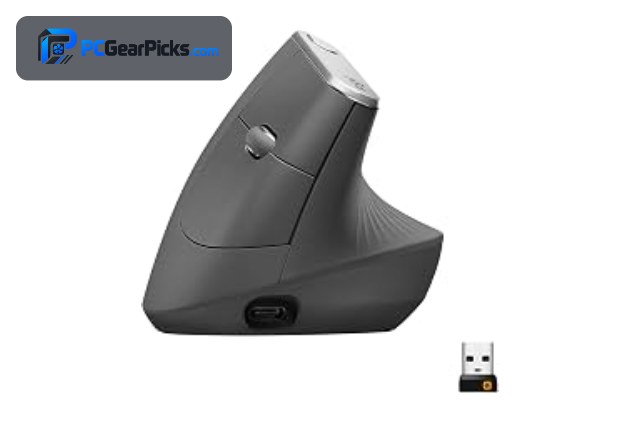
An ergonomic mouse is designed to reduce wrist and hand strain during long hours of work, using vertical angles or sculpted shapes to keep your hand in a more natural position. The best ergonomic mouse for you depends on whether you prefer a vertical or sculpted design, your hand size, and your budget.
Below we rank six of the best ergonomic mice, led by the comfortable Logitech MX Vertical. For gaming-focused comfort, see our gaming mouse guide, or our best computer mouse roundup for everyday options.
Top 3 Best Ergonomic Mice at a Glance

- 57° vertical design
- Reduces muscle strain
- Wireless + Bluetooth

- Sculpted ergonomic shape
- Precise scrolling
- Multi-device wireless

- Compact ergonomic shape
- Bluetooth + receiver
- Quiet clicks
Best Ergonomic Mice in 2027
| Product | Key specs | Rating | Price | |
|---|---|---|---|---|
| Logitech MX Vertical Best Overall | 57° vertical design, Reduces muscle strain, Wireless + Bluetooth | 4.4★ | $74.99 | Check Price on Amazon |
| Logitech MX Master 4 Best Premium | Sculpted ergonomic shape, Precise scrolling, Multi-device wireless | 4.3★ | $119.99 | Check Price on Amazon |
| Logitech Ergonomic Wireless Mouse Best for Smaller Hands | Compact ergonomic shape, Bluetooth + receiver, Quiet clicks | 4.4★ | $62.90 | Check Price on Amazon |
| Anker Vertical Ergonomic Mouse Best Budget | Vertical design, Adjustable DPI, Wireless | 4.2★ | $29.99 | Check Price on Amazon |
| 58° Vertical Ergonomic Mouse Best Vertical Value | 58° vertical angle, Natural wrist position, Wireless | 4.4★ | $25.99 | Check Price on Amazon |
| Multi-Device Ergonomic Mouse Best Multi-Device | 3-device switching, 6 DPI levels, Bluetooth + 2.4G | 4.4★ | $22.49 | Check Price on Amazon |
1. Logitech MX Vertical – Best Overall
- ✓ Vertical shape reduces wrist strain
- ✓ Comfortable for all-day use
- ✓ Huge review base of 15,000+
- ✗ Takes time to adjust to
- ✗ Premium price
The Logitech MX Vertical is the best ergonomic mouse overall, using a 57-degree vertical design to put your hand in a more natural handshake position that reduces wrist strain for around $75. With over 15,000 reviews, it is the proven choice for comfortable all-day use.
Its vertical shape takes a little time to adjust to and it sits at a premium price, but for reducing wrist strain during long work sessions, it is our top pick.
Best for: Office users wanting to reduce wrist strain
May not fit: Gamers or those who dislike vertical shapes
2. Logitech MX Master 4 – Best Premium
- ✓ Superb sculpted ergonomic comfort
- ✓ Fast, precise scroll wheel
- ✓ Multi-device and app customization
- ✗ Premium price
- ✗ Larger, right-handed shape
The Logitech MX Master 4 is the best premium ergonomic mouse, combining a superbly sculpted shape with a fast, precise scroll wheel and deep multi-device customization for around $120. It is the gold standard for productivity and comfort on a traditional ergonomic shape.
It carries a premium price and uses a larger, right-handed shape, but for the most comfortable, feature-rich productivity mouse, it is the standout premium pick.
Best for: Professionals wanting the best productivity comfort
May not fit: Left-handed users or budget buyers
3. Logitech Ergonomic Wireless Mouse – Best for Smaller Hands
- ✓ Comfortable compact ergonomic shape
- ✓ Bluetooth and receiver connectivity
- ✓ Well reviewed with 14,000+ ratings
- ✗ Smaller than the MX Master
- ✗ Fewer advanced features
This Logitech ergonomic wireless mouse is the best pick for smaller hands, offering a comfortable, compact ergonomic shape with Bluetooth and receiver connectivity for around $63. It brings everyday ergonomic comfort to those who find larger mice unwieldy.
It is smaller than the MX Master and has fewer advanced features, but for a comfortable, compact ergonomic mouse that suits smaller hands, it is an excellent choice.
Best for: Smaller-handed users wanting ergonomic comfort
May not fit: Those wanting a large shape or advanced features
4. Anker Vertical Ergonomic Mouse – Best Budget

- ✓ Affordable vertical ergonomic design
- ✓ Reduces wrist strain
- ✓ Enormous review base of 53,000+
- ✗ Plasticky build
- ✗ Basic features
The Anker Vertical Ergonomic Mouse is the best budget ergonomic mouse, offering a wrist-friendly vertical design and adjustable DPI at a very low price of around $30. With over 53,000 reviews, it is the proven, affordable way to try a vertical mouse.
Its build is plasticky and features are basic, but for an affordable vertical mouse that reduces wrist strain, it is the value standout.
Best for: Budget buyers wanting a wrist-friendly vertical mouse
May not fit: Those wanting a premium build or advanced features
5. 58° Vertical Ergonomic Mouse – Best Vertical Value

- ✓ Steep 58° angle for a natural grip
- ✓ Affordable price
- ✓ Well reviewed with 6,000+ ratings
- ✗ Takes adjustment
- ✗ Basic software
This 58-degree vertical ergonomic mouse is the best vertical value pick, using a steep angle to support a natural wrist position for around $26. It is an affordable way to get strong ergonomic benefits for users who want a more upright grip.
It takes some adjustment and has basic software, but for an affordable, steeply angled vertical mouse that eases wrist strain, it is a strong pick.
Best for: Users wanting a steep vertical angle for less
May not fit: Those wanting advanced features or a gentle angle
6. Multi-Device Ergonomic Mouse – Best Multi-Device

- ✓ Switches among three devices
- ✓ Adjustable DPI levels
- ✓ Affordable and well reviewed
- ✗ Basic ergonomic shape
- ✗ Plasticky build
This multi-device ergonomic mouse is the best pick for working across several computers, letting you switch among three devices with adjustable DPI for around $22. It is an affordable, flexible option for users with a laptop, desktop, and tablet.
Its ergonomic shape is basic and the build is plasticky, but for affordable multi-device switching with everyday comfort, it is a practical choice.
Best for: Users working across multiple computers
May not fit: Those wanting a premium build or a steep vertical angle
How to Choose an Ergonomic Mouse
Vertical vs sculpted shapes
Vertical mice like the Logitech MX Vertical and Anker mouse angle your hand into a handshake position that reduces wrist twist, while sculpted mice like the MX Master 4 keep a traditional orientation with a comfortable contoured shape. Vertical offers the most strain relief but takes adjustment; sculpted is more familiar.
Reducing wrist and hand strain
If you experience wrist discomfort, a vertical mouse’s angle can help by reducing forearm rotation. The steeper the angle, as on the 58-degree vertical mouse, the more upright your grip, though steeper angles take more getting used to. A sculpted mouse still helps by supporting your hand comfortably.
Hand size and fit
Ergonomic mice come in different sizes, so match the mouse to your hand. Larger shapes like the MX Master suit bigger hands, while compact ergonomic models fit smaller hands better. A mouse that is too big or small undermines the comfort benefits, so fit matters as much as shape.
Connectivity and multi-device use
Many ergonomic mice offer wireless and Bluetooth, and some, like the multi-device model, switch among several computers. If you work across a laptop, desktop, and tablet, multi-device switching is convenient. For a single computer, simple wireless or a receiver is enough.
Features and software
Premium ergonomic mice like the MX Master 4 add precise scrolling, extra buttons, and app customization that boost productivity, while budget models keep things simple. Decide whether you want advanced features and software or just a comfortable, affordable shape.
Frequently Asked Questions
What is the best ergonomic mouse in 2027?
Our overall pick is the Logitech MX Vertical, a vertical mouse that reduces wrist strain with a huge review base for around $75. For premium productivity, the MX Master 4 is the best sculpted choice, and the Anker vertical mouse is the best budget pick.
Do ergonomic mice really help with wrist pain?
For many people, yes — vertical ergonomic mice like the MX Vertical reduce forearm rotation and can ease wrist strain, while sculpted mice support the hand more comfortably. They are not a medical treatment, but many users find them noticeably more comfortable for long sessions.
Are vertical or sculpted ergonomic mice better?
It depends on your preference. Vertical mice offer the most wrist-strain relief but take time to adjust to, while sculpted mice like the MX Master keep a familiar orientation with a comfortable shape. Try a vertical mouse if you have wrist discomfort, or a sculpted one for easy familiarity.
How long does it take to adjust to a vertical mouse?
Most people adapt to a vertical mouse within a few days to a couple of weeks. Precision can feel off at first since the grip is different, but it usually improves quickly. A steeper angle like 58 degrees takes a little longer to adjust to than a gentler one.
How much should I spend on an ergonomic mouse?
Budget vertical mice like the Anker and 58-degree models cost around $26-30 and ease wrist strain well, the sweet spot for a proven vertical mouse is roughly $63-75, and premium productivity mice like the MX Master 4 run about $120. Spend based on comfort needs and features.
Final Verdict
For an ergonomic mouse in 2027, the Logitech MX Vertical is the best all-round pick thanks to its wrist-friendly design and huge review base, while the MX Master 4 is the best premium productivity choice and the Anker vertical mouse is the best budget option. See our computer mouse and gaming mouse guides for more.
No reviews yet. Be the first to share your experience!