

For streamers, the right custom keyboard does double duty: it looks great on camera and puts volume, mute, and scene controls within easy reach. The best custom keyboard for streaming blends quiet switches that won’t bleed into your mic with handy knobs, displays, and programmable macros.
We compared hot-swappable boards with control knobs, displays, and macro support — plus quiet, dampened typing — to find the top picks for 2026. Each balances on-camera style with real streaming utility. For related gear, see our guides to the best custom gaming keyboards and the best budget wireless keyboards. For more gear, browse our full range of PC peripherals guides.

- 75% hot-swappable layout
- Gasket mount, quiet feel
- Tri-mode wireless + RGB
- 4.6 stars from 2,600+ buyers

- Color smart display + control knob
- Hot-swap sockets
- Gasket mount, vivid RGB
- 4.8-star rating

- Gasket build + scroll knob
- RGB backlight
- Tri-mode wireless under $50
- 4.6 stars from 1,400+ buyers
Best Custom Keyboards for Streaming in 2026
| # | Product | Key Features | Price |
|---|---|---|---|
| 1 | AULA F75 Hot-Swap Keyboard |
| CHECK LATEST PRICE |
| 2 | Womier SK80 Keyboard |
| CHECK LATEST PRICE |
| 3 | Redragon K673 PRO Keyboard |
| CHECK LATEST PRICE |
| 4 |  Keychron K4 Ultra Keyboard Keychron K4 Ultra Keyboard |
| CHECK LATEST PRICE |
| 5 |  YUNZII B75 PRO Keyboard YUNZII B75 PRO Keyboard |
| CHECK LATEST PRICE |
| 6 |  GravaStar Mercury K1 Keyboard GravaStar Mercury K1 Keyboard |
| CHECK LATEST PRICE |
| 7 |  Redragon K617 Hot-Swap Keyboard Redragon K617 Hot-Swap Keyboard |
| CHECK LATEST PRICE |
1. AULA F75 Hot-Swap Keyboard – Best Overall
- 75% hot-swappable layout
- Gasket mount, quiet feel
- Tri-mode wireless + RGB
- 4.6 stars from 2,600+ buyers
As an Amazon Associate we earn from qualifying purchases, at no additional cost to you.
- ✓Quiet gasket-mounted typing
- ✓Hot-swappable switches
- ✓Tri-mode wireless + RGB
- ✓Great value at ~$66
- ✗75% drops the numpad
- ✗Basic software
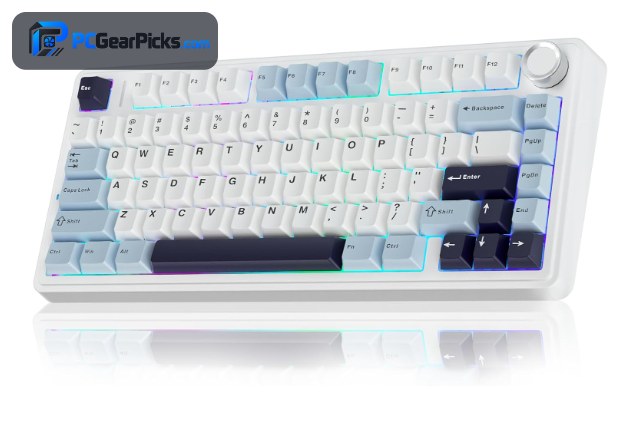
The AULA F75 is the best overall custom keyboard for streaming. Its gasket mount and pre-lubed switches keep typing quiet and muted, so clacky keys won’t bleed into your microphone during a stream, and the RGB looks clean on camera.
Hot-swap sockets let you fit even quieter switches if you want, and tri-mode wireless keeps your setup tidy and cable-free. With 2,600+ ratings at 4.6 stars, it is a dependable, affordable foundation for any streaming desk.
For whom this is best
Streamers who want quiet typing and a clean on-camera look.
For whom this may not fit
Those who need a dedicated numpad.
2. Womier SK80 Keyboard – Best Features
- Color smart display + control knob
- Hot-swap sockets
- Gasket mount, vivid RGB
- 4.8-star rating
As an Amazon Associate we earn from qualifying purchases, at no additional cost to you.
- ✓Color display + control knob
- ✓Hot-swap sockets
- ✓Vivid RGB for on-camera
- ✓4.8-star rating
- ✗Newer with fewer reviews
- ✗Display adds cost
The Womier SK80 is the most stream-ready custom keyboard here. Its built-in color display can show your logo, alerts, or stream stats, and the control knob makes adjusting volume or muting your mic effortless mid-broadcast.
It is a proper custom board too, with a gasket mount and hot-swap switches for a satisfying feel, plus bright RGB that pops on camera. At around $60 with a 4.8-star rating, it packs the most streaming personality per dollar.
For whom this is best
Streamers who want a display, knob, and eye-catching RGB.
For whom this may not fit
Minimalists who prefer a plain board.
3. Redragon K673 PRO Keyboard – Best Value
- Gasket build + scroll knob
- RGB backlight
- Tri-mode wireless under $50
- 4.6 stars from 1,400+ buyers
As an Amazon Associate we earn from qualifying purchases, at no additional cost to you.
- ✓Scroll knob for volume/mute
- ✓Tri-mode wireless under $50
- ✓Gasket build + RGB
- ✓Compact 81-key layout
- ✗Smaller keys take adjustment
- ✗ABS keycaps
The Redragon K673 PRO is the best value custom keyboard for streaming. Its scroll knob is perfect for quick volume and mute adjustments on the fly, and the gasket-mounted RGB build looks great on camera — all for under $50.
Tri-mode wireless keeps your desk clean, and the compact 81-key layout saves space for a mic arm or stream deck. With 1,400+ ratings at 4.6 stars, it delivers streaming-friendly features without stretching the budget.
For whom this is best
Budget streamers who want a control knob and wireless under $50.
For whom this may not fit
Those who prefer full-size layouts or PBT keycaps.
4. Keychron K4 Ultra Keyboard – Best for Macros
- Macros + layers for scene control
- 96% compact layout
- Hot-swap + tri-mode wireless
- 8000 Hz polling
As an Amazon Associate we earn from qualifying purchases, at no additional cost to you.
- ✓Macros + layers for scene control
- ✓96% keeps numpad
- ✓Hot-swap + tri-mode wireless
- ✓8000 Hz polling
- ✗Around $115
- ✗Heavier build
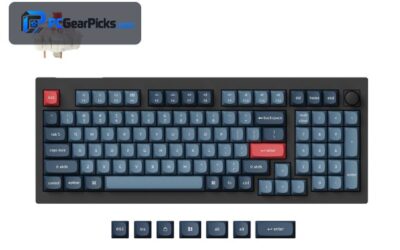
The Keychron K4 Ultra is the best custom keyboard for streamers who rely on macros. Full QMK/VIA support lets you bind scene switches, mute toggles, soundboard triggers, or chat commands to single keys — turning the keyboard into a mini stream deck.
The 96% layout keeps a numpad for extra bindable keys, and hot-swap sockets let you pick quiet switches. For streamers who want to control their broadcast without extra hardware, it is the standout pick.
For whom this is best
Streamers who want to bind scene and audio controls to macros.
For whom this may not fit
Buyers trying to stay well under $100.
5. YUNZII B75 PRO Keyboard – Best for Quiet Typing
- Gasket build, muted sound
- Pre-lubed switches
- Tri-mode wireless
- 4.6 stars from 1,300+ buyers
As an Amazon Associate we earn from qualifying purchases, at no additional cost to you.
- ✓Muted, mic-friendly sound
- ✓Pre-lubed switches
- ✓Gasket-mounted build
- ✓Tri-mode wireless
- ✗No numpad
- ✗Subtle RGB
The YUNZII B75 PRO is the best custom keyboard for quiet typing on stream. Its gasket mount, layered foam, and pre-lubed switches produce a soft, muted sound that stays out of your microphone, even during fast typing.
It connects over Bluetooth, 2.4GHz, or USB-C and looks clean on a streaming desk. With 1,300+ ratings at 4.6 stars, it is a favorite for creators who want a premium feel without distracting key noise.
For whom this is best
Streamers whose mic picks up loud keyboards.
For whom this may not fit
Those who want bright RGB or a numpad.
6. GravaStar Mercury K1 Keyboard – Best Design
- CNC aluminum body
- Hot-swap + bright RGB
- Tri-mode wireless
- 4.7 stars from 1,800+ buyers
As an Amazon Associate we earn from qualifying purchases, at no additional cost to you.
- ✓CNC aluminum body
- ✓Bright RGB for on-camera
- ✓Hot-swap + tri-mode wireless
- ✓Premium desk presence
- ✗Around $130
- ✗Heavier build
The GravaStar Mercury K1 is the best-designed custom keyboard for streamers who want standout on-camera gear. Its machined metal body and futuristic styling make it a visual centerpiece, and the vivid RGB reads beautifully on stream.
It performs as well as it looks, with hot-swap switches and reliable tri-mode wireless. With 1,800+ ratings at 4.7 stars, it is the pick for creators who treat their desk as part of the show.
For whom this is best
Streamers who want premium, camera-ready aesthetics.
For whom this may not fit
Budget creators or those who want a light board.
7. Redragon K617 Hot-Swap Keyboard – Best Compact
- 60% hot-swap layout
- RGB backlight
- Under $30
- 4.6 stars from 5,800+ buyers
As an Amazon Associate we earn from qualifying purchases, at no additional cost to you.
- ✓Hot-swap under $30
- ✓Compact 60% frees desk space
- ✓RGB backlight
- ✓5,800+ proven reviews
- ✗60% drops arrows to a layer
- ✗ABS keycaps
The Redragon K617 is the best compact custom keyboard for streamers on a budget. Its 60% footprint clears space for a mic arm, stream deck, or second display, and the hot-swap sockets let you fit quieter switches for under $30.
It is the most affordable way to get a tidy, custom-capable board on a crowded streaming desk. With over 5,800 ratings at 4.6 stars, it is a popular, low-risk choice.
For whom this is best
Streamers who want a tiny, affordable board that frees desk space.
For whom this may not fit
Creators who need always-visible arrows and a function row.
What to Look for in a Custom Keyboard for Streaming
A custom keyboard for streaming should look good on camera, keep typing quiet for your mic, and offer quick controls. Here is what our team prioritized.
Quiet, Mic-Friendly Switches
Gasket-mounted boards with foam (AULA F75, YUNZII B75 PRO) produce a muted sound that stays out of your microphone. Hot-swap sockets let you fit even quieter switches, so clacky keys never distract your audience.
Control Knobs and Displays
A control knob (Womier SK80, Redragon K673 PRO) makes volume and mute adjustments instant, and a built-in display can show alerts, your logo, or stream stats. These touches reduce the need for extra hardware on your desk.
Programmable Macros
Macros let you bind scene switches, soundboard triggers, or chat commands to a single key. Boards with VIA support like the Keychron K4 Ultra can act as a built-in stream deck, saving both money and desk space.
On-Camera Design and Footprint
RGB and a clean build (GravaStar Mercury K1) look great on stream, while compact layouts (Redragon K617) free space for a mic arm or second monitor. Balance aesthetics with the desk room you need. For more, see the best budget mechanical keyboards.
Frequently Asked Questions
What is the best custom keyboard for streaming?
For most streamers the AULA F75 is the best custom keyboard for streaming, with quiet gasket-mounted typing, hot-swap switches, and clean RGB for around $66. If you want a display and control knob, the Womier SK80 is purpose-built for creators.
How do I keep my keyboard quiet on stream?
Choose a gasket-mounted board with sound-dampening foam (AULA F75, YUNZII B75 PRO) and, if needed, swap in quieter linear switches — easy on hot-swap boards. These steps keep key noise from bleeding into your microphone.
Can a keyboard replace a stream deck?
To an extent, yes. A programmable board with VIA support like the Keychron K4 Ultra lets you bind scene switches, mute toggles, and macros to keys, covering many stream deck tasks without extra hardware.
Do I need a control knob for streaming?
It is not essential, but a knob (on the Womier SK80 or Redragon K673 PRO) makes adjusting volume or muting your mic fast and tactile mid-broadcast, which many streamers find more convenient than keyboard shortcuts.
Which Custom Keyboard for Streaming Should You Buy?
After testing the field, the AULA F75 is the best overall custom keyboard for streaming in 2026, with quiet gasket typing, hot-swap switches, and clean RGB for around $66. For built-in controls, the Womier SK80’s display and knob stand out, while the Keychron K4 Ultra is the macro champion for creators who want a keyboard-as-stream-deck.
Match the controls, noise level, and footprint to your setup, and any board above will upgrade your stream. For more, see our guides to the best budget custom keyboards and the best custom keyboards for video editing.
No reviews yet. Be the first to share your experience!