

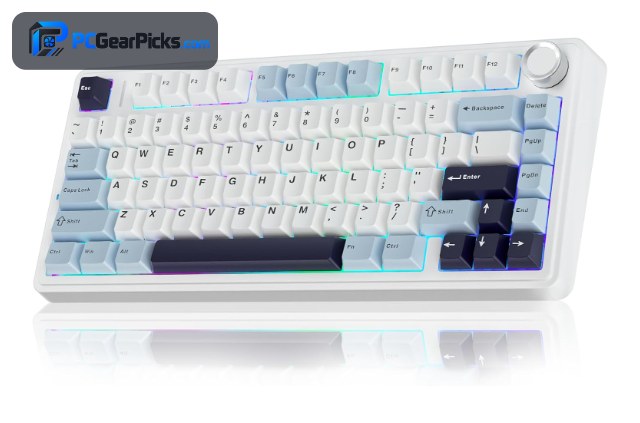
Under $150 is the sweet spot for custom keyboards. At this budget you can get gasket-mounted builds, hot-swappable switches, tri-mode wireless, and even premium metal cases or full QMK/VIA programmability. The best custom keyboard under $150 delivers a genuinely enthusiast experience without flagship pricing.
We compared the top hot-swap boards in this range on build quality, switch feel, features, and value to find the best picks for 2026. From quiet typing boards to programmable powerhouses, there is something for every workflow. For more, see our guides to the best custom keyboards under $50 and the best budget mechanical keyboards. For more gear, browse our full range of PC peripherals guides.

- 75% hot-swappable layout
- Gasket mount, creamy sound
- Tri-mode wireless
- 4.6 stars from 2,600+ buyers

- Full QMK/VIA + macros
- 96% layout with numpad
- 8000 Hz polling, hot-swap
- Premium build quality

- CNC aluminum body
- Hot-swap + bright RGB
- Tri-mode wireless
- 4.7 stars from 1,800+ buyers
Best Custom Keyboards Under $150 in 2026
| # | Product | Key Features | Price |
|---|---|---|---|
| 1 | AULA F75 Hot-Swap Keyboard |
| CHECK LATEST PRICE |
| 2 | Keychron K4 Ultra Keyboard |
| CHECK LATEST PRICE |
| 3 | GravaStar Mercury K1 Keyboard |
| CHECK LATEST PRICE |
| 4 |  YUNZII B75 PRO Keyboard YUNZII B75 PRO Keyboard |
| CHECK LATEST PRICE |
| 5 |  EPOMAKER TH99 PRO Keyboard EPOMAKER TH99 PRO Keyboard |
| CHECK LATEST PRICE |
| 6 |  ASUS ROG Strix Scope II 96 Wireless ASUS ROG Strix Scope II 96 Wireless |
| CHECK LATEST PRICE |
| 7 |  Womier SK80 Keyboard Womier SK80 Keyboard |
| CHECK LATEST PRICE |
1. AULA F75 Hot-Swap Keyboard – Best Overall
- 75% hot-swappable layout
- Gasket mount, creamy sound
- Tri-mode wireless
- 4.6 stars from 2,600+ buyers
As an Amazon Associate we earn from qualifying purchases, at no additional cost to you.
- ✓Hot-swappable switches
- ✓Gasket mount, creamy sound
- ✓Tri-mode wireless
- ✓Excellent value at ~$66
- ✗75% drops the numpad
- ✗Basic software
The AULA F75 is the best overall custom keyboard under $150 — and it leaves plenty of budget to spare. Its gasket-mounted 75% build, pre-lubed hot-swappable switches, and tri-mode wireless deliver a premium, creamy feel for around $66.
You simply do not need to spend near $150 to get a great custom board, and the F75 proves it. With 2,600+ ratings at 4.6 stars, it is the pick we recommend first for most buyers in this range.
For whom this is best
Anyone who wants the best value custom board well under the budget cap.
For whom this may not fit
Those who need a dedicated numpad.
2. Keychron K4 Ultra Keyboard – Best for Customization
- Full QMK/VIA + macros
- 96% layout with numpad
- 8000 Hz polling, hot-swap
- Premium build quality
As an Amazon Associate we earn from qualifying purchases, at no additional cost to you.
- ✓Full QMK/VIA + macros
- ✓96% layout with numpad
- ✓8000 Hz polling, hot-swap
- ✓Premium build
- ✗Around $115
- ✗Heavier build
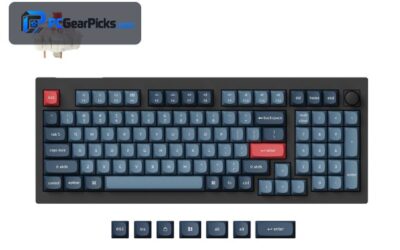
The Keychron K4 Ultra is the best custom keyboard under $150 for customization. Full QMK/VIA support lets you remap every key, build layers, and program macros, while the 8000 Hz polling and hot-swap sockets give it enthusiast-grade flexibility.
The 96% layout keeps a numpad in a compact body, making it as capable for work as it is for play. For power users who want deep control over their board, it is the standout pick in this range.
For whom this is best
Power users who want full programmability and a numpad.
For whom this may not fit
Buyers who want to spend as little as possible.
3. GravaStar Mercury K1 Keyboard – Best Design
- CNC aluminum body
- Hot-swap + bright RGB
- Tri-mode wireless
- 4.7 stars from 1,800+ buyers
As an Amazon Associate we earn from qualifying purchases, at no additional cost to you.
- ✓CNC aluminum body
- ✓Hot-swap + bright RGB
- ✓Tri-mode wireless
- ✓Premium desk presence
- ✗Near the top of the budget
- ✗Heavier build
The GravaStar Mercury K1 is the best-designed custom keyboard under $150. Its CNC-machined metal chassis and industrial styling look stunning and feel rock-solid, offering a premium build that rivals pricier boards for around $130.
It backs the looks with hot-swappable switches, vivid RGB, and reliable tri-mode wireless. With 1,800+ ratings at 4.7 stars, it is the pick for buyers who want a premium metal board that doubles as desk decor.
For whom this is best
Buyers who want a premium metal build and standout design.
For whom this may not fit
Those who want to spend well under the cap.
4. YUNZII B75 PRO Keyboard – Best for Typing
- Gasket build, creamy feel
- Pre-lubed switches
- Tri-mode wireless
- 4.6 stars from 1,300+ buyers
As an Amazon Associate we earn from qualifying purchases, at no additional cost to you.
- ✓Creamy gasket typing
- ✓Pre-lubed switches
- ✓Tri-mode wireless
- ✓Great value at ~$64
- ✗No numpad
- ✗Subtle RGB
The YUNZII B75 PRO is the best custom keyboard under $150 for pure typing feel. Its gasket mount, layered foam, and pre-lubed switches produce a soft, “thocky” sound that enthusiasts love — right out of the box for around $64.
It connects over Bluetooth, 2.4GHz, or USB-C, and the cocoa-cream colorways look great on any desk. With 1,300+ ratings at 4.6 stars, it is a favorite for comfort-focused typists who want premium feel on a budget.
For whom this is best
Typists who want a soft, premium sound signature affordably.
For whom this may not fit
Gamers who want the brightest RGB or a numpad.
5. EPOMAKER TH99 PRO Keyboard – Best 96% Layout
- 96% layout with numpad + knob
- Gasket mount, hot-swap
- Tri-mode wireless
- 4.6-star rating
As an Amazon Associate we earn from qualifying purchases, at no additional cost to you.
- ✓96% layout + numpad and knob
- ✓Gasket mount, hot-swap
- ✓Tri-mode wireless
- ✓Lots of features at ~$81
- ✗Newer with fewer reviews
- ✗Heavier board
The EPOMAKER TH99 PRO is the best 96% custom keyboard under $150. It packs a near-full layout with a numpad and control knob, a gasket-mounted build, and hot-swap sockets — a lot of enthusiast features for around $81.
Tri-mode wireless adds flexibility, and the knob handles volume and media on the fly. For buyers who want a feature-loaded, customizable board with a numpad, it offers strong value in this range.
For whom this is best
Users who want a feature-rich 96% board with a knob and numpad.
For whom this may not fit
Those who prefer a compact, minimalist layout.
6. ASUS ROG Strix Scope II 96 Wireless – Best for Gaming
- 96% full-size layout
- Pre-lubed ROG NX switches
- Low-latency tri-mode wireless
- 4.6 stars from 1,000+ buyers
As an Amazon Associate we earn from qualifying purchases, at no additional cost to you.
- ✓96% layout keeps numpad
- ✓Pre-lubed ROG NX switches
- ✓Low-latency tri-mode wireless
- ✓Premium gaming build
- ✗Near top of budget
- ✗Heavier software suite
The ASUS ROG Strix Scope II 96 is the best custom keyboard under $150 for gaming. Its low-latency 2.4GHz wireless and smooth, pre-lubed ROG NX switches deliver fast, consistent actuation, while the 96% layout keeps the numpad in a compact footprint.
Sound-dampening foam gives it a muted, premium sound, and the long battery life keeps you playing. With 1,000+ ratings at 4.6 stars, it is a reliable choice for gamers who want esports-ready wireless with a numpad.
For whom this is best
Gamers who want low-latency wireless plus a numpad.
For whom this may not fit
Minimalists who prefer 60% or 75% layouts.
7. Womier SK80 Keyboard – Best Features
- 75% with color smart display
- Hot-swap + control knob
- Gasket mount
- 4.6-star rating
As an Amazon Associate we earn from qualifying purchases, at no additional cost to you.
- ✓Color smart display + knob
- ✓Hot-swap sockets
- ✓Gasket mount
- ✓Affordable at ~$57
- ✗Display adds to the price
- ✗Fewer reviews than rivals
The Womier SK80 is the most feature-rich custom keyboard under $150 for the money. Its built-in color display can show GIFs, system info, or shortcuts, and the control knob makes quick adjustments easy — all for around $57.
Underneath the flashy extras it is a real custom board, with a gasket mount and hot-swap switches for a satisfying feel. For buyers who want personality and function without spending much, it is a standout value.
For whom this is best
Buyers who want a display and extra controls at a low price.
For whom this may not fit
Minimalists who prefer a plain, distraction-free board.
What to Look for in a Custom Keyboard Under $150
This budget unlocks nearly every enthusiast feature, so the choice comes down to what matters most for you. Here is what our team weighed.
Build and Mounting
A gasket mount with foam (AULA F75, YUNZII B75 PRO) gives a soft, premium typing feel, and metal cases (GravaStar Mercury K1) add durability and heft. Under $150 you can have either, so decide between a cushioned sound and a rock-solid chassis.
Programmability
If you want to remap keys, build layers, and program macros, look for QMK/VIA support. The Keychron K4 Ultra leads here, turning the keyboard into a productivity tool for coding, editing, or gaming shortcuts.
Connectivity and Features
Tri-mode wireless is standard in this range, and many boards add control knobs or displays (EPOMAKER TH99 PRO, Womier SK80). Decide which extras you will actually use rather than paying for features you won’t.
Layout
Choose the layout that fits your work: 75% (AULA F75) balances size and function, while 96% (K4 Ultra, ASUS ROG, EPOMAKER) keeps a numpad in a compact body. For cheaper options, see the best custom keyboards under $50.
Frequently Asked Questions
What is the best custom keyboard under $150?
For most people the AULA F75 is the best custom keyboard under $150, offering a gasket build, hot-swap switches, and tri-mode wireless for around $66 — well under the cap. For full programmability, the Keychron K4 Ultra is the top choice.
Do I need to spend $150 for a good custom keyboard?
No. Excellent custom boards like the AULA F75 and YUNZII B75 PRO cost well under $100, and only premium metal or highly programmable boards approach the $150 mark. Spend more only for a specific feature you want.
Are metal keyboards worth it?
If you value durability and a premium feel, yes. A CNC aluminum board like the GravaStar Mercury K1 feels rock-solid and looks striking, though it is heavier and pricier than plastic-cased boards with similar internals.
Which layout should I choose under $150?
Pick based on your needs: a 75% board (AULA F75) saves space while keeping arrows, and a 96% board (Keychron K4 Ultra, ASUS ROG) retains the numpad in a compact body. Both are widely available in this budget.
Which Custom Keyboard Under $150 Should You Buy?
After comparing the field, the AULA F75 is the best overall custom keyboard under $150 for 2026, delivering a premium gasket feel and tri-mode wireless for around $66. For deep customization, the Keychron K4 Ultra is the programmability champion, while the GravaStar Mercury K1 is the pick for a premium metal build.
Decide which features matter most and any board above will deliver an enthusiast experience under budget. For more, see our guides to the best custom keyboards under $500 and the best budget custom keyboards.
No reviews yet. Be the first to share your experience!