

Call of Duty asks two different things of a graphics card. Standard multiplayer is fast and benefits from high frame rates and low latency, much like esports. Warzone, on the other hand, is genuinely demanding and VRAM-hungry at high texture settings, which means the ideal CoD card balances raw frames with enough memory to avoid stutter.
On a budget that points to 8GB cards as the floor, with more VRAM and upscaling (FSR, DLSS, XeSS) paying off in Warzone specifically. Below we rank seven budget cards for Call of Duty, weighing multiplayer speed against Warzone’s heavier demands. For the pure-multiplayer angle, see our competitive gaming GPU guide, and the components hub for everything else.
Top 3 Best Budget CoD GPUs at a Glance
Best Budget GPUs for Call of Duty in 2027
| GPU | Best For | Key Spec | Rating | Price |
|---|---|---|---|---|
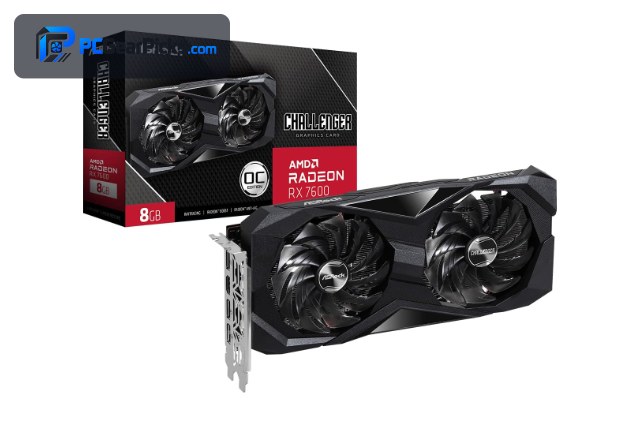
| Radeon RX 7600 8GB | Best Overall | RDNA 3, 8GB | 4.6★ (294) | Check Price |
| GeForce RTX 3060 12GB | Best for Warzone | Ampere, 12GB | 4.7★ (3168) | Check Price |
| Radeon RX 6600 8GB | Best Value Multiplayer | RDNA 2, 8GB | 4.6★ (145) | Check Price |
| Intel Arc B570 10GB | Best 10GB Value | Battlemage, 10GB | 4.6★ | Check Price |
| Radeon RX 9060 XT 16GB | Best for 1440p / High Textures | RDNA 4, 16GB | 4.7★ (357) | Check Price |
| GeForce RTX 3050 8GB | Best NVIDIA Value | Ampere, 8GB | 4.7★ (1143) | Check Price |
| Radeon RX 580 8GB | Best Ultra-Budget | Polaris, 8GB | 4.1★ (498) | Check Price |
1. Radeon RX 7600 8GB – Best Overall

- ✓ High 1080p multiplayer frame rates
- ✓ FSR helps in heavy Warzone maps
- ✓ Modern, efficient RDNA 3
- ✗ 8GB wants tuned textures in Warzone
- ✗ Ray tracing is a stretch
For Call of Duty the RX 7600 is the balanced pick. It pushes the high frame rates fast-paced multiplayer wants at 1080p, and FSR keeps the heavier, more demanding Warzone maps smooth when the action gets busy.
Modern Warzone is VRAM-hungry at the highest texture settings, so an 8GB card like this is happiest at high rather than extreme textures — a sensible trade for the price and performance.
Best for: Players who want high-fps multiplayer plus Warzone
May not fit: Those running extreme textures or heavy ray tracing
2. GeForce RTX 3060 12GB – Best for Warzone

- ✓ 12GB VRAM handles high textures
- ✓ DLSS smooths Warzone
- ✓ NVIDIA Reflex for multiplayer latency
- ✗ Priciest here
- ✗ Ampere lacks frame generation
Warzone is the demanding side of Call of Duty, and the RTX 3060 12GB is built for it on a budget. The 12GB buffer comfortably holds high texture settings, DLSS keeps frame rates up on large maps, and Reflex trims input latency in multiplayer.
It costs the most on this list, but for players who live in Warzone and want higher textures without stutter, the extra VRAM and DLSS are worth it.
Best for: Warzone players who want high textures and DLSS
May not fit: Budget players who mainly play lighter multiplayer
3. Radeon RX 6600 8GB – Best Value Multiplayer

- ✓ Great multiplayer fps per dollar
- ✓ Low power, cool and quiet
- ✓ Easy prebuilt upgrade
- ✗ No DLSS (uses FSR)
- ✗ 8GB tight at max Warzone textures
For standard Call of Duty multiplayer, the RX 6600 delivers high frame rates at 1080p while sipping power. It’s an efficient, affordable way to keep fast matches smooth without a pricey card.
Warzone at the highest textures will push its 8GB, but with FSR and sensible settings it stays very playable, making it the value champion for CoD.
Best for: Multiplayer-focused players on a tight budget
May not fit: Max-texture Warzone or 1440p play
4. Intel Arc B570 10GB – Best 10GB Value

- ✓ 10GB VRAM for Warzone textures
- ✓ XeSS upscaling
- ✓ Strong value under $300
- ✗ Driver performance varies by patch
- ✗ Newer platform
The Intel Arc B570’s 10GB of VRAM is a real asset in Warzone, where textures eat memory, and XeSS upscaling helps hold frame rates on big maps. For under $300 it’s a lot of card for Call of Duty.
Intel’s drivers improve with each update but can vary around new game patches, so it suits value-minded players who don’t mind Intel’s evolving ecosystem.
Best for: Warzone players who want 10GB cheaply
May not fit: Players needing identical performance every patch
5. Radeon RX 9060 XT 16GB – Best for 1440p / High Textures

- ✓ 16GB for extreme textures
- ✓ Newest RDNA 4 with FSR
- ✓ Headroom for 1440p
- ✗ Costs the most
- ✗ Overkill for light multiplayer only
If you play Call of Duty at 1440p or insist on the highest textures in Warzone, the 16GB RX 9060 XT has the VRAM and horsepower to do it on a budget. FSR adds extra headroom on the most demanding maps.
It’s the priciest option and more than pure 1080p multiplayer needs, but for high-texture Warzone and 1440p play it’s the most future-proof pick here.
Best for: 1440p and max-texture Warzone players
May not fit: Those who only play light 1080p multiplayer
6. GeForce RTX 3050 8GB – Best NVIDIA Value

- ✓ NVIDIA Reflex for multiplayer
- ✓ DLSS helps in Warzone
- ✓ Quiet and efficient
- ✗ 8GB limits max textures
- ✗ Slower than RX 7600 in spots
The RTX 3050 8GB brings Reflex and DLSS to a tighter budget, a useful combo for Call of Duty: Reflex lowers multiplayer latency and DLSS keeps Warzone smooth. It runs quiet and cool too.
Its 8GB and core count mean you’ll keep textures reasonable, but for a player who values NVIDIA’s latency and upscaling features on a budget, it covers the essentials.
Best for: Budget players who want Reflex and DLSS for CoD
May not fit: Max-texture Warzone or 1440p
7. Radeon RX 580 8GB – Best Ultra-Budget

- ✓ Cheapest 8GB entry
- ✓ Runs multiplayer at 1080p
- ✓ Great value for a first CoD rig
- ✗ Older architecture, more power
- ✗ Struggles in heavy Warzone scenes
The RX 580 8GB is the budget entry for Call of Duty. Standard multiplayer runs at 1080p with tuned settings, and its 8GB buffer helps more than you’d expect for a card around $130.
Heavy Warzone fights will tax it, so expect to lower settings there, but as the cheapest way into CoD on PC it still delivers playable multiplayer.
Best for: First-time CoD players on the tightest budget
May not fit: Smooth high-texture Warzone play
How to Choose a Budget GPU for Call of Duty
Multiplayer vs Warzone demands
Standard multiplayer is lighter and rewards high frame rates, so efficient cards like the RX 6600 shine. Warzone is heavier and texture-hungry, favouring more VRAM — the RTX 3060 12GB or RX 9060 XT. Decide which mode you play most.
VRAM for high textures
Modern Call of Duty can use a lot of VRAM at high texture settings, especially in Warzone. 8GB is the sensible floor and works with tuned textures; 10–16GB cards (Arc B570, RTX 3060, RX 9060 XT) let you push textures higher without stutter.
Upscaling and latency features
FSR, DLSS, and XeSS all help in heavy Warzone scenes, while NVIDIA Reflex and AMD Anti-Lag reduce multiplayer input latency. Match the feature set to how you play — Reflex for twitch multiplayer, upscaling for Warzone.
Frame rate and your monitor
CoD multiplayer feels best on a high-refresh monitor. The cards here can feed a 144Hz 1080p panel in standard multiplayer; pair the GPU with a fast display to get the full benefit of those frames.
Balance the whole PC
Warzone leans on the CPU and RAM as well as the GPU. On a budget, make sure those aren’t bottlenecks before spending extra on the graphics card alone.
Frequently Asked Questions
What is the best budget GPU for Call of Duty in 2027?
The RX 7600 is our overall pick — high multiplayer frame rates plus FSR for Warzone at a reasonable price. Warzone-focused players should consider the RTX 3060 12GB for its extra VRAM and DLSS, while the RX 6600 is the value champion for standard multiplayer.
How much VRAM do I need for Warzone?
8GB is the practical minimum and works with tuned texture settings. For the highest textures without stutter, 10–16GB cards like the Arc B570, RTX 3060, or RX 9060 XT are more comfortable, since Warzone is one of the more VRAM-hungry games around.
Is the RX 6600 good enough for Call of Duty?
Yes, especially for standard multiplayer, where it delivers high 1080p frame rates efficiently. In Warzone at maximum textures its 8GB gets tight, but with FSR and sensible settings it stays very playable — making it the value pick.
Does NVIDIA Reflex help in Call of Duty?
In multiplayer, yes — Reflex (on the RTX cards) lowers system input latency, which helps in fast gunfights. AMD’s Anti-Lag does the same on Radeon cards. For twitch-heavy play, it’s a feature worth having.
Can a cheap card like the RX 580 run Call of Duty?
Yes, standard multiplayer runs at 1080p with tuned settings, and its 8GB helps. Heavy Warzone scenes will push it, so you’ll lower settings there, but as the cheapest entry into CoD on PC it does the job.
Final Verdict
For Call of Duty, balance multiplayer frame rate against Warzone’s heavier VRAM demands. The RX 7600 is the best all-round pick, the RTX 3060 12GB is the Warzone specialist thanks to 12GB and DLSS, and the RX 6600 is the value champion for multiplayer. Whichever you choose, 8GB is the floor and upscaling is your friend in Warzone — set it up that way and budget hardware handles CoD well. See our competitive gaming picks for the multiplayer-first view.
No reviews yet. Be the first to share your experience!