

Black Myth Wukong is one of the more demanding games you can throw at a budget PC. Built on Unreal Engine 5 with heavy effects and optional ray tracing, it punishes weak cards — but it also supports upscaling (FSR, DLSS, and XeSS), which is the key to running it well without a premium GPU.
The honest approach on a budget is to target 1080p, enable the upscaler your card supports, aim for high rather than ultra settings, and keep the heaviest ray-tracing options low or off. Below we rank six budget cards for Wukong with that reality in mind — no inflated promises, just which cards give the smoothest experience for the money. For the broader picture, see our budget gaming GPU guide and the components hub.
Top 3 Best Budget Wukong GPUs at a Glance
Best Budget GPUs for Black Myth Wukong in 2027
| GPU | Best For | Key Spec | Rating | Price |
|---|---|---|---|---|
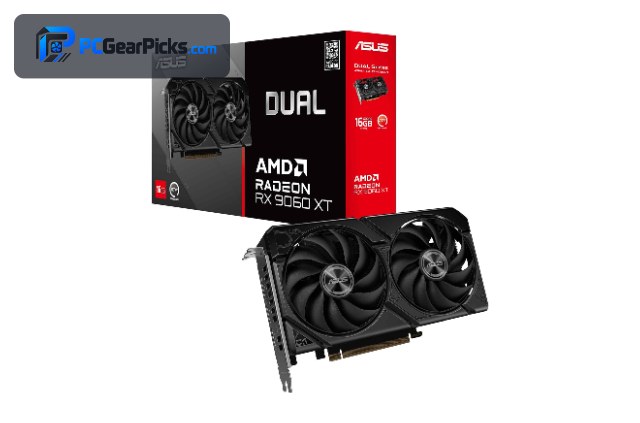
| Radeon RX 9060 XT 16GB | Best Overall | RDNA 4, 16GB | 4.7★ (357) | Check Price |
| GeForce RTX 3060 12GB | Best for DLSS | Ampere, 12GB | 4.7★ (3168) | Check Price |
| Radeon RX 7600 8GB | Best Value 1080p | RDNA 3, 8GB | 4.6★ (294) | Check Price |
| Intel Arc B570 10GB | Best Budget 10GB | Battlemage, 10GB | 4.6★ | Check Price |
| Radeon RX 6600 8GB | Best Efficient | RDNA 2, 8GB | 4.6★ (145) | Check Price |
| GeForce RTX 3050 8GB | Best Entry DLSS | Ampere, 8GB | 4.7★ (1143) | Check Price |
1. Radeon RX 9060 XT 16GB – Best Overall

- ✓ 16GB VRAM for UE5 textures
- ✓ Newest RDNA 4 with FSR
- ✓ Most headroom on this list
- ✗ Priciest budget option
- ✗ Ray tracing still demanding
Black Myth Wukong is a heavy Unreal Engine 5 game, so the RX 9060 XT — the most capable card here — is the best budget match. Its 16GB of VRAM handles the game’s dense textures, and FSR upscaling lets it deliver a smooth 1080p experience with high settings.
Even this card benefits from leaving the heaviest ray-tracing options low on a budget, but with FSR enabled it gives you the most comfortable Wukong experience of any card in this price range.
Best for: Players who want the smoothest budget Wukong run
May not fit: Anyone expecting maxed ray tracing without upscaling
2. GeForce RTX 3060 12GB – Best for DLSS

- ✓ DLSS upscaling is excellent in UE5
- ✓ 12GB VRAM
- ✓ Strong all-round performance
- ✗ Ampere, no frame generation
- ✗ No AV1
The RTX 3060 12GB leans on DLSS, which is particularly effective in Unreal Engine 5 titles like Wukong. With DLSS set to Quality or Balanced at 1080p, it holds a smooth, good-looking experience, and the 12GB buffer avoids VRAM stalls.
It doesn’t have the newer frame-generation tricks, so keep ray tracing modest, but DLSS alone makes this a very comfortable budget card for the game.
Best for: Players who want DLSS image quality in Wukong
May not fit: Those chasing heavy ray tracing at high fps
3. Radeon RX 7600 8GB – Best Value 1080p

- ✓ Modern RDNA 3 with FSR
- ✓ Good 1080p with upscaling
- ✓ Efficient and affordable
- ✗ 8GB can be tight with high textures
- ✗ Ray tracing is a stretch
The RX 7600 is the value way to play Wukong at 1080p. With FSR enabled and settings tuned to high rather than ultra, it delivers a solid experience in this demanding game without costing much.
Its 8GB buffer means you should be sensible with texture settings, and ray tracing is best left off, but as a budget 1080p Wukong card it hits the mark.
Best for: Budget players targeting smooth 1080p with FSR
May not fit: High-texture or ray-traced play
4. Intel Arc B570 10GB – Best Budget 10GB

- ✓ 10GB VRAM helps with UE5 textures
- ✓ XeSS upscaling
- ✓ Good value under $300
- ✗ Driver performance varies in new titles
- ✗ Newer platform
Intel’s Arc B570 brings 10GB and XeSS upscaling to the table for under $300, a useful combination for a VRAM-hungry UE5 game. XeSS does a good job stretching performance at 1080p in Wukong.
Intel’s drivers have improved steadily, though performance in brand-new titles can vary, so it’s a value option for players comfortable with Intel’s evolving ecosystem.
Best for: Value players who want 10GB and XeSS
May not fit: Those needing guaranteed day-one driver performance
5. Radeon RX 6600 8GB – Best Efficient

- ✓ Low power, cool and quiet
- ✓ 8GB GDDR6
- ✓ Playable 1080p with FSR
- ✗ Older RDNA 2, no AV1
- ✗ Needs upscaling and tuned settings
The efficient RX 6600 can run Wukong at 1080p if you lean on FSR and dial settings to medium-high. It stays cool and quiet, which makes it a sensible pick for a compact or prebuilt-upgrade build.
It has less raw headroom than the RX 7600, so expect to tune settings more, but with upscaling it delivers a playable experience in this heavy game.
Best for: Efficient builds playing at tuned 1080p settings
May not fit: Players wanting high settings without compromise
6. GeForce RTX 3050 8GB – Best Entry DLSS

- ✓ DLSS helps a lot in UE5
- ✓ Quiet and efficient
- ✓ Lowest-cost NVIDIA option
- ✗ 8GB and fewer cores limit settings
- ✗ Ray tracing not realistic here
The RTX 3050 8GB is the entry point for DLSS-assisted Wukong. With DLSS on and settings kept moderate at 1080p, it offers a playable run of a game that would otherwise crush an entry card.
It’s the least powerful pick here, so temper expectations — medium settings and upscaling are the recipe — but for a tight budget it gets you into the game with DLSS doing the heavy lifting.
Best for: Tight budgets relying on DLSS at medium settings
May not fit: Players wanting high settings or ray tracing
How to Choose a Budget GPU for Black Myth Wukong
Upscaling is not optional here
On a budget, FSR, DLSS, or XeSS is what makes Wukong smooth. DLSS (RTX cards) and XeSS (Arc) tend to look especially clean in UE5, while FSR works on everything. Plan to enable upscaling from the start rather than treating it as a last resort.
Settings: high, not ultra
Ultra settings and heavy ray tracing are a stretch for any budget card in this game. Targeting high settings at 1080p with upscaling gives a far better experience than chasing ultra and stuttering. The RX 9060 XT and RTX 3060 have the most headroom to push settings up.
VRAM and UE5 textures
Unreal Engine 5 games are texture-heavy, so more VRAM helps avoid stutter. The 16GB RX 9060 XT, 12GB RTX 3060, and 10GB Arc B570 have comfortable buffers; 8GB cards work but want more conservative texture settings.
Ray tracing on a budget
Wukong’s ray tracing is gorgeous but heavy. On these cards it’s best kept low or off so you can hold a smooth frame rate. Treat RT as a bonus for the strongest picks here, not a baseline expectation.
Balance the rest of your PC
A demanding game also leans on your CPU and RAM. If one of those is a bottleneck, even a good GPU will stutter, so make sure the whole system is balanced before blaming the card.
Frequently Asked Questions
What is the best budget GPU for Black Myth Wukong in 2027?
The 16GB RX 9060 XT is our overall pick because it has the most headroom and VRAM to handle this demanding UE5 game at 1080p with FSR. The RTX 3060 12GB is close behind thanks to DLSS, which looks excellent in Wukong.
Can a budget GPU run Black Myth Wukong?
Yes, at 1080p with upscaling enabled and settings around high rather than ultra. Wukong is demanding, so upscaling (FSR, DLSS, or XeSS) and modest ray-tracing settings are essential on budget cards — but the experience is smooth when set up that way.
Do I need to turn on DLSS or FSR for Wukong?
On a budget, effectively yes. Upscaling is what lets these cards deliver a smooth frame rate in this heavy game. DLSS (RTX) and XeSS (Arc) look especially clean here, while FSR works on any card.
Should I enable ray tracing in Wukong on a budget card?
Generally keep it low or off. Wukong’s ray tracing is very demanding, and on budget hardware it costs too many frames. The RX 9060 XT and RTX 3060 can handle light RT with upscaling, but smooth play comes first.
How much VRAM do I need for Black Myth Wukong?
More is better for this UE5 title. 8GB works with tuned texture settings, but 10–16GB cards (Arc B570, RTX 3060, RX 9060 XT) handle the game’s heavy textures more comfortably and reduce stutter.
Final Verdict
Black Myth Wukong is demanding, so on a budget the plan is clear: target 1080p, turn on upscaling, aim for high settings, and keep ray tracing modest. The 16GB RX 9060 XT gives the smoothest experience, the RTX 3060 12GB is excellent thanks to DLSS, and the RX 7600 is the value pick with FSR. None of these will max the game out — and set up sensibly, none of them need to. See our budget gaming GPU roundup for other demanding-title picks.
No reviews yet. Be the first to share your experience!