

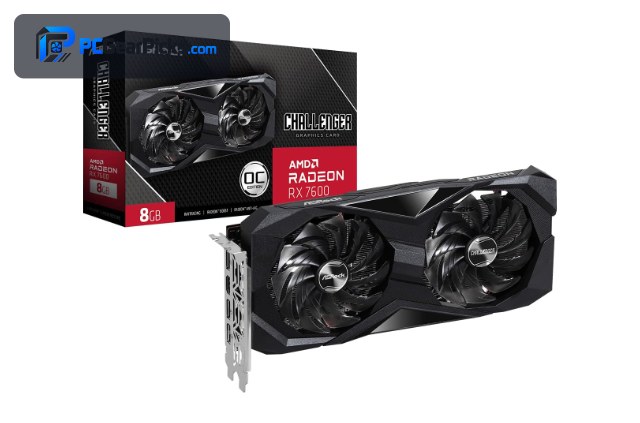
Competitive gaming flips the usual priorities. Instead of maxing out visuals, you turn settings down for clarity and chase the highest, steadiest frame rate your monitor can show. The good news is that most esports titles — Valorant, CS2, Apex Legends, Rocket League, League of Legends — are relatively light, so you don’t need an expensive card to feed a 144Hz or even 240Hz display at 1080p.
What matters more is consistent frame pacing and low input latency, where features like NVIDIA Reflex and AMD Anti-Lag help. Below we rank seven budget cards for competitive play, and we’ll say it plainly: pair any of them with a high-refresh monitor, because that upgrade often matters as much as the GPU. For the all-round view, see our budget gaming GPU guide and the components hub.
Top 3 Best Budget Competitive GPUs at a Glance
Best Budget GPUs for Competitive Gaming in 2027
| GPU | Best For | Key Spec | Rating | Price |
|---|---|---|---|---|
| Radeon RX 7600 8GB | Best Overall for Esports | RDNA 3, 8GB | 4.6★ (294) | Check Price |
| GeForce RTX 3060 12GB | Best for 1440p High-Refresh | Ampere, 12GB | 4.7★ (3168) | Check Price |
| Radeon RX 6600 8GB | Best Value | RDNA 2, 8GB | 4.6★ (145) | Check Price |
| GeForce RTX 3050 8GB | Best NVIDIA Value | Ampere, 8GB | 4.7★ (1143) | Check Price |
| Intel Arc B570 10GB | Best Budget 10GB | Battlemage, 10GB | 4.6★ | Check Price |
| Radeon RX 580 8GB | Best Ultra-Budget Esports | Polaris, 8GB | 4.1★ (498) | Check Price |
| Radeon RX 6500 XT 4GB | Best Entry | RDNA 2, 4GB | 4.5★ (272) | Check Price |
1. Radeon RX 7600 8GB – Best Overall for Esports

- ✓ Easily drives high-refresh 1080p
- ✓ Modern RDNA 3 with Anti-Lag
- ✓ 8GB is plenty for esports titles
- ✗ Not needed if you only play the lightest games
- ✗ 8GB caps heavy AAA
For competitive play the RX 7600 is the sweet spot. Esports titles like Valorant, CS2, Apex Legends, and Rocket League are relatively light, and this card pushes the high frame rates a 144Hz–240Hz monitor wants at 1080p with settings turned down for clarity.
AMD’s Anti-Lag helps trim input latency, and 8GB is more than enough for competitive titles. It’s the card that pairs best with a high-refresh display without overspending.
Best for: Players on 144Hz+ monitors who want high, steady fps
May not fit: People who only play the very lightest esports titles
2. GeForce RTX 3060 12GB – Best for 1440p High-Refresh

- ✓ Headroom for 1440p competitive play
- ✓ NVIDIA Reflex for low latency
- ✓ 12GB VRAM for mixed libraries
- ✗ Costs the most here
- ✗ Overkill for pure 1080p esports
If you compete on a 1440p high-refresh monitor, the RTX 3060 12GB has the extra headroom to keep frame rates high at that resolution. NVIDIA Reflex is widely supported in competitive games and measurably reduces system latency — a real edge in fast shooters.
It’s the priciest pick and more than pure 1080p esports needs, but for players who also dip into heavier titles, the 12GB and Reflex support make it versatile.
Best for: 1440p competitors who value Reflex and headroom
May not fit: Strict-budget 1080p esports players
3. Radeon RX 6600 8GB – Best Value

- ✓ High esports fps per dollar
- ✓ Low power, cool and quiet
- ✓ Easy prebuilt upgrade
- ✗ No Reflex (AMD uses Anti-Lag)
- ✗ RDNA 2 lacks AV1
The RX 6600 is the value champion for competitive 1080p. It delivers the high, consistent frame rates esports titles need while sipping power, so it runs cool and quiet through long ranked sessions.
It’s an easy upgrade for a budget prebuilt and leaves money for the thing that matters just as much — a high-refresh monitor. For most competitive players this is the smart buy.
Best for: Budget competitors who want high fps and efficiency
May not fit: Players set on NVIDIA Reflex specifically
4. GeForce RTX 3050 8GB – Best NVIDIA Value

- ✓ NVIDIA Reflex low-latency support
- ✓ Smooth 1080p esports
- ✓ Quiet and efficient
- ✗ 8GB caps heavier games
- ✗ Slower than RX 7600 in some titles
The RTX 3050 8GB is the budget way into NVIDIA’s Reflex ecosystem, which is a genuine latency advantage in competitive shooters. It runs esports titles smoothly at high-refresh 1080p and stays quiet.
It’s not the fastest card here, but if low input latency via Reflex is your priority on a tight budget, it delivers the essentials.
Best for: Competitive players who want Reflex on a budget
May not fit: Those chasing maximum raw frames per dollar
5. Intel Arc B570 10GB – Best Budget 10GB

- ✓ 10GB VRAM and strong 1080p value
- ✓ Low-latency support maturing
- ✓ AV1 for clipping plays
- ✗ Driver maturity varies by title
- ✗ Newer platform
Intel’s Arc B570 brings 10GB and solid 1080p performance for under $300, making it a value pick for competitive players who also like to record and share clips thanks to its AV1 encoder.
Intel’s drivers have improved greatly, though performance can vary by title, so it suits flexible players chasing value over guaranteed consistency in every single game.
Best for: Value seekers who also clip and share gameplay
May not fit: Players needing identical performance across every title
6. Radeon RX 580 8GB – Best Ultra-Budget Esports

- ✓ Cheapest high-fps esports option
- ✓ 8GB VRAM
- ✓ Runs the popular competitive titles
- ✗ Older architecture, more power
- ✗ No low-latency tech
The RX 580 8GB is the cheapest way to hit high frame rates in popular esports titles. CS2, Valorant, and Rocket League run well at 1080p with competitive settings, which is all many players need.
It’s older and power-hungry and lacks modern latency features, but for a bargain competitive rig it still gets the frames up where they matter.
Best for: Bargain hunters playing mainstream esports titles
May not fit: Players wanting modern low-latency features
7. Radeon RX 6500 XT 4GB – Best Entry

- ✓ Cheap and low power
- ✓ Fine for lighter esports titles
- ✓ Cool and quiet
- ✗ 4GB VRAM
- ✗ Struggles in heavier games
For the lightest competitive titles — think Valorant, League of Legends, or Rocket League — the RX 6500 XT is an inexpensive, low-power way to run them at high frame rates on 1080p.
Its 4GB buffer limits it in heavier shooters, so it’s best matched to the genuinely light esports games rather than demanding battle royales.
Best for: Players focused on light esports titles
May not fit: Heavier battle-royale or AAA competitive games
How to Choose a Budget GPU for Competitive Gaming
Frame rate and your monitor
A fast GPU only helps if your monitor can display the frames. Match the card to your refresh rate: the RX 7600 and RX 6600 easily feed a 144Hz 1080p panel in most esports titles, while the RTX 3060 has headroom for 1440p high-refresh. If you’re still on a 60Hz screen, upgrade that first.
Input latency: Reflex and Anti-Lag
In fast shooters, lower system latency is a real advantage. NVIDIA Reflex (RTX 3060/3050) and AMD Anti-Lag (RX 6600/7600) both reduce it. If you play latency-sensitive titles seriously, factor which ecosystem your games support.
Settings over raw power
Competitive players run low or medium settings for visibility and frames, which means even modest cards hit high fps in light esports games. Don’t overbuy for titles that are easy to run — spend the savings elsewhere in the setup.
VRAM is rarely the limit here
Esports titles are light on VRAM, so 8GB is plenty and even 4GB works for the lightest games. Only step up to 10–12GB cards if you also play heavier AAA titles alongside your competitive games.
The rest of the chain matters
A high-refresh monitor, a responsive mouse, and a fast CPU all contribute to competitive performance. On a budget, balance these rather than pouring everything into the graphics card alone.
Frequently Asked Questions
What is the best budget GPU for competitive gaming in 2027?
The RX 7600 is our overall pick — it easily drives a high-refresh 1080p monitor in popular esports titles and includes Anti-Lag. The RX 6600 is the value champion, and the RTX 3060 12GB is best if you compete at 1440p or want NVIDIA Reflex.
Do I need an expensive GPU for esports?
No. Titles like Valorant, CS2, and Rocket League are relatively light, so mid-budget cards hit very high frame rates at 1080p. Your monitor’s refresh rate often matters more than spending extra on the GPU.
Does NVIDIA Reflex or AMD Anti-Lag really help?
Yes, modestly but measurably — both reduce system input latency in supported games, which can help in fast shooters. NVIDIA Reflex is on the RTX cards and AMD Anti-Lag on the Radeon cards, so consider which your main games support.
How many frames per second do I need for competitive play?
Match it to your monitor: aim to feed a 144Hz display with 144+ fps, or a 240Hz display with more. The cards here comfortably exceed 144 fps in most esports titles at 1080p with competitive settings.
Is 4GB of VRAM enough for esports?
For the lightest titles — Valorant, League of Legends, Rocket League — a 4GB card like the RX 6500 XT works. For heavier competitive games such as Apex Legends or Call of Duty multiplayer, an 8GB card like the RX 6600 is the safer choice.
Final Verdict
For competitive gaming, aim for high, steady frame rates and low latency rather than maxed visuals. The RX 7600 is the best all-round pick for a high-refresh 1080p setup, the RX 6600 is the value champion, and the RTX 3060 12GB suits 1440p competitors who want Reflex. Whatever you choose, pair it with a high-refresh monitor — that combination, not raw GPU power, is what wins budget esports builds. Compare with our budget gaming GPU roundup.
No reviews yet. Be the first to share your experience!