

Content creation spans video editing, streaming, photo work, and design, and a graphics card helps each one differently. The specs that matter are the hardware video encoder (NVENC, AV1, or QuickSync), the amount of VRAM for timelines and effects, and GPU acceleration in your editor. A card that games well isn’t automatically a great creator card — and vice versa.
Below we rank eight budget cards for a broad creator workflow, calling out which encoder each one has and how much VRAM you get for the money. If your focus is purely cutting footage, our video-editing GPU guide narrows it down, and the streaming guide covers going live. Everything lives in our components hub.
Top 3 Best Budget Creator GPUs at a Glance
Best Budget GPUs for Content Creation in 2027
| GPU | Best For | Key Spec | Rating | Price |
|---|---|---|---|---|
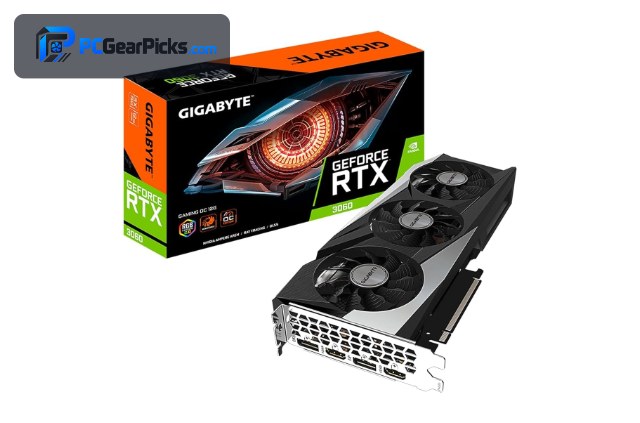
| GeForce RTX 3060 12GB | Best Overall for Creators | Ampere, 12GB | 4.7★ (3168) | Check Price |
| Radeon RX 9060 XT 16GB | Best VRAM + AV1 | RDNA 4, 16GB | 4.7★ (357) | Check Price |
| Intel Arc B570 10GB | Best Value Encoder | Battlemage, 10GB | 4.6★ | Check Price |
| GeForce RTX 3050 8GB | Best Budget NVENC | Ampere, 8GB | 4.7★ (1143) | Check Price |
| Radeon RX 7600 8GB | Best AMD Value | RDNA 3, 8GB | 4.6★ (294) | Check Price |
| Radeon RX 6600 8GB | Best Efficient | RDNA 2, 8GB | 4.6★ (145) | Check Price |
| Radeon RX 580 8GB | Best Ultra-Budget | Polaris, 8GB | 4.1★ (498) | Check Price |
| Radeon RX 6400 4GB | Best for Photo / Light Edit | RDNA 2, 4GB | 4.3★ (120) | Check Price |
1. GeForce RTX 3060 12GB – Best Overall for Creators

- ✓ NVENC encoder + CUDA acceleration
- ✓ 12GB VRAM for heavy timelines
- ✓ Accelerates Premiere, DaVinci, Photoshop
- ✗ Ampere NVENC lacks AV1
- ✗ Pricier than entry cards
The RTX 3060 12GB is the most well-rounded budget creator card. Its NVENC encoder speeds up exports in Premiere Pro and DaVinci Resolve, CUDA accelerates effects and AI tools, and 12GB of VRAM keeps multi-layer timelines and large Photoshop files responsive.
Its only real gap is that Ampere’s NVENC encodes H.264/HEVC but not AV1 — fine for most delivery today. For an all-purpose edit-plus-design machine on a budget, it’s the safe pick.
Best for: Video editors and multi-app creators who want CUDA + VRAM
May not fit: Creators who specifically need AV1 hardware export
2. Radeon RX 9060 XT 16GB – Best VRAM + AV1

- ✓ 16GB for 4K timelines and effects
- ✓ AV1 hardware encode
- ✓ Newest RDNA 4
- ✗ Smaller CUDA-only app ecosystem
- ✗ Priciest here
The RX 9060 XT pairs 16GB of VRAM with AV1 hardware encoding, a strong combination for creators working in 4K or with heavy effects. DaVinci Resolve and Premiere both use AMD acceleration, and the big buffer avoids the stutter that hits 8GB cards on complex timelines.
A handful of plugins and apps favour CUDA, so check your specific tools, but for AV1 delivery and VRAM-hungry projects this is the budget value leader.
Best for: 4K editors wanting AV1 and maximum VRAM
May not fit: Workflows locked to CUDA-only plugins
3. Intel Arc B570 10GB – Best Value Encoder

- ✓ Excellent AV1 + QuickSync encoders
- ✓ 10GB VRAM for under $300
- ✓ Great quality-per-bitrate
- ✗ Creator-driver maturity still improving
- ✗ Newer platform
Intel’s Arc B570 is a budget encoding bargain. Its AV1 and QuickSync encoders are genuinely excellent for the price, producing clean exports and great quality-per-bitrate, and 10GB of VRAM for under $300 is generous.
Intel’s creative-app drivers have improved dramatically but still trail NVIDIA’s in a few pro tools, so it’s best for YouTubers and hobbyist editors chasing value rather than studios needing bulletproof compatibility.
Best for: Budget YouTubers who want top-tier AV1 encoding cheaply
May not fit: Studios needing the most mature pro-app drivers
4. GeForce RTX 3050 8GB – Best Budget NVENC

- ✓ NVENC + CUDA at a low price
- ✓ 8GB for 1080p editing
- ✓ Reliable drivers
- ✗ 8GB limits 4K effects
- ✗ No AV1 encode
The RTX 3050 8GB brings NVENC and CUDA to a tighter budget, which makes 1080p editing and streaming snappy in Premiere and DaVinci. For creators who mostly deliver 1080p, it hits the essentials.
The 8GB buffer is the limit for heavy 4K work with many effects, so treat it as a capable 1080p creator card rather than a 4K powerhouse.
Best for: 1080p editors and streamers wanting NVENC on a budget
May not fit: Heavy 4K projects with stacked effects
5. Radeon RX 7600 8GB – Best AMD Value

- ✓ AV1 hardware encode
- ✓ Modern RDNA 3, efficient
- ✓ Good 1080p/1440p edit performance
- ✗ 8GB VRAM ceiling
- ✗ Fewer CUDA-only app options
The RX 7600 adds AV1 encoding to a modern, efficient RDNA 3 card, making it a strong value for creators who want future-friendly export without spending up. It handles 1080p and light 1440p editing comfortably.
Like other 8GB cards it’s best for mainstream projects rather than huge 4K effect stacks, and a few CUDA-only plugins won’t use it, but for everyday content it’s a smart buy.
Best for: Creators wanting AV1 export on a mid budget
May not fit: 4K-heavy or CUDA-only pipelines
6. Radeon RX 6600 8GB – Best Efficient

- ✓ Low power, quiet editing rig
- ✓ 8GB GDDR6
- ✓ Accelerates mainstream editors
- ✗ No AV1 encode
- ✗ RDNA 2, older media engine
The RX 6600 is the efficiency choice for a quiet, cool content machine that still accelerates Premiere and DaVinci at 1080p. Its low power draw suits compact creator builds and all-day editing.
It lacks AV1 hardware encode, so for cutting-edge delivery look to the RX 7600 or Arc B570, but for standard H.264/HEVC workflows it’s efficient and capable.
Best for: Quiet, efficient 1080p editing builds
May not fit: AV1 delivery or 4K effect-heavy timelines
7. Radeon RX 580 8GB – Best Ultra-Budget

- ✓ 8GB for very little money
- ✓ Usable for 1080p cuts and photo work
- ✓ Huge install base
- ✗ Old architecture, slower exports
- ✗ No modern encoder, high power
The RX 580 8GB is the entry point for a would-be creator on the tightest budget. With 8GB it can handle 1080p timelines and Photoshop/Lightroom work, letting someone start editing for around $130.
Exports are slower and it lacks a modern hardware encoder, so you’ll feel the limits as projects grow — but as a first creator card it gets you going cheaply.
Best for: Beginners starting 1080p editing and photo work cheaply
May not fit: Fast exports or 4K content
8. Radeon RX 6400 4GB – Best for Photo / Light Edit

- ✓ Low-profile, fits small PCs
- ✓ Low power
- ✓ Fine for Lightroom/Photoshop
- ✗ Only 4GB VRAM
- ✗ Weak for video effects
For photographers and light editors, the compact RX 6400 accelerates Lightroom and Photoshop nicely and fits slim builds that can’t take a bigger card. It’s a tidy option for a photo-focused desk.
Its 4GB buffer and modest power mean it isn’t built for heavy video effects, so pair it with photo and light-video work rather than demanding 4K timelines.
Best for: Photographers and compact light-edit builds
May not fit: Serious video editing with effects
How to Choose a Budget GPU for Content Creation
Encoders: NVENC vs AV1 vs QuickSync
The hardware encoder shapes export speed and quality. NVIDIA’s NVENC (RTX 3060/3050) is a proven H.264/HEVC workhorse; AMD’s RDNA 3/4 cards and Intel’s Arc add AV1 for smaller, higher-quality files; and Intel’s QuickSync is superb value. Pick based on what you deliver to.
VRAM for timelines and effects
More VRAM means smoother scrubbing and fewer stalls with effects, color grades, and high-resolution footage. 8GB is fine for 1080p; 12GB (RTX 3060) eases 4K; and 16GB (RX 9060 XT) is the budget pick for heavy 4K and effect-stacked timelines.
App acceleration and plugins
Premiere Pro, DaVinci Resolve, and Photoshop all use the GPU, but some plugins and AI features are CUDA-only, favouring NVIDIA. If your pipeline leans on those, choose a GeForce card; if not, AMD and Intel give you more VRAM and better AV1 for the money.
Streaming vs editing needs
Streaming leans on a good real-time encoder so your CPU stays free for the game; editing leans on VRAM and acceleration. The Arc B570 and RTX cards are excellent streamers, while the 12GB–16GB cards shine for editing.
Don’t forget CPU and RAM
A GPU only solves part of creation. Export and timeline performance also depend on a capable CPU and plenty of system RAM, so if you’re on a budget, balance the build rather than overspending on the card alone.
Frequently Asked Questions
What is the best budget GPU for content creation in 2027?
The RTX 3060 12GB is our overall pick — NVENC, CUDA acceleration, and 12GB of VRAM make it strong across editing, streaming, and design. For AV1 delivery and maximum VRAM, the 16GB RX 9060 XT is the value alternative, and the Arc B570 is the best cheap encoder.
Do I need AV1 encoding?
It helps if you upload to platforms that favour AV1 or want smaller files at the same quality. The RX 7600, RX 9060 XT, and Arc B570 encode AV1 in hardware; the RTX 3060/3050 do fast H.264/HEVC via NVENC, which is still perfectly usable.
How much VRAM do I need for video editing?
8GB handles 1080p editing. For 4K footage, color grading, and stacked effects, 12GB (RTX 3060) is more comfortable and 16GB (RX 9060 XT) is the budget safety margin. Running out of VRAM is what causes timeline stutter.
Is Intel Arc good for content creation?
For encoding, yes — the Arc B570’s AV1 and QuickSync are excellent value, and 10GB for under $300 is generous. Intel’s creative-app drivers have improved a lot but still trail NVIDIA in a few pro tools, so it’s best for budget creators and YouTubers.
Can one budget GPU handle editing and gaming?
Yes. Cards like the RTX 3060 and RX 7600 edit 1080p–1440p content and game at 1080p, so a single budget card can cover both creating and playing without compromise for most people.
Final Verdict
For budget content creation, buy for your encoder and VRAM, not gaming benchmarks. The RTX 3060 12GB is the best all-rounder, the 16GB RX 9060 XT wins on VRAM and AV1, and the Arc B570 is the standout cheap encoder for streamers and YouTubers. Match the card to what you create and deliver to, and balance it with a solid CPU and enough RAM. Our streaming GPU guide covers the live-video side in more depth.
No reviews yet. Be the first to share your experience!